7 Days to Die: maps, seeds, and Random World Generation
 7 Days To DieGuide
Your map lives in one setting: open your server on My Servers, go to the Overview card's Details tab, and scroll to World. Changing it starts a fresh save…
Your map lives in one setting: open your server on My Servers, go to the Overview card's Details tab, and scroll to World. Changing it starts a fresh save (your old world stays on the server and in your backups). World Seed and World Size only appear when you pick Random World Generation, and they only apply to a world that has not been generated yet. Gameplay settings, difficulty included, apply to your existing world on the next restart and do not wipe anything.
Picking a map
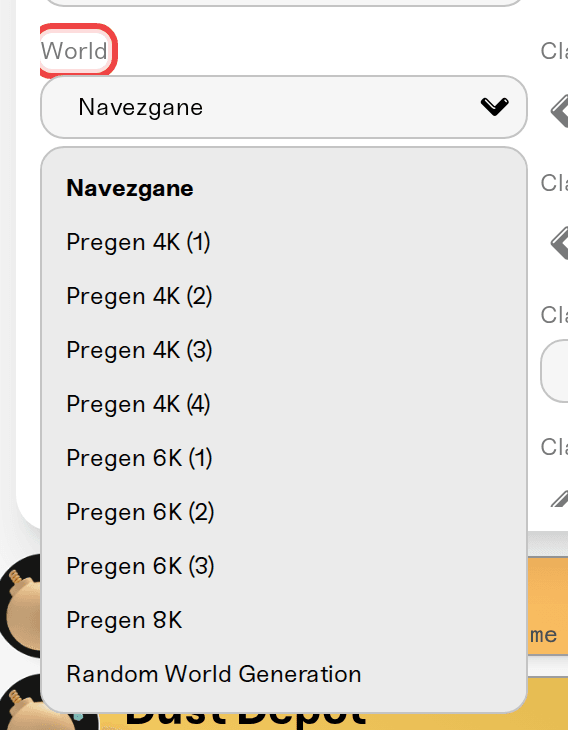
Navezgane: the game's handcrafted map. Familiar layout, well-stocked points of interest, and it starts in a couple of minutes. The safe default.
Pregen 4K (1-4), Pregen 6K (1-3), Pregen 8K: random maps the game ships pre-built, in 4096, 6144, and 8192 block sizes. You get a map nobody has memorized without waiting for generation, so they start as fast as Navezgane.
Random World Generation (RWG): your server builds a unique map from a seed you choose. This is the only option that takes real time on first startup.
If you want a fresh map and you do not care about a specific seed, pick a Pregen map. It saves you the wait entirely.
Changing the map starts a fresh save
Switching World to a different map means your server starts a brand new save on that map. That is a 7 Days to Die rule, not ours: a save belongs to one map, so your bases and progress cannot move to a different one.
Nothing is deleted. Your old save is still on the server under its own map name, and it is inside your backups, so it is there to go back to as long as you have not reset the world in between.
Player levels and skills live in the world save too, so a map change means everyone starts over. Worth a heads-up in your Discord before you press save.
Seed and size (Random World Generation only)
Pick Random World Generation and two more fields appear: World Seed and World Size.
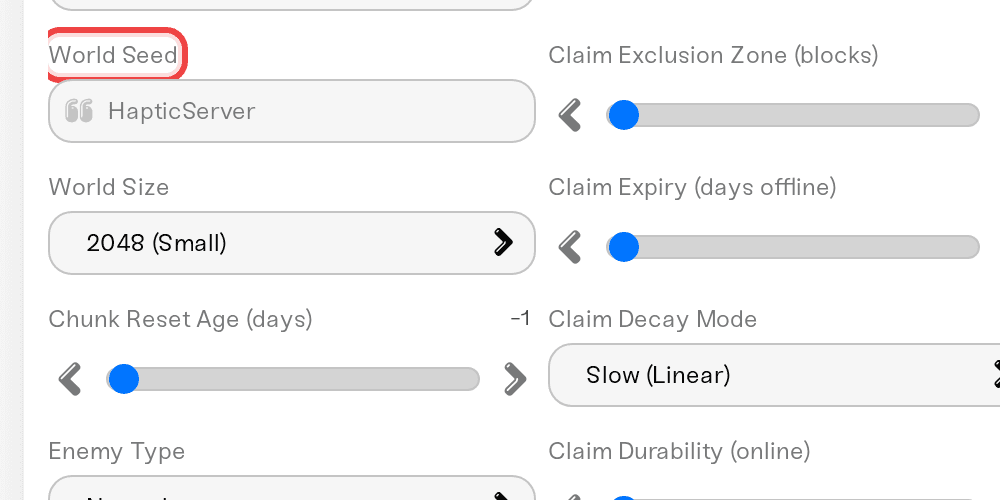
The same seed plus the same size always builds the same map, so sharing a seed gets you and a friend identical worlds. Any text works as a seed.
Size sets how long the first startup takes:
| World Size | Generation time |
|---|---|
| 2048 (Small) | about 5 minutes |
| 4096 (Medium) | 10 to 15 minutes |
| 6144 (Large) | 20 to 30 minutes |
| 8192 (Huge) | 30 to 60 minutes |
| 10240 (Massive) | an hour or more |
| 12288 (Enormous) | longer again, the option itself says "extremely long generation" |
| 16384 (Maximum) | hours |
6144 is the default and is plenty of room for most groups. Bigger maps also use more disk space and take longer to load for players joining the first time.
If console players are part of your group, keep the size at 8192 or below: bigger worlds are reported to lose crossplay, a game-side limit the dashboard does not enforce. See crossplay, EAC, and mods.
"My server has said Preparing for 20 minutes"
That is expected on the first boot after switching to RWG. The server is building your map before it can accept anyone.
The status badge reads Powering up for the first two minutes, then changes to Preparing. A long generation then sits on Preparing for the rest of the wait. That switch is just the label at the two minute mark, not a stall and not a restart.
We stretch the startup window for RWG servers so a slow map is not treated as a failed start: 15 minutes up to 4096, 30 minutes at 6144, 45 minutes at 8192, and an hour at 10240 and above. A map that runs to the slow end of its estimate can still outrun that window, so on the biggest sizes be ready to watch the first boot and start the server again if it gives up.
Leave it alone and check back after the generation time for your size above. Once the map exists, later restarts take the normal minute or two.
"I changed the seed and got the same map"
Seed and size only apply to a world that has not been generated yet, as both fields note. Your server already has a world, so it keeps loading it.
To actually build the new map:
Set your new World Seed or World Size and press Save changes.
Stop the server.
On the Backups card, use Reset World. It saves your current world as a backup first, then clears it.
Start the server, and let it generate the new map.
Full steps and the safety net are in Reset your world.
Settings that do not touch your world
Gameplay settings, difficulty, zombie settings, loot abundance, blood moon frequency, day length, XP, apply to your existing world on the next restart and never regenerate anything. Only World, World Seed, and World Size need a new world. (Latest Experimental is the one other setting with a caution of its own: your world is kept, but switching back to stable can cause problems if the experimental build changed save data. The dashboard says so when you tick it.)
One extra world setting worth knowing on a long-running server: Chunk Reset Age (days) resets a chunk to its original state, loot included, if nobody has visited it in that many days. It is -1 (never) by default; 30 to 90 days suits an active server.
Need help?
Reach us on Discord or at support@haptic.gg. Include your server name and which map, seed, and size you selected.
Connect to your server with SFTP (saves live at
data/Saves/<map name>/<your server ID>)


