Which mods your friends need to install
 HapticGuide
A mod can run in three places: on the server only, on each player's PC only, or on both at once. You never have to memorize which is which, because mods in…
A mod can run in three places: on the server only, on each player's PC only, or on both at once. You never have to memorize which is which, because mods in your Mods card carry a plain-language label such as Works for everyone on this server or Required on every player's PC to join. In some games (Project Zomboid, Terraria, and others) the game even installs the player copy automatically when a friend joins. And nothing here can hurt your world: the worst case with a missing mod is a friend who cannot join yet, or who cannot see a visual change.
The three kinds of mods
Server-side mods run on the server itself: changed spawn rates, new rules, admin tools, economy plugins. Every player gets the effect with nothing to install, which also makes these the only kind that fully work for console players.
Client-side mods run inside a player's own game: minimaps, UI tweaks, graphics packs. They belong on each player's PC and do nothing on a server, which is why we do not host them.
Both-sides mods run on the server and on each player's PC at the same time. Most big content mods (new items, bosses, mechanics) work this way. Whether your friends have to install their half by hand depends on the game, and that is the part this article untangles.
How to tell for a given mod: read the label
Open your server on My Servers and expand the Mods card. In most games, every mod row shows a short label saying exactly who gets the mod. Hover it for the longer explanation; when we have run the mod on our own machines the tooltip ends with "Verified on Haptic servers", and when the answer comes from the mod's author it ends with "Reported by the mod author".
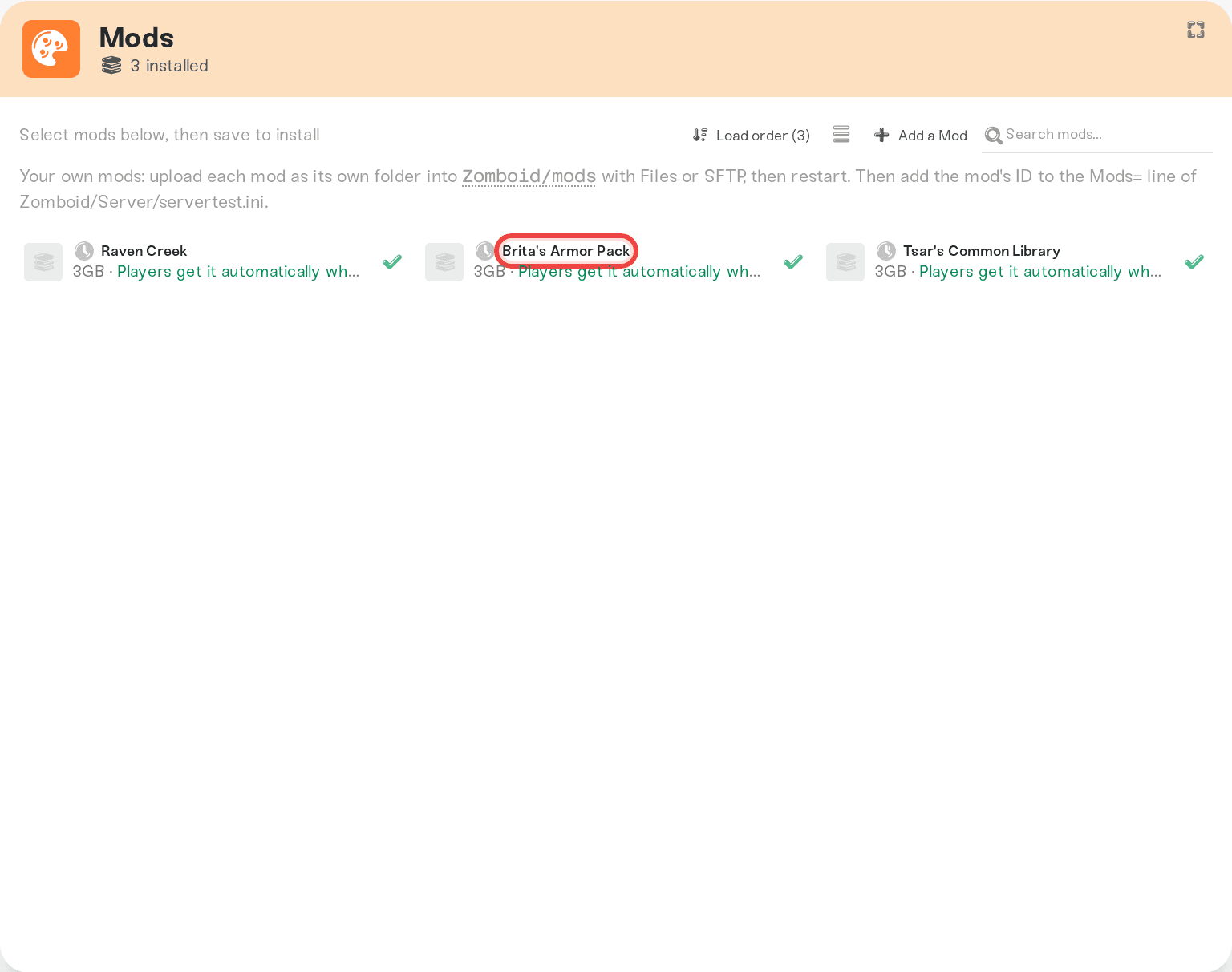
Here is the full set of labels and what each one means for your friends:
Works for everyone on this server: pure server-side. Friends install nothing.
Works on both console and PC: the same thing, on a game where console players can join your server. Console friends get the effect too.
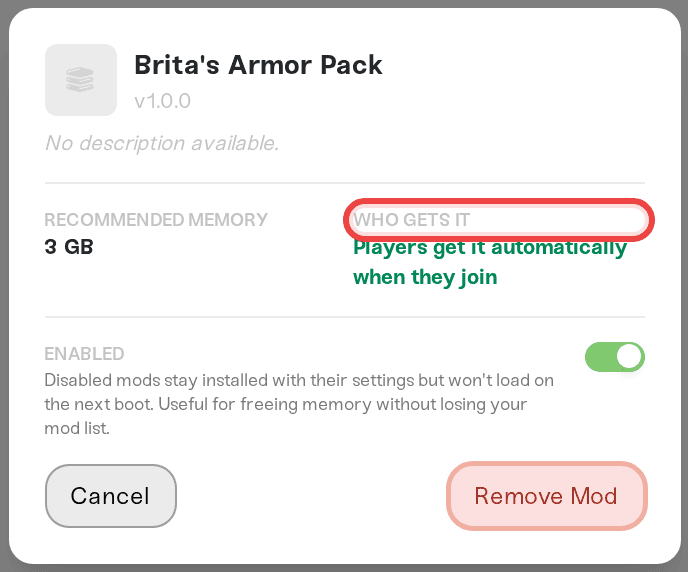
Players get it automatically when they join: friends need the mod, and the game downloads it for them on join. Nobody installs anything by hand.
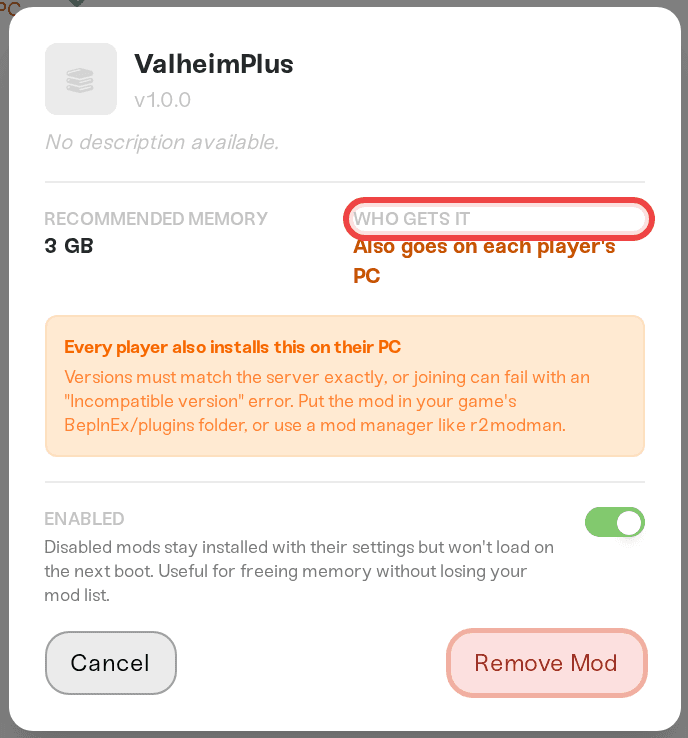
Also goes on each player's PC: friends install the same mod, at the same version, on their own computer. Without it, joining can fail or features go missing.
Required on every player's PC to join: the strict version of the above. The server actively kicks anyone who joins without the exact same mod version.
Works from the server. A PC copy adds extras: it already works for everyone; friends can optionally install it locally for bonus features.
Shows only for players who install it (and on crossplay servers, PC players only. Consoles won't see it): a visual overlay. The server needs it and so does anyone who wants to see it, and console players never can.
Client-side only. Doesn't work on servers: installing it on a server has no effect. Each player who wants it installs it in their own game.
Compatibility not verified yet: we have not confirmed this one yet. The label updates as the mod is checked.
Clicking a mod opens its detail panel, where the same answer appears as the Who Gets It stat next to Recommended Memory.
A few games do not show these labels yet (DayZ is the main one). For those, the per-game rundown below is your guide, and you can always ask us about a specific mod.
Your friends can see the answer too, without a dashboard login: your server's public page lists the installed mods with the same labels, so it doubles as a join checklist. (The mods list is on by default; you can hide it in the public page's settings.) See Your server's public page.
What each game actually does
Games that install mods for your friends automatically. In Project Zomboid, Terraria, Conan Exiles, Don't Starve Together, Factorio, and Minecraft Bedrock, the game itself delivers server mods to players when they join. You add mods in the Mods card, your friends just connect. Project Zomboid downloads them through a Steam Workshop prompt, and Conan Exiles restarts once after downloading new mods; both are normal. Details for the most-asked game: Project Zomboid: your players get the mods automatically.
Games where friends install their half by hand. In Valheim, Minecraft Java, Palworld, and Satisfactory there is no auto-delivery. When a mod's label says Also goes on each player's PC or Required on every player's PC to join, every friend installs the same mod at the same version in their own game. On Valheim, installed mods that go on player PCs show a Download PC files link that hands your friends the exact file the server runs, so nobody grabs the wrong version; the full walkthrough is in Valheim mods: what your players need to install. On Minecraft Java, plugins run entirely on the server while many Forge and Fabric mods go on each player's PC too; the label on each row tells you which kind you are looking at. DayZ also needs every friend to have the server's mods, though DayZ's own launcher takes the sting out: it can download a server's whole mod list from the Steam Workshop before joining.
Games where mods are server-only by design. Rust plugins run entirely on the server. Friends install nothing and the labels will say so.
7 Days to Die depends on the mod. Its mods are uploaded by hand into /data/Mods/, so there is no Mods card and no labels; the mod's own page is your guide. Mods that only run on the server, including server-only DLL mods, work with Easy Anti-Cheat on and friends install nothing. A mod whose DLL also goes on each player's PC means every friend installs the same version and launches without EAC, and the server needs EAC off. Mods that change game data (a Config folder) also hide the server from PS5 and Xbox players. Details: 7 Days to Die: crossplay, Easy Anti-Cheat, and mods.
Console players are a special case. Consoles cannot install mod files at all; that is a platform rule on every host. So only server-side mods can ever reach a console friend. Palworld supports crossplay and its labels are console-aware; see Palworld: which mods work for console players. Valheim makes you choose between mods and crossplay entirely; see Valheim mods or crossplay. And on Factorio the Mods card warns: "Heads up: Nintendo Switch players can only join Factorio servers with no mods installed."
When a friend is missing a required mod
What actually happens depends on the game:
Auto-delivery games (Project Zomboid, Terraria, Conan Exiles, and friends): they cannot really be missing it; the game fetches mods on join. If joins suddenly fail with a checksum or mismatch error after weeks of working, a mod author shipped an update and your server needs a restart to catch up. The fix is in the Project Zomboid mods article.
Valheim: a friend without a Required on every player's PC to join mod is kicked with an "Incompatible version" error. Send them the Download PC files link from the mod's row. (The same error also appears on patch days for a different reason; see Valheim "Incompatible version" after an update.)
Minecraft Java and other manual-install games: joining typically fails with a mod or version mismatch message at the connect screen until their mod list matches the server's.
Visual overlay mods (Palworld pak mods, for example): the friend joins fine and plays fine, they just do not see the visual change until they install their own copy. Console players never will.
Mods we cannot host
If you search for a mod in Add a Mod and it is client-side only, the window greys it out and labels it "Client-only" instead of letting you spend a request on it. That is not a catalog gap: the mod genuinely does nothing on a server. Each player who wants it installs it in their own game, and it works with your server as-is. More in Add a mod we don't have yet.
Things that will not fix it
Reinstalling the mod on the server when a friend cannot see a visual mod: the missing half is on their PC, not on the server.
Restarting the server to push a mod to players in a manual-install game: only auto-delivery games send mods to players.
Adding more memory: memory changes what the server can run, never who needs to install a mod.
Installing a client-side-only mod on the server through any side door: it would load nothing. That is why the request flow refuses it up front.
Need help?
Not sure which kind a mod is, or a friend still cannot join after installing everything? Message us on Discord or at support@haptic.gg with the mod's name, your game, and a screenshot of the error your friend sees, and we will sort out who needs what.



