Add a mod we don't have yet
 HapticGuide
If a mod you want isn't in your server's catalog yet, you can add it without leaving the dashboard. The quickest way is to search the catalog for it: when…
If a mod you want isn't in your server's catalog yet, you can add it without leaving the dashboard. The quickest way is to search the catalog for it: when nothing there matches, the Mods card looks it up on your game's mod sites (CurseForge, Modrinth, Thunderstore, Steam Workshop, and friends) and shows what it finds with an Add button next to each one. You can also press Add a Mod to search yourself. Either way, pick a version and press Add to server. We test it on a real server first, usually in about a minute, then add it to your server and email you. You can watch every step under Recent adds at the top of the Mods card.
Check the catalog first
Your server's Mods card already contains every mod that has passed testing for your game. Type the mod's name into the Search mods... box on the expanded card before adding it; if it's there, just check it and save. How to install mods on your server walks through that flow.
If the catalog has nothing (or almost nothing) matching what you typed, the card searches your game's mod sites for you and lists up to five results under Available to add, right below the catalog. Press Add next to one to jump straight to picking its version, or press Search more to open the full search with your words already filled in. Results that can't run on your server, such as client-only mods, sit behind a "not compatible with your server" link with the reason on each row. Anything you have already added shows its live status instead of a button.
Requests are for mods (or specific versions of mods) we haven't imported yet.
Where we search
The request flow searches the same site you would normally download that game's mods from:
| Game | Where we search |
|---|---|
| Minecraft Java | CurseForge and Modrinth (mods, plugins, data packs, worlds, and modpacks) |
| Minecraft Bedrock | CurseForge (add-ons and texture packs) |
| Valheim | Thunderstore |
| Terraria, Project Zomboid, Conan Exiles, DayZ, Don't Starve Together | Steam Workshop |
| Palworld | CurseForge and Steam Workshop |
| Rust | uMod (plugins) |
| Satisfactory | ficsit.app |
| Factorio | Factorio Mod Portal |
If a game isn't listed here, look at its Mods card: whenever adding is available for your game, the Add a Mod button is right there. Games without mod support say so on the card and include a box where you can suggest what we should add.
Add a mod, step by step
Open the Mods card
Go to My Servers, open your server, and click the Mods card to expand it.
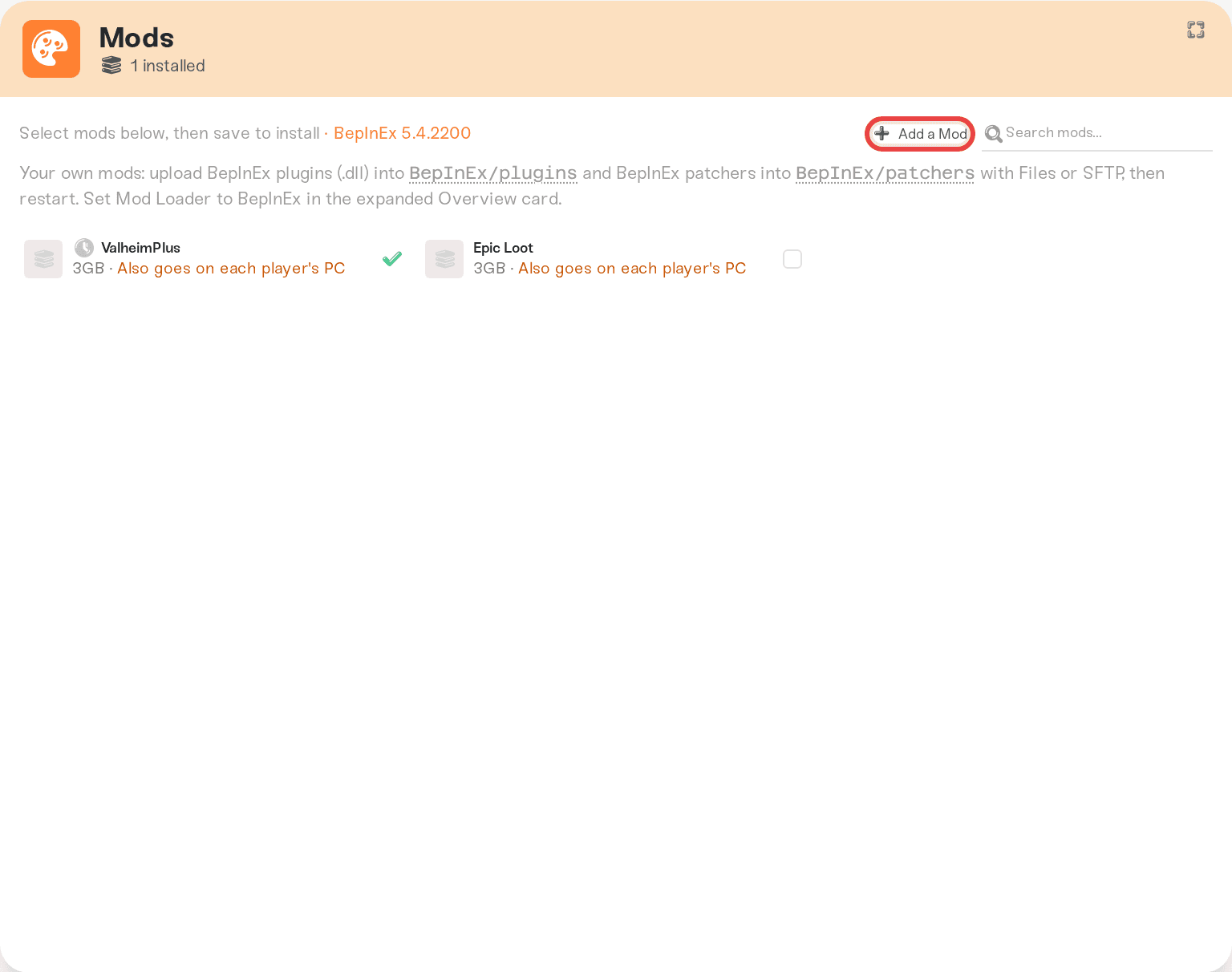
Press Add a Mod
The button sits in the card's title row, next to the search box. On Minecraft Java the last word of the label follows the tab you're on, so it can also read Add a Plugin, Add a Data Pack, Add a World, or Add a Modpack. On Minecraft Bedrock it reads Add an Addon.
Search for the mod, or paste a link
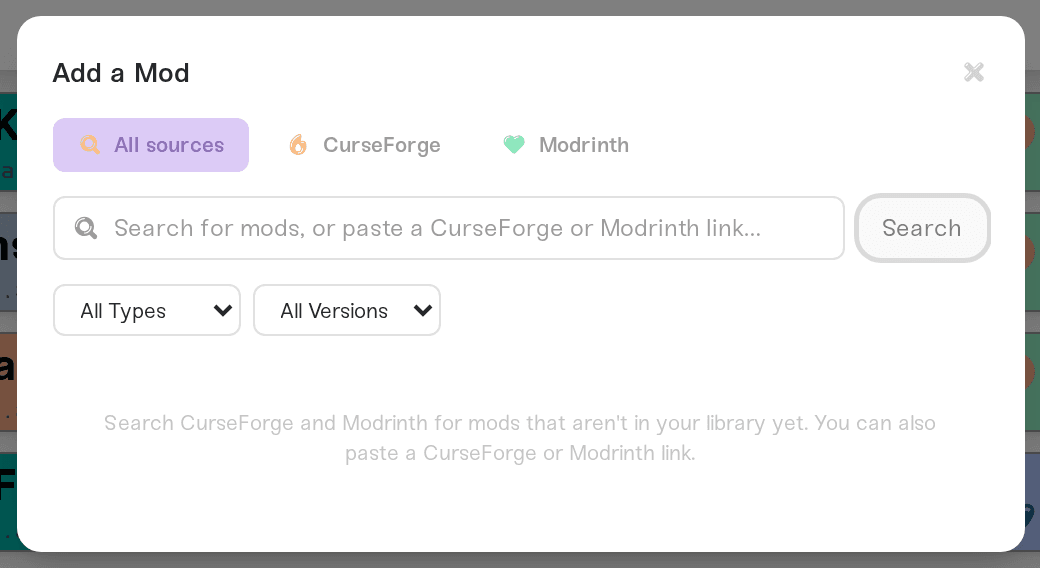
Type a name and hit Search, or paste a link straight from the mod's page (for example a CurseForge or Steam Workshop URL). Pasted links switch the button to Open and jump to the right source automatically. If your game has more than one source, tabs at the top let you switch between them.
Pick the version you need
Click the mod, then choose a version under Select Version. We pre-select the first version in the list that isn't in our catalog yet. Versions with a green Already available chip are already in the catalog, so there's nothing to add: close the window and install them from the Mods card. On CurseForge and Modrinth you can tick Include beta/alpha to see prerelease versions.
Submit it
Press Add to server. A message confirms it: "We test it on a real server first, usually in about a minute, then add it to this server." The mod appears under Recent adds on the Mods card. There's a generous daily cap (currently 50 requests a day); the window warns you when you're running low and shows "You've added as many mods as you can today. Try again tomorrow." if you hit it.
What review and testing actually mean
Every request goes through the same pipeline:
In queue. Your request is waiting for a test slot.
Testing on a live server. We spin up a real server for your game, install the mod along with any required dependencies, and boot it to confirm it starts and runs cleanly. The test also measures how much memory the mod needs, which is where the "Requires 4GB memory" locks in the catalog come from.
Classification. We work out who needs the mod: just the server, every player's PC, or both. That's what powers the "Works for everyone on this server" style labels you see in the catalog. Server-side vs client-side mods explains what each label means.
The result. If the mod passes, it joins the catalog and we email you. When possible we also install it on the server you requested it from, so all that's left is a restart.
Because approved mods join the shared catalog, your request helps everyone else hosting that game too.
How long it takes
Testing is automated, so most single-mod requests finish within minutes. Big mods, modpacks, and busy queues can stretch that to a few hours. You don't need to keep the page open: we email you when the mod is ready, and the status is always visible on the Mods card. If a request has been sitting untouched for more than a day, message us and we'll take a look.
Where to see your request's status
The Recent adds list sits at the top of the Mods card whenever you have recent adds (they stay listed for 30 days).

Each row shows a status pill:
In queue: waiting for testing to start.
Testing on a live server: the automated test is running right now.
Installed, restart to load: it passed, and we already installed it on this server. Restart to start using it.
In mod list / Ready to install: it passed and is in your catalog; install it from the Mods card whenever you like.
Didn't pass testing: the mod crashed or failed to load during the test. The row shows the reason.
Retrying automatically: the test hit a problem on our side. Nothing for you to do, we run it again on our own.
Couldn't finish testing: something on our side stopped the test, so the mod itself never got a result. The row says what to do next, and requesting the mod again starts a fresh test.
Couldn't add this mod: the request itself can't go ahead, usually a download link that no longer works or a mod it depends on that we don't have. The row shows which.
Can't be supported: the mod can't run on a dedicated server at all (see below).
The small X on a row dismisses it for the current phase; the row comes back when the status changes, so you won't miss the result.
Why some mods can't be added
Some mods only run on a player's own PC: minimaps, shaders, UI tweaks, and similar. There's nothing for a server to load, and shipping them to one can even crash it. Search results like this sit behind the "not compatible with your server" link, grayed out and labeled "Client-only. It only works installed in each player's own game.", along with a link to view the mod on its source site. Players install those on their own machines instead; on Terraria, for example, that's done through tModLoader's in-game Mod Browser. Server-side vs client-side mods has the full picture.
Steam Workshop links skip the queue
On Terraria, Project Zomboid, Conan Exiles, DayZ, and Don't Starve Together, pasting a Steam Workshop mod or collection link doesn't go into the testing queue at all. You get a preview reading "Selected mods install directly on this server. No testing queue wait.", pick the items you want, press Install on this server, and they install straight onto your server.
Palworld is the exception: a pasted Workshop link does not install directly. We fetch the mod, check what is inside, and boot it on a real test server first. Once it passes, we install it on the server you requested it from and email you, and all that's left is a restart. If it fails, you see a plain reason under Recent adds instead. Palworld also has extra rules about which Workshop mods can run server-side; Palworld: Steam Workshop mods covers those.
Need help?
Message us in Discord or email support@haptic.gg. Include a link to the mod's page, which game and server you requested it for, and (if it failed) a screenshot of the status pill and its reason.



