Minecraft: Java and Bedrock Crossplay on Your Server
 Minecraft JavaGuide
Your Haptic Minecraft server runs Java Edition, but with Bedrock Crossplay turned on, friends on Bedrock Edition (phones, tablets, Windows, and consoles)…
Your Haptic Minecraft server runs Java Edition, but with Bedrock Crossplay turned on, friends on Bedrock Edition (phones, tablets, Windows, and consoles) can join the same world and play together with Java players. We run the translation layer for you: no plugins to install, no accounts to buy, and Bedrock friends do not need a Java account. Phones, tablets, and PCs join directly with the Bedrock address from your dashboard. Xbox, PlayStation, and Switch can join too, with a one-time extra step covered below.
Turning crossplay on
Crossplay is a single toggle in your server settings, and you can also tick Java + Bedrock crossplay when you buy a Minecraft Java server or add one from the dashboard. It needs at least 3 GB of memory on the server (5 GB counting the free memory boost Haptic adds), a Minecraft version the crossplay software supports, and the Paper server type. You don't have to sort those out first: turning it on shows you everything it changes and does it in one go.
Open your server settings
Open your server in the dashboard. The Bedrock Crossplay toggle is on the Overview card.
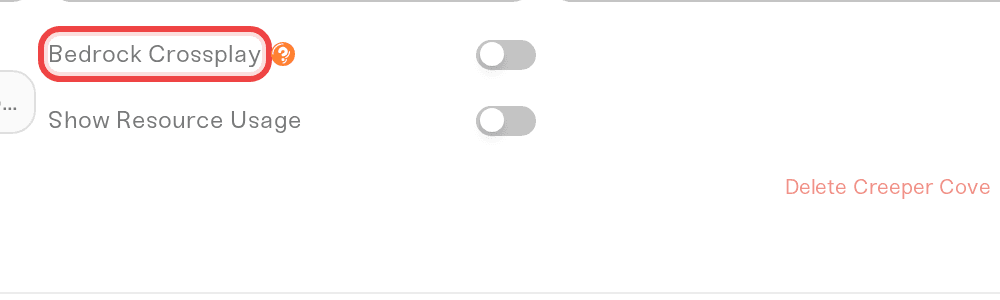
Turn on Bedrock Crossplay
Flip the toggle. A window lists what changes, then Turn on crossplay does all of it:
Server type: the switch to Paper. Installed mods that can't run on Paper are named, and they come off after a safety backup.
Memory: if the server needs more, unallocated memory on your plan is used. If your plan is full, Add 1 GB takes you to your plan, where you see the price and confirm; then come back and turn crossplay on.
Version: a server on the newest version stays on the newest version crossplay supports. A server pinned outside the supported range moves into it. A world already played on a newer version than crossplay supports can't take crossplay yet, and the window says so.
Restart when nobody is online
If nobody is online, the server restarts right away to turn crossplay on. If players are online, nothing restarts: crossplay starts working at the next restart. Your server card then shows a Bedrock: address row next to the Java address; click it to copy. On most crossplay servers Bedrock has its own port, the Java port plus one. Java players keep joining exactly as before, nothing changes for them.
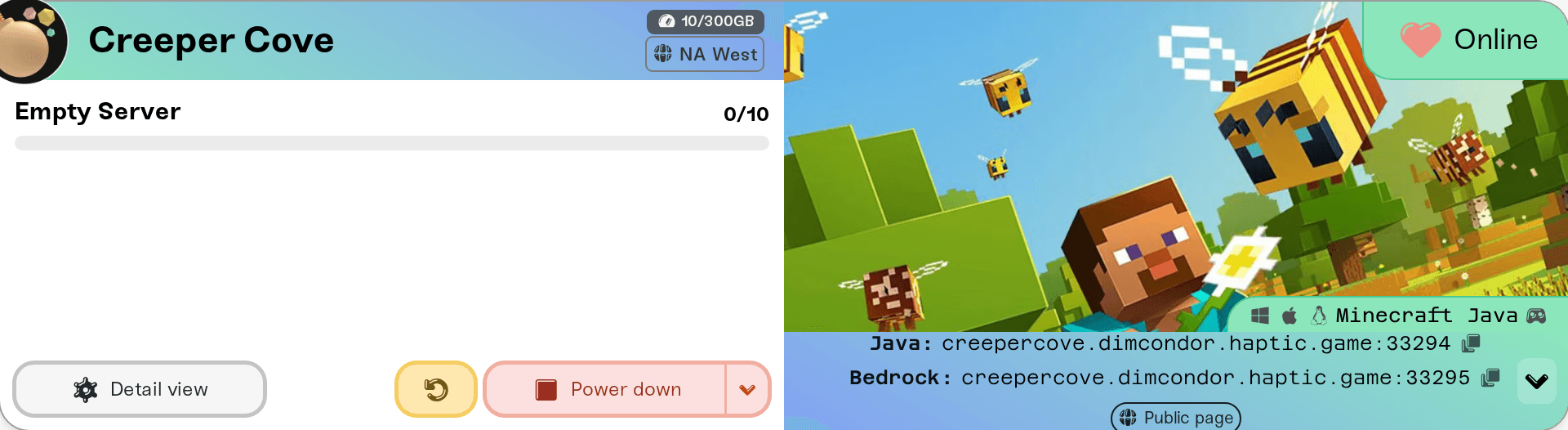
How Bedrock players join
Windows, iPhone, iPad, and Android
Open Minecraft (Bedrock) and go to the Servers tab.
Scroll down and choose Add Server.
Enter any name, then the address and the port from the Bedrock: row of your Haptic dashboard, each in its own box. The Bedrock port is usually different from the Java one, so always use the Bedrock row. On a computer, the gamepad icon next to your server's version opens How Bedrock players join, with the address and port as two copy buttons.
Save and join. That is it, no extra account needed.
Xbox, PlayStation, and Nintendo Switch
Consoles do not have an "add a server address" screen, so they need a one-time workaround. This is a limitation Microsoft, Sony, and Nintendo put on the console versions of Minecraft; every server host has the same constraint.
BedrockConnect (DNS method, recommended): change your console's primary DNS to a BedrockConnect server (keep the secondary as
8.8.8.8), restart Minecraft, and open any Featured Server. You get a server list where you can enter your Haptic Bedrock address and port. Follow the current instructions from the BedrockConnect project or the GeyserMC console guide, since the DNS addresses can change over time.Xbox only (friend-session tools): community tools like MCXboxBroadcast can make a server appear in the Friends tab. These are self-hosted tools for advanced users; the DNS method above is the one we recommend and can help with.
If a console player is the only one who cannot join while phones and PCs can, it is almost always their join method or your whitelist. How Xbox, PlayStation, and Switch friends join your server walks through the DNS step and the whitelist command in full.
Bedrock players on your server: what to expect
Names have a
.in front. A Bedrock player namedSteve Jrshows up as.Steve_Jr(spaces become underscores). The dot prevents clashes with Java accounts and is how you can tell who is on Bedrock.Whitelist: a whitelisted server rejects Bedrock friends even when their address is correct, and they just see a generic connection failure. Add them in your server's Admins tab: set Edition to Bedrock, type their gamertag, and add them. A Bedrock player added as a Java player never matches. The Console command
fwhitelist add TheirGamertagworks too, with no dot in front, even though they appear in your player list as.TheirGamertag.Commands: include the dot when targeting a Bedrock player, for example
/tp .Steve_Jr. If a command complains about the name, wrap it in quotes:/tp ".Steve_Jr".Skins: Bedrock players' skins are visible to everyone, including Java players.
Account linking (optional): players who own both editions can link them by joining the server
link.geysermc.org(in Minecraft, from both editions) and running/linkaccount, so they keep one identity and one inventory whichever edition they play from. Steps in the GeyserMC linking guide.
After a Bedrock update: a short wait is normal
Minecraft Bedrock updates itself automatically on phones and consoles. Once in a while, a brand-new Bedrock version comes out before the crossplay software supports it. During that window (usually hours, occasionally a day or two), freshly updated Bedrock players may see an "outdated server" style error and cannot join.
Java players are never affected by this. We check for a new crossplay layer every hour, and a server restart picks up the fix once it is available.
If Bedrock players suddenly cannot join right after a Minecraft update on their device, restart your server first. If it persists a day later, check status.haptic.gg or message us.
The same logic applies in the other direction: when a new Java version releases, a crossplay server set to the newest version stays on the newest version crossplay supports, and moves up once the crossplay software supports the new one.
Good to know (honest limitations)
Crossplay is at its best on vanilla-ish survival servers. A few things do not translate perfectly:
How it works: Bedrock players are translated into Java players by Geyser, the open-source standard used across the industry, plus Floodgate so they can log in with their Microsoft account (no Java purchase needed).
Resource packs do not carry over. Java resource packs on your server will not show for Bedrock players (Bedrock uses its own pack format).
Some plugins clash. The vast majority of plugins work fine, but a few that hook into logins or check UUIDs (certain auth or anti-cheat plugins) can block Bedrock players. If Bedrock players get kicked at login on a plugin-heavy server, tell us which plugins you run. The conflicts are well known and usually fixable with a setting.
Small gameplay differences. Bedrock combat has no built-in attack cooldown display (the crossplay layer shows an indicator), some UI screens look different, and heavily custom content from mods may not appear correctly for Bedrock players.
Xbox achievements stay off while playing on a crossplay server. That is a Minecraft rule for third-party servers, not something we control.
Chat reporting is off. Bedrock players cannot sign chat messages the way Java accounts do, so we configure crossplay servers to accept unsigned chat automatically. Java players may see a small "chat messages can't be verified" notice; that is cosmetic and standard on every crossplay server. If Bedrock players cannot chat at all, restart your server: the setting is applied at startup. Details in Bedrock players can't chat.
Troubleshooting: a Bedrock player can't connect
Double-check the address and port. Bedrock needs the port from your dashboard's Bedrock: row, not Java's default.
Restart the Minecraft app on the player's device. This fixes a surprising number of cases, especially on mobile.
Did Bedrock just update? See the section above. Restart your server to pick up the latest crossplay version.
On a console? Make sure they are using the console join method above; consoles cannot join by typing an address directly.
"Unable to connect to world" with everything else correct: have the player try another network, for example a phone hotspot. Some routers and ISPs handle Bedrock's connection type (UDP) poorly.
Need help?
Message us on Discord or email support@haptic.gg with the player's device type and the exact error message, and we will help you track it down.


