Conan Exiles: can console friends join your server?
 Conan ExilesGuide
No. PlayStation and Xbox players cannot join your Conan Exiles server, and there is no setting that changes that. Conan Exiles has never had crossplay…
No. PlayStation and Xbox players cannot join your Conan Exiles server, and there is no setting that changes that. Conan Exiles has never had crossplay between PC and consoles, so this is a Funcom rule, not something we control. PC players can all share your server, whichever store they bought the game from, as long as their copy runs Conan Exiles Enhanced, which is the version your server runs.
Why consoles are locked out
Your server runs Conan Exiles Enhanced, the Unreal Engine 5 version of the game that launched on PC in May 2025. Console Conan Exiles is still the older Legacy version of the game, and Funcom has not announced a date for Enhanced on PlayStation or Xbox.
Even on the Legacy build, console players never had a way to enter a server address and join a PC server. So there are two separate walls here, and no server setting, mod, or host can move either one. Console players can still play with each other through Conan's own console multiplayer, just not on your server.
The platform icons on your server card are not a guest list
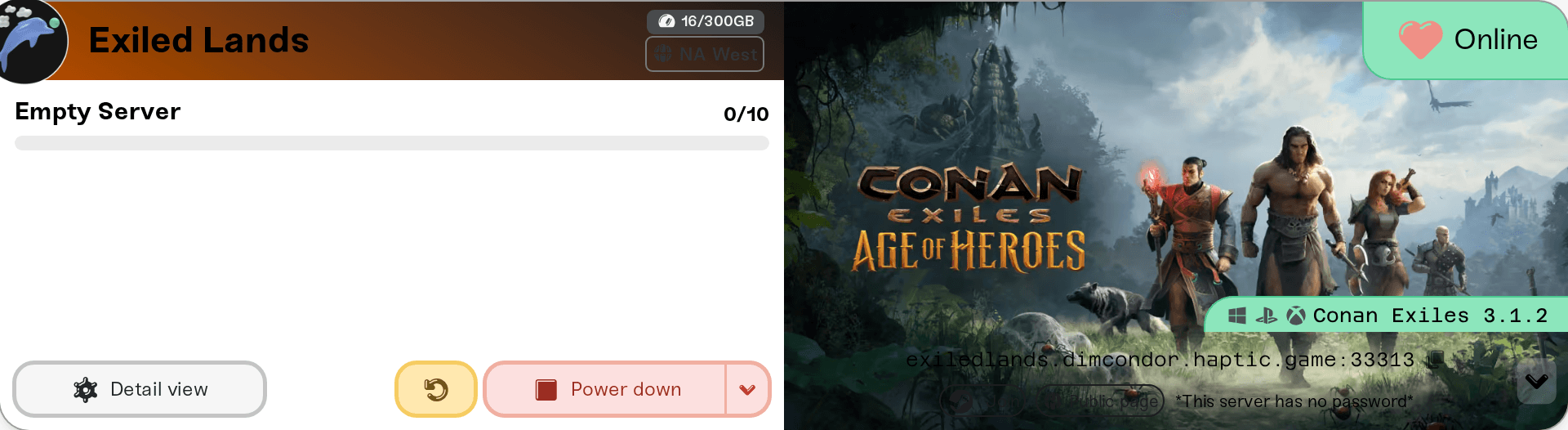
Your server card shows Windows, PlayStation, and Xbox icons next to the game name. Those icons say which platforms Conan Exiles is sold on, not who can connect to your server. For joining, only the Windows icon counts.

Who can join
PC on Steam: yes.
PC on the Epic Games Store, Microsoft Store, or PC Game Pass: yes, as long as that copy is running the Enhanced update. Enhanced and Legacy are different builds and cannot connect to each other, so a friend whose game still launches Legacy will be turned away until their store's copy updates.
Xbox and PlayStation: no.
If a PC friend is unsure which build they have, the quickest test is simply to try joining by address. A Legacy copy either fails to connect or never sees the server.
How PC friends join
Send them two things from your server card: the address (the hostname:port line) and your Server Password if you set one in the Basic tab.
Join button: on a desktop browser, while your server is Online, click the small arrow at the right end of the address strip. The Join pill in the row that opens launches Conan Exiles through Steam and connects straight to your server.
Direct Connect: in Conan Exiles, choose Play Online, then Direct Connect at the bottom of the server browser. Paste the full address including the
:portpart, enter the password if there is one, and connect. This is the most reliable route because it ignores the browser's filters.Steam favorites: if a friend adds your server under Steam's View > Game Servers > Favorites, that list wants the query port, which is the port on your card plus 2. The port shown on your card is the game port, which is what Direct Connect and the Join button use.
Two things friends ask before joining:
Mods: nobody installs anything by hand. Their game downloads your server's mods when they join, then restarts once. See Steam Workshop mods.
Isle of Siptah DLC: not needed to join or to play the Exiled Lands. A friend only needs the DLC to travel to the Siptah region. See Both maps on one server.
Things that will not get a console player in
Removing the password or making your server public. Console copies cannot reach PC servers at all, so visibility is not the problem.
Changing the Region or Community Style tags. Those only affect where your server sorts in the PC server browser.
Installing or removing mods. No mod runs on console Conan Exiles.
Switching hosts. Every Conan Exiles PC server on the internet has the same limit.
Need help?
Reach us in Discord or at support@haptic.gg. Include your server name, the platform and store your friend plays on, and the exact message they see when they try to join.


