Counter-Strike 2: Players can't join after an update? Restart your server
 Counter Strike 2Troubleshooting
Steam updates players' copies of CS2 within minutes of a patch, but your server keeps running the previous build until it restarts, and in that window…
Steam updates players' copies of CS2 within minutes of a patch, but your server keeps running the previous build until it restarts, and in that window updated players can't join. Your server card shows an orange New update available triangle when that happens, and an empty server restarts itself onto the new build, never while anyone is connected. To update right away, Restart from your dashboard: the server picks up the latest CS2 build Haptic has mirrored as it starts. Your settings, config file, and plugins are untouched.
Why patch day locks everyone out
CS2 requires your game and the server to run the same build. When Valve ships an update, Steam pushes it to players right away, but a running server stays on its build until it restarts. Until then, updated players are refused, and an out-of-date server also drops out of the in-game Community Server Browser. This happens on every host, self-hosted servers included.
The mismatch runs both ways. A player whose own copy of CS2 hasn't finished updating sees "Your client is out of date", which is fixed on their PC, not on your server.
The fix: restart once
Press and hold the yellow Restart button on your server card until the ring completes. A quick click does nothing on purpose, so a stray click can't restart a full server.
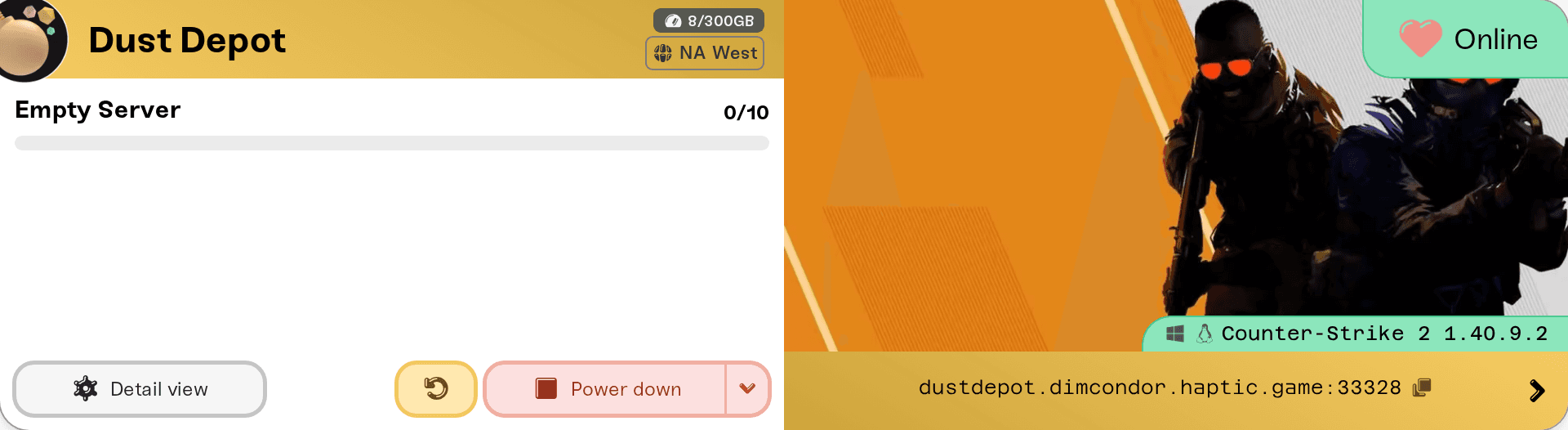
Every start installs the latest CS2 build Haptic has mirrored, so a power-on or a wake from sleep updates it too. Your match settings, your haptic-*.cfg config file, and installed plugins come back exactly as they were.
Two things worth knowing:
Watch for the triangle. When a newer CS2 build is ready, your server card shows an orange warning triangle next to the status that reads New update available. An empty server restarts itself within about half an hour of the new build, with warnings in game first, and never while anyone is connected, so pressing Restart just makes it sooner.
The first start after a big patch is slow. CS2's server files are tens of gigabytes, so that start can take noticeably longer than usual. The status badge on the card shows what it's doing.
One player still can't join
If everyone got back in except one person, their own copy of CS2 hasn't updated yet. They should quit Steam completely, start it again so the update finishes, then relaunch the game. Matching builds is a CS2 rule, not something we control, so there's no server setting that lets an outdated player in.
Stay current automatically
You don't have to do anything: an empty server restarts itself onto each new CS2 build. A server that's busy around the clock is the exception, because updates never interrupt a match; it picks the patch up at its next restart. Auto Restart, in your server's expanded Overview settings under Basic, sets how often that happens. New servers come set to Every 48 hours. Switch it to Every 24 hours (daily), then press Save changes in the popup at the bottom of the page. The new schedule arms the next time your server starts.
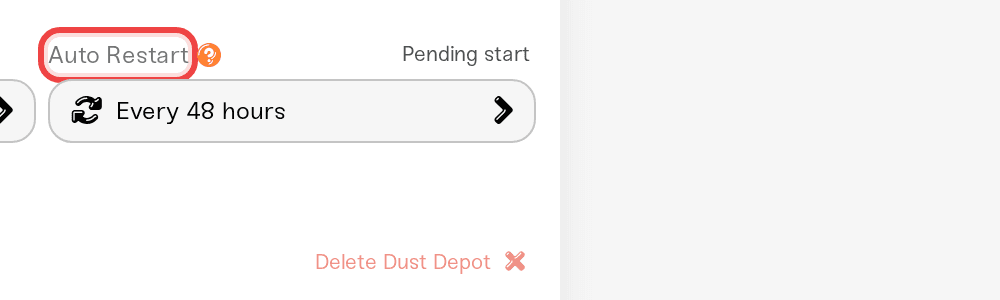
Scheduled restarts wait until the server has been empty for 15 straight minutes, so nobody gets pulled out of a match. That also means a server that's busy around the clock never restarts on its own and still needs a manual Restart. More in Automatic server restarts.
If it still fails after a restart
You restarted in the first minutes after the patch. Haptic mirrors each new CS2 build before servers can install it, and CS2 is a big download. Restart that early and the server can come back on the same old build. Give it a while and restart again.
The server isn't in the Community Server Browser. Give it a couple of minutes after it comes online. If it has never appeared there, check its Game Server Login Token: see Add a Game Server Login Token (GSLT) so players can join.
You run Metamod and CounterStrikeSharp plugins. Big CS2 patches break plugins until their authors catch up, which is a plugin ecosystem reality, not a Haptic one. If the server crashes on startup after a patch, remove or update the offenders, then restart. Plugins you added from the catalog are managed in the Mods card, and deleting those in Files is undone on the next start (see install mods on your server); plugins you uploaded yourself live under
install/counter-strike-2/game/csgo/addons/counterstrikesharp/plugins/in the Files card.The server won't come online at all. Work through My server status is offline.
No version pinning or rollback
CS2 servers on Haptic always follow the latest public build. There's no version or branch picker, so you can't stay on an older build or roll back after a patch. Backups protect your config and plugin files, not the game itself, so restoring one doesn't move the server back a version either.
Need help?
Reach us on Discord or at support@haptic.gg. Include your server name and a screenshot of the message the affected player sees.


