Factorio: list your server on the public server browser
 FactorioGuide
Your Factorio server is private by default: only people you give the address to can join. To put it in the in-game Browse Public Games list, open the…
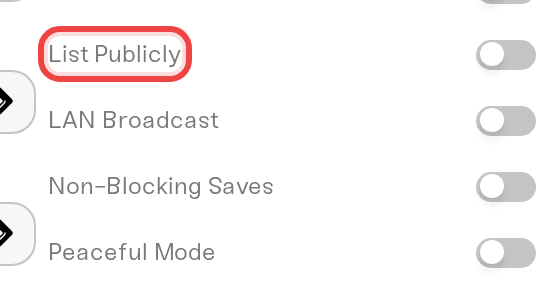
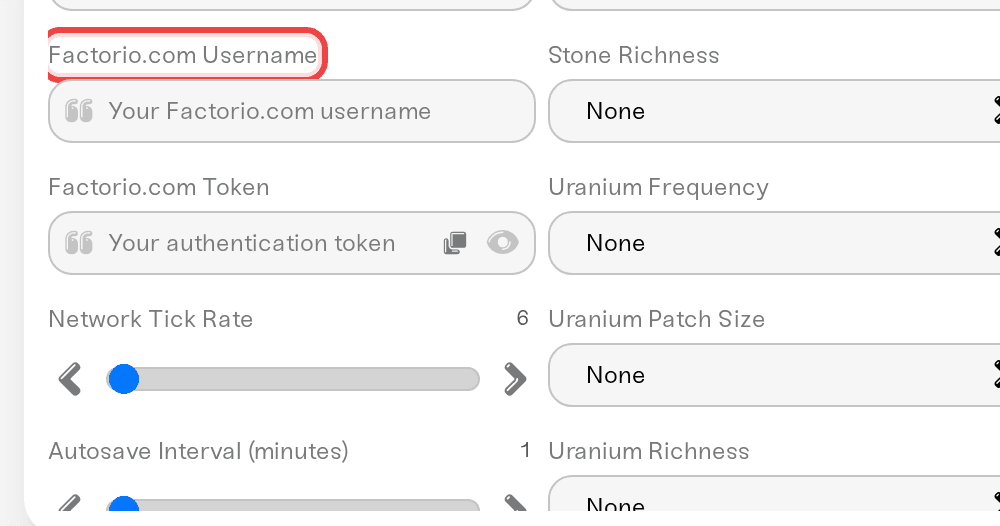
Your Factorio server is private by default: only people you give the address to can join. To put it in the in-game Browse Public Games list, open the Details tab of the Overview card, tick List Publicly, fill in the Factorio.com Username and Factorio.com Token fields that appear, save, and restart. Nothing about your world or your settings changes; this only changes who can find the server.
Why Factorio asks for your token
The public list is run by the Factorio developers, and a server can only register on it under a factorio.com account. That is a Factorio rule, not something we control. Your server registers under your account, so it needs your username and the authentication token from your profile. Treat the token like a password: the dashboard shows it as dots, and you should never paste it into Discord.
Step 1: get your token from factorio.com
Log in at factorio.com and open your Profile.
Next to Token, click reveal and copy the value.
Note your username on the same page. It is your factorio.com username, not your Steam display name and not your email address.
No factorio.com account yet? Register one at factorio.com first.
Step 2: turn the listing on in your dashboard
Go to My Servers and press Detail view on your Factorio server.
In the Overview card, open the Details tab and find List Publicly.
Tick it. Two new fields appear: Factorio.com Username and Factorio.com Token. Paste both in. The token shows as dots, and the eye icon reveals it if you want to check the paste. If either field is empty, the server will not list.
While you are here, set what players see in the list: Server Description (up to 500 characters, it starts as our default welcome text) and Server Tags, comma separated, for example
vanilla, coop, newbie-friendly. The name in the list is your Server Name from the Basic tab.Press Save changes in the popup at the bottom of the page, then restart the server. Factorio reads these settings when it starts, so nothing changes until then; see start, stop, and restart your server.
Once the server is back online, open Factorio, go to Multiplayer, then Browse Public Games, and search for your server name.
Not showing up? Check these
Did the server restart after you saved? The listing only starts on the next boot. Give it a couple of minutes after that.
Are the credentials exact? Re-copy the username and token from factorio.com, with no stray spaces, save, and restart again. A wrong or partial token means no listing.
Is the server online right now? A stopped or sleeping server is off the list, and people browsing have no way to wake it. To be findable at any hour, see stop your server going to sleep.
Did Factorio just update? Updated players cannot join a server still on the old version. Restart so your server picks up the newest stable build; see Factorio: version mismatch when joining.
Are you searching the right name? The list shows your Server Name from the Basic tab, not your factorio.com username. Search for it exactly.
Your other access settings still apply
Server Password (Basic tab) works on a listed server: it shows as password-protected and players are asked for the password. Listing plus a password lets friends find you without opening the server to everyone. See set, change, or remove your server password.
Require Factorio Account (Details tab, on by default) makes everyone join under a real factorio.com name, which is what lets you ban by username. Keep it on for a public server.
Whitelist beats the listing: once it is on and at least one name is on the whitelist, everyone else is rejected even though they can see the server.
LAN Broadcast is for same-network play only. It does nothing for the public list, so leave it off.
Staying private instead
Leave List Publicly off. Your server is then join-by-address only: players use Multiplayer, then Connect to address, with the address from your server card. Add a Server Password on top and you have the usual private co-op setup.
Need help?
Reach us on Discord or at support@haptic.gg. Include your server name and a screenshot of the Details tab with the token field left hidden.


