Project Zomboid: Enable Safehouse Claiming and Tune Safehouses
 Project ZomboidGuide
Project Zomboid ships with safehouse claiming turned off on dedicated servers, so on a fresh server nobody gets a Claim Safehouse option. Turning it on is…
Project Zomboid ships with safehouse claiming turned off on dedicated servers, so on a fresh server nobody gets a Claim Safehouse option. Turning it on is one line in servertest.ini: open the file from your server's Files card, set PlayerSafehouse=true, save, and restart. Your world and characters are not touched. Letting players respawn at their safehouse is a separate dashboard toggle, Safehouse Respawn.
Why nobody can claim a safehouse
The game's own default is PlayerSafehouse=false, and it is the same on every host. The dashboard has no field for it (only Safehouse Respawn lives in the settings), so you flip it in the config file.
Turn on claiming
1. Open servertest.ini
In My Servers, press Detail view on your server and expand the Files card. Click the servertest.ini chip next to Quick access:. If you do not see a Quick access: row at all, the server has not started yet; start it once and come back.
2. Check the badge, then change one line
The editor shows a badge next to the file name. Linked to dashboard means your edits to this file survive restarts, which is what the rest of this guide assumes. If it says Regenerated on boot, this server still rebuilds servertest.ini from your dashboard settings on every start and the edit below would be wiped: restart the server once and check the badge again, and email support@haptic.gg if it has not changed. What each badge means: Edit your server's config files.
Press Ctrl+F (Cmd+F on Mac), search for PlayerSafehouse, and change the line to:
PlayerSafehouse=trueIf the line is missing, add it on its own line anywhere in the file.
3. Save and restart
Press Save (Ctrl+S), then restart your server. The restart is the reliable way to apply the change. If you saved something you did not mean to, the History button in the editor restores any of the file's last 10 versions.
4. Claim in game
Stand inside the building you want, right-click, and choose Claim Safehouse. The safehouse panel then lets the owner invite and remove players, rename it, or release the building.
If Claim Safehouse still fails
These are Project Zomboid's own rules, not something we control. The game shows a message naming the one you hit:
"Must be inside a building to claim it." Right-click from indoors.
"Spawn location. Cannot be claimed." Starting houses are off limits; pick another building.
"Occupied building. Cannot be claimed until empty." Everyone has to step out, friends included. Claim it, then invite them.
"Non-residential building. Cannot be claimed." Shops, warehouses, and the like need
SafehouseAllowNonResidential=true(see below)."Must survive for X days before claiming." Controlled by
SafehouseDaySurvivedToClaim."Safehouse intersects with another." Someone already claimed part of that footprint.
"You are already a member or owner of a safehouse". A player can only be in one at a time; leave or release the old one first.
Let players respawn at their safehouse
This one is in the dashboard. Open the Overview card, switch to the Details tab, and turn on Safehouse Respawn. Press Save changes in the popup at the bottom of the page, then restart. Players who were members of a safehouse before dying respawn inside it.
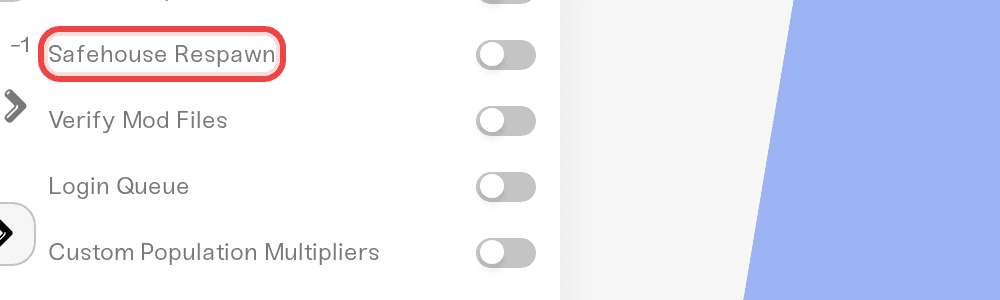
The toggle and the SafehouseAllowRespawn line in servertest.ini are the same setting; the dashboard writes that line for you. Use the toggle so the dashboard and the file always agree.
Other safehouse settings
These live in the same servertest.ini. Same routine: edit, save, restart. Copy the key names exactly; the game really does spell SafehouseAllowTrepass with no s after Tre, and SafeHouseRemovalTime with a capital H. A misspelled key is silently ignored. Each line shows the game's default.
| Line (default) | What true does |
|---|---|
| AdminSafehouse=false | Only admins can claim safehouses. |
| SafehouseAllowTrepass=true | Non-members can walk in. Set false to keep outsiders out. |
| SafehouseAllowLoot=true | Non-members can take items from a safehouse. Set false to protect your stash. |
| SafehouseAllowFire=true | Fire can damage safehouses. |
| SafehouseAllowNonResidential=false | Players may claim shops, warehouses, and other non-residential buildings. |
| SafehousePreventsLootRespawn=true | Items do not respawn inside claimed safehouses. |
| DisableSafehouseWhenOwnerConnected=false | Protection switches off while the owner is online, so the safehouse is only protected when the owner is away. |
| SafehouseDaySurvivedToClaim=0 | Number: in-game days a player must survive before claiming. |
| SafeHouseRemovalTime=144 | Number: real-world hours without a visit before a player is removed from a safehouse. |
A common PVP setup that keeps bases off limits: PlayerSafehouse=true, SafehouseAllowTrepass=false, SafehouseAllowLoot=false, SafehouseAllowFire=false.
Admins can also manage safehouses from chat: /addtosafehouse "title" "username", /kickfromsafehouse "title" "username", and /releasesafehouse "title". /reloadoptions re-reads servertest.ini and sends the options to players, so it is worth trying after an edit; restart if the change does not take effect.
Things that will NOT fix it
Sandbox Overrides or
servertest_SandboxVars.lua. Safehouse options are server options inservertest.ini, not sandbox settings; adding them to the sandbox file does nothing.Turning on Safehouse Respawn. It decides where members respawn; it does not enable claiming.
Need help?
Reach us on Discord or at support@haptic.gg. Include your server name and a screenshot of the safehouse lines in your servertest.ini.


