7 Days to Die: crossplay, Easy Anti-Cheat, and mods
 7 Days To DieGuide
Crossplay is on by default, so PlayStation 5 and Xbox Series X|S players can join alongside Steam players. While Allow Crossplay is on, Easy Anti-Cheat…
Crossplay is on by default, so PlayStation 5 and Xbox Series X|S players can join alongside Steam players. While Allow Crossplay is on, Easy Anti-Cheat stays on and four settings stay inside the game's crossplay ranges, which is why the XP slider stops at 300%. Mods are yours to add: upload each into its own folder under /data/Mods/ and restart. A mod that changes game data hides your server from console players, and a mod whose DLL your players must install on their PC needs EAC off.
What crossplay locks
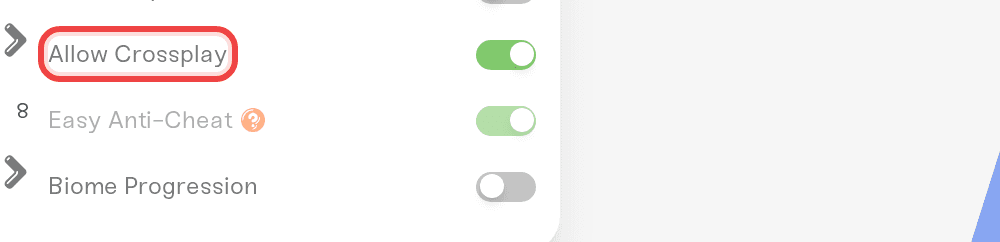
Allow Crossplay is in the Details tab of the Overview card on your server. While it is on:
| Setting | Allowed while crossplay is on |
|---|---|
| Easy Anti-Cheat | Locked on |
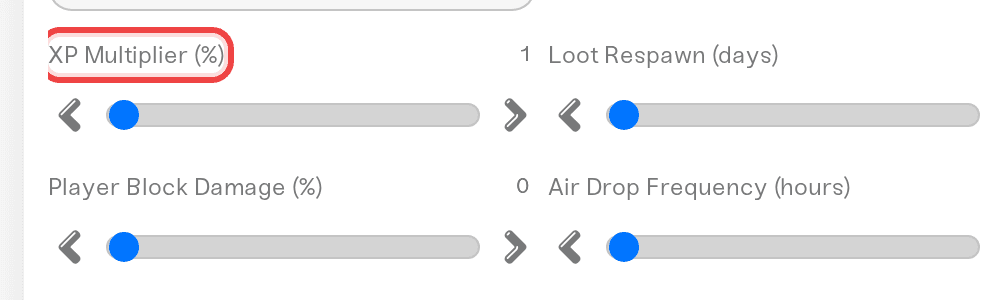
| XP Multiplier (%) | 25 to 300 |
| Loot Abundance (%) | 200 or less |
| Loot Respawn (days) | 5 or more |
| Air Drop Frequency (hours) | 24 or more |
The game refuses to start with a value outside those ranges, so each slider tightens instead. One row is our own limit: the game allows air drops switched off, but our slider keeps a 24 hour floor while crossplay is on. A value outside its range turns red with the reason, and Save changes refuses it.
How PS5 and Xbox friends join
Platforms: PlayStation 5 and Xbox Series X|S only. PS4, Xbox One, and Switch players cannot join.
Server browser only. Consoles cannot connect by address (a game rule): friends search the in-game browser for your exact server name, so keep Server Visibility on Public (the default). Friends Only and Not Listed hide it from them.
Same version. Everyone must be on the server's game version, and stable and experimental players cannot mix. After a game update your card shows New update available, and the server restarts onto the new build once it has been empty for 15 minutes; restart it yourself if people are waiting.

The community reports crossplay limits we don't enforce: if console friends matter, keep Max Players at 8 or below and World Size at 8192 or below.
Turning crossplay or EAC off
Turn off Allow Crossplay for XP above 300%, loot above 200%, air drops off, or EAC off. Save, then restart. Console players cannot join while it is off; your world is untouched. To turn it back on, first bring every red field back inside the ranges above.
To turn EAC off: turn off Allow Crossplay, save, then turn off Easy Anti-Cheat, save, and restart.

Add mods to your server
There is no mod catalog or Steam Workshop for this game: most mods come from Nexus Mods, and you upload them yourself.
Download the mod and unzip it on your PC. A mod is a folder with a
ModInfo.xmlfile at its top level.In the Files card, open
/data/, create aModsfolder if needed, and drag the whole mod folder in (or use SFTP), so you get/data/Mods/<ModName>/ModInfo.xml. If the zip had an extra folder level, upload the inner folder. You can upload a.zipand unzip it in the Files card too. The server can be running or stopped.Restart (or start) the server and open the Console: every mod that loaded prints
Loaded Mod:and the name from itsModInfo.xml, and a short note at the end says how many of your mods loaded and why any were skipped.
Never use the Mods folder under /install/7-days-to-die/: it is the game's read-only copy. To remove a mod, delete its folder and restart. Mods survive restarts, backups and server moves.
A console line ending did not apply means part of an XML mod doesn't fit the game version; the server still starts and skips that change.
Mods made for older game versions are often skipped: version 3 refuses a ModInfo.xml in the old format (with a <ModInfo> block inside), one without a DisplayName, and a mod Name with spaces or symbols. The console says which one. Get the mod's current version from its page.
Mods, console players and EAC
Mods that change game data (a
Configfolder, as in most XML mods) mark the server as modded, and 7 Days to Die hides modded servers from PS5 and Xbox players. Only menu, loading screen and translation changes are exempt. Mixed PC and console groups: stay vanilla or use DLL-only mods.Server-only DLL mods (a
.dll, noConfigfolder) keep console players in and work with EAC on. Players install nothing.Mods whose DLL every player must install (the mod's page says so): every player installs the same version and launches without EAC (Steam launch options), and the server needs EAC off, so crossplay off. A mismatch is the usual cause of kicks seconds after joining.
Game updates and overhaul mods
7 Days to Die ships a new version about once a month, and your server moves onto each one by itself, which can break a mod until its author updates it. After an update, check the console for did not apply lines. To update a mod, delete its old folder, then upload the new version. Before uploading any mod, check that its page lists your server's game version; overhauls such as Darkness Falls are built for one version.
Need help?
Reach us on Discord or at support@haptic.gg. Include your server name, the player's platform, and your mod folder names or a console screenshot.


