Start, stop, and restart your server
 HapticGuide
All the power controls live right on your server's card on My Servers. Power up starts your server with one click, and it is usually joinable in well under…
All the power controls live right on your server's card on My Servers. Power up starts your server with one click, and it is usually joinable in well under a minute. Power down and Restart are hold-to-confirm buttons: press and hold for about a second and a half until the ring finishes, so you can't stop a full server with a stray click. Every normal stop and restart saves and backs up your world first, so nothing is ever lost by powering down.
Where the controls are
Open your dashboard and find your server's card. The bottom row of the card has everything:
Detail view opens the expanded view with settings, backups, console, and more. You do not need it for power controls; the same buttons stay in place either way.
The yellow circular-arrow button is Restart (it shows the label "Restart" on mobile).
The big button on the right is the power button. It changes with your server's state: Power up (green) when it is off, Power down (red) when it is running.
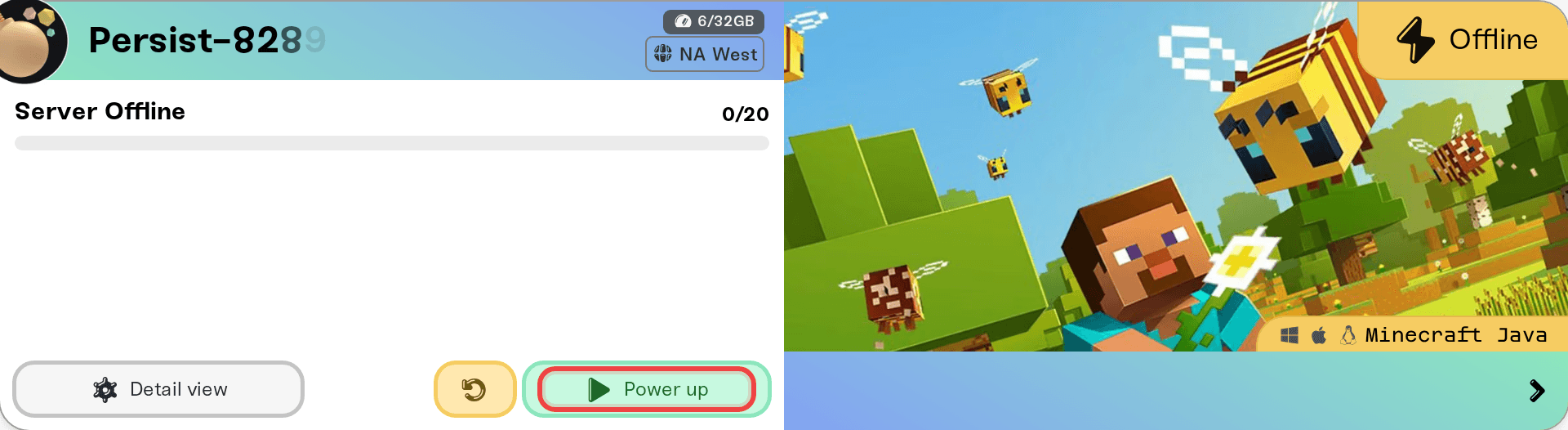
On Wake & Play plans the green button says Wake up instead of Power up when your server is sleeping or off. Same button, same result.
Starting your server
Click Power up (or Wake up). The button switches to Powering up... and the status badge counts you through what is happening.
Most starts finish in well under a minute.
The very first start, big worlds, and modded servers take longer. The status badge shows exactly what is going on, with a progress bar: Preparing your world…, Downloading world, Installing {mod name} (2/5), or Checking mod compatibility.
If a start has been going for a couple of minutes, the label changes to Preparing. No action needed: Preparing your server. It will start automatically.
Once the badge shows Online with the beating heart, everyone can join.
Stopping your server
Press and hold the red Power down button. A ring fills around the button while you hold; the stop fires when the ring completes, after about a second and a half. If you let go early, nothing happens and the ring resets a moment later. A single click never stops the server; that is on purpose, so nobody powers down a full server by accident. (Keyboard users can hold the Space bar instead.)
What happens on a stop:
Everyone playing is disconnected right away.
The button shows Powering down... while your world is saved and backed up. This can take up to a few minutes for large worlds, so let it finish.
The status lands on Offline (or Sleeping on Wake & Play). Nothing is deleted; press the power button any time and your world comes back exactly as you left it.
Restarting your server
Press and hold the yellow Restart button, same hold-to-confirm ring as Power down. A restart is a clean stop (world saved and backed up) followed by a fresh start, so it takes about as long as both put together.
Restart when:
The card shows the yellow Restart to apply changes: triangle: settings you saved while the server was running apply on the next restart. See Changing your server settings.
The card shows New update available: restarting installs the latest game patch on auto-update games.
The server feels stuck or laggy and you want a clean slate.
Players are disconnected during the restart and can rejoin the moment the status shows Online again. Your join address never changes on a restart.
One game-specific note: on FiveM and RedM servers, friends you added as operators see the Restart button disabled with "Restart is available to admins."
If you want your server to restart on a schedule instead of by hand, see Automatic server restarts.
Why is my button greyed out?
Every disabled power button has a tooltip explaining why. Hover it (or tap it on mobile) and you will see one of these:
| Tooltip | What it means |
|---|---|
| "This server is stashed. Allocate memory in Manage Servers to activate it." | Stashed servers are parked with 0GB. Give the server memory first; see Stash and switch servers. |
| "Allocate at least 2GB in Manage Servers before powering up." | Servers need at least 2GB of memory to run. |
| "Not enough memory available. You are using {X}GB of {Y}GB." | Your active servers add up to more than your plan. Free some up or add memory; see Understanding your memory budget. |
| "Restoring backup. Please wait until it finishes." (and similar messages for world uploads, world resets, and open file edits) | A world operation is in flight. Power controls unlock the moment it finishes, so nothing can interrupt your world mid-copy. |
| "Server is starting" / "Server is stopping" | Restart is unavailable while the server is already mid-transition. Wait for it to settle. |
Stuck powering up, down, or restarting? Force shutdown
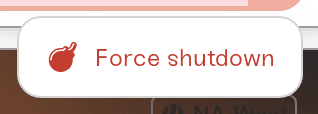
If a start, stop, or restart has been spinning for a long time and the progress labels are not moving, there is an emergency exit. Next to the power button, click the small arrow (the More power options chevron), then Force shutdown.
A confirmation explains the trade-off, and it is worth reading: "This terminates the server immediately. Players are disconnected and no shutdown backup is taken. Any world progress since the last backup may be lost. Only use this if your server is stuck powering up, powering down, or restarting."
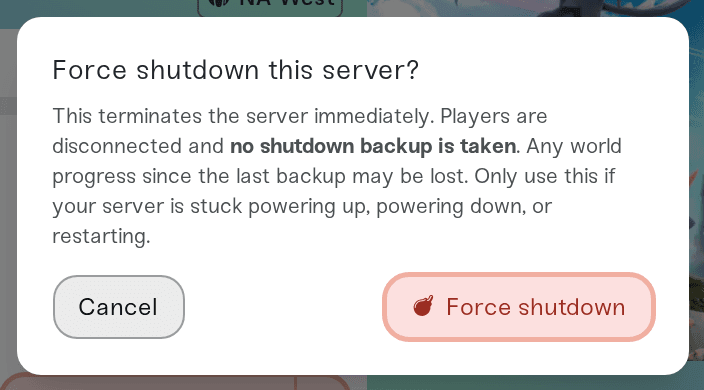
In plain terms: a normal Power down saves your world first, Force shutdown does not. Use it as a last resort. It is never available while a backup restore or world upload is running (the arrow disappears during those, so you cannot interrupt your world mid-copy). The arrow only appears while the server is running, mid-transition, or Failed; on a fully offline server there is nothing to force stop, so you will not see it at all.
If your server fails to start
A start that goes wrong ends in the red Failed badge, and the power button becomes a yellow Retry.
Hover the warning triangle on the badge for the reason and a Try these fixes: list (add more memory for out-of-memory failures, remove recently added mods, restore an earlier backup, reset world data).
The full error log is in the Console card of the Detail view; see Use the server console.
If the same crash happens 3 times in a row, Retry turns red and asks "Keep retrying?" before starting again. At that point, restoring a backup from before the crash is usually the faster fix.
What each status means
Quick reference for everything the badge can say. My server status is Offline covers these in more depth.
Online: live and joinable.
Offline: powered down. Your world is saved; start it any time.
Sleeping: a Wake & Play server that dozed off after about an hour with nobody playing. Press Wake up. See Stop your server going to sleep.
Powering up / Starting: on its way online.
Preparing: a longer start; it will start automatically, no action needed.
Stopping / Restarting: saving and backing up your world, then shutting down or coming back.
Recovering: the server stopped unexpectedly and is coming back online on its own.
Failed: the start did not succeed; see the section above.
Import failed: a world upload could not be applied; power up to start with a fresh world, or retry the upload.
Stashed: parked with no memory allocated.
Preparing your world… / Downloading world / Restoring backup / Installing {mod}: progress labels while we work on your world or mods, each with a progress bar.
Need help?
If a server will not leave a spinning state even after a Force shutdown, or Failed keeps coming back and the console error means nothing to you, message us on Discord or email support@haptic.gg with your server name and a screenshot of the status badge or console. We can see the same logs you can, plus a bit more, and we are happy to dig in.



