Satisfactory: updates, version mismatches, and the Experimental branch
 SatisfactoryTroubleshooting
Your save is fine. When Coffee Stain ships a patch, Steam and Epic update your players' games within minutes, but your server keeps the build it started…
Your save is fine. When Coffee Stain ships a patch, Steam and Epic update your players' games within minutes, but your server keeps the build it started on, so joins fail until it starts again. Press and hold Restart on your server card and everyone can get back in. The Experimental branch is a checkbox in your server settings, and every player has to opt in on their own copy of the game too.
Why joins break right after a patch
Satisfactory clients and servers have to be on the same build. There is no grace period: a player whose game updated an hour before your server did simply cannot connect.
Your server fetches the newest build for its branch every time it powers up, and never while it is running. So the cure is always a fresh start: a restart from the dashboard, a stop and start, a Wake & Play wake up, or a scheduled Auto Restart all put it on the current build.
One kind of restart does not count. Satisfactory's own Daily Restart Time is the game relaunching itself inside your server to clear memory, and it does not fetch a new game build. If your server restarted overnight and players are still on the wrong version, that is why.
When a newer build is out and your server has not restarted onto it yet, your server card shows an orange New update available warning next to the status. If joins started failing on a day the game patched, that is the cause.
The fix: restart your server
Open My Servers and press and hold the yellow Restart button on your server's card until the ring completes. A quick click does nothing on purpose, so a stray click cannot restart a server full of people. Your server picks up the current build during startup, then comes back online. No reinstall, no file work, and your world is untouched.
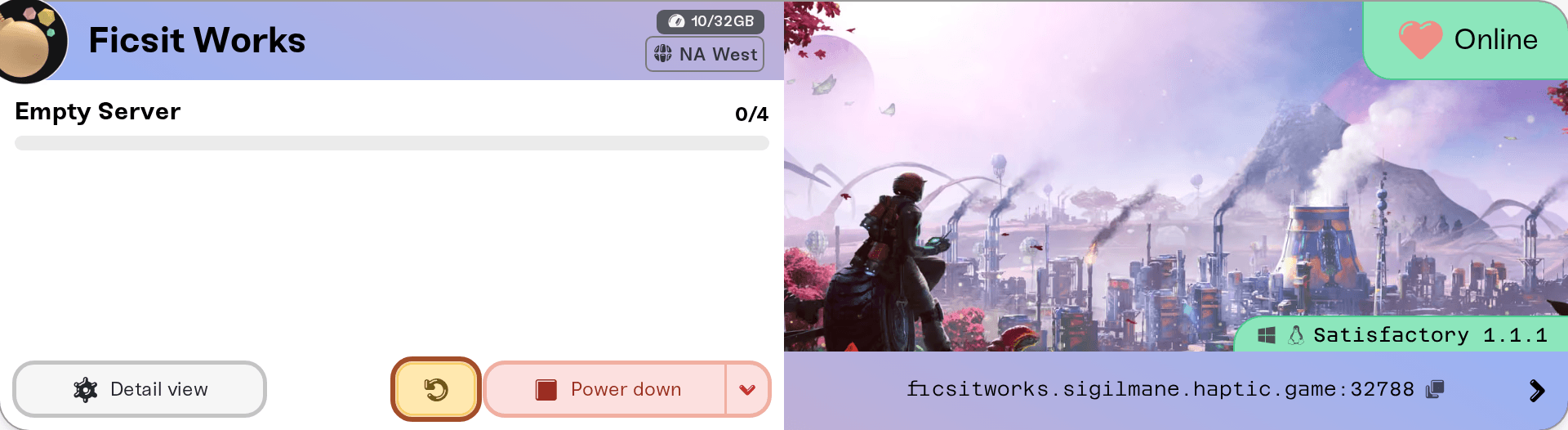
Give it a few extra minutes after a big update: the download is larger than usual and the first start is slower.
If one player still cannot join after your server is back, their own game has not finished updating. Restarting Steam or the Epic launcher pushes it through.
Do I have to update my server by hand?
Only if you want the new build right now. Your server restarts onto a new build by itself once it has been empty for 15 minutes, so nobody is kicked. Auto Restart covers it too: it sits in the Basic section of your server's expanded Overview card, new servers come set to Every 48 hours, and you can switch it to Every 24 hours (daily). A scheduled restart backs up your world first and waits until the server has been empty for 15 straight minutes, so nobody is kicked, and the server comes back on the latest build for its branch. Full details in Set up automatic server restarts.
So an idle server gets itself onto a new patch. On a server people keep trying to join it never gets its 15 quiet minutes, and that is why patch day is worth one manual restart.
Switching to the Experimental branch
Experimental is Coffee Stain's early build line. It is a whole separate version of the game, not a setting inside it.
Turn on the checkbox
On My Servers, press Detail view on your server's card, open the Details tab of the Overview card, and tick Experimental Branch.
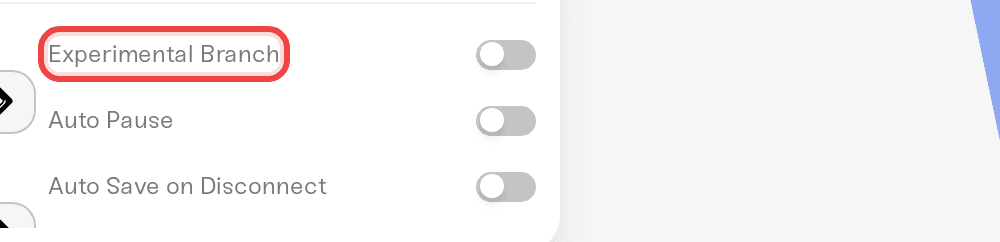
Read the warning and accept
A warning appears before the change is saved: your world data is preserved, but going back to stable later can cause problems if the experimental build changed your save. Choose Switch to Experimental if you are happy with that.
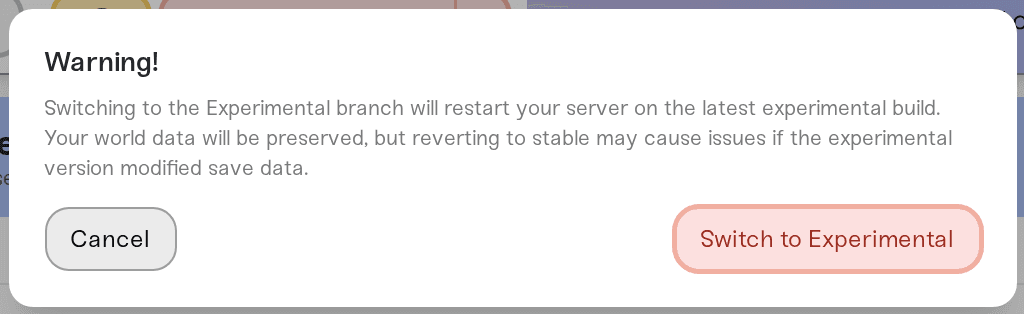
Save, then restart
Click Save changes. Settings apply the next time your server powers up, so restart it. It comes back on the latest experimental build.
Have every player switch too
This is the step people miss. Your friends' games have to be on Experimental as well, or they will hit the same mismatch:
Steam: right-click Satisfactory in your library, open Properties, then Betas, and pick experimental from the dropdown. Steam downloads the swap.
Epic Games Store: Experimental is a separate entry in your library called Satisfactory Experimental. Install it and launch that one instead.
Experimental builds change more often than stable, so expect more patch days and more restarts.
Going back to stable
Take a backup first: press Detail view on your server's card, find the Backups card, and press New Backup. A world that has been played on Experimental may have been written in a newer save format, and stable builds cannot always load it. If the server comes back with your factory missing, restore that backup and go back to Experimental rather than playing on.
Then untick Experimental Branch, click Save changes, and restart. Your players switch back the same way they switched over.
Mods after a game update
Satisfactory mods target a specific game version, so a patch commonly breaks them until the authors publish updates. Mods from the Mods card update themselves: Haptic checks ficsit.app every hour, test-starts a new version first, and your server picks it up at its next restart. Mods you uploaded yourself stay at the build you uploaded until you replace them. If a mod no longer fits the game, the server stops at startup and the card names the mod and the game or Mod Loader version it needs: remove it, or replace it once the author ships an update. Running vanilla for a few days is the usual stopgap. That is a modding reality, not something we control.
Things that will not fix a version mismatch
Reinstalling the game on a player's PC. It is a slow way to do what restarting Steam or the Epic launcher does in seconds.
Changing server settings or adding memory. Neither changes which build the server runs.
Resetting your world. The start that follows a reset does land on the current build, so it looks like a fix, but it deletes your factory to achieve what a plain restart achieves on its own.
Waiting it out on a busy server. A scheduled restart only fires after 15 straight minutes with nobody online, so on a server people are trying to join all day it keeps getting postponed.
Need help?
Reach us on Discord or at support@haptic.gg. Include your server name, the exact error your players see, and whether they are on Steam or Epic.


