Change Any Project Zomboid Sandbox Setting
 Project ZomboidGuide
Every Project Zomboid sandbox setting can be changed from your dashboard, no FTP needed. The common ones (zombies, loot, food, day length, weather) are…
Every Project Zomboid sandbox setting can be changed from your dashboard, no FTP needed. The common ones (zombies, loot, food, day length, weather) are regular settings on your server's page. Everything else, including settings added by mods, goes in the Sandbox Overrides box at the bottom of the settings. Changes apply the next time the server restarts, and your world is never wiped by a settings change. Changes you make from the in-game admin panel are kept across restarts too.
Zombie population, the real way
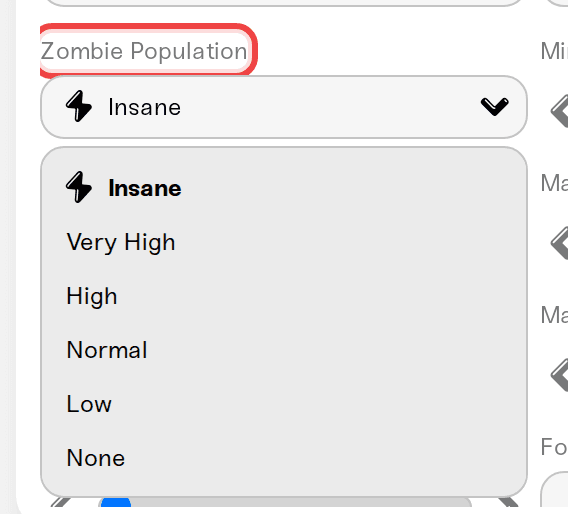
Project Zomboid dedicated servers control population with a multiplier, the same one the game calls Population Multiplier under Advanced Zombie Options.
The Zombie Population preset in your dashboard sets it for you: Insane is 2.5, Very High 1.6, High 1.2, Normal 0.65, Low 0.15, None 0.
Want an exact number instead? Turn on Custom Population Multipliers and set the multiplier yourself (0 to 4), plus the start multiplier, peak multiplier, and Population Peak Day.
Respawn is separate: Respawn Hours (0 turns respawn off), Respawn Unseen Hours, and Respawn Fraction control how zombies come back. Zombie Migration Hours controls how they drift into cleared areas.
Save, restart, done. Population settings apply to the world on the next restart.
Food and spoilage
These are regular settings on your server's page:
Food Spoilage Speed: Very Fast to Very Slow.
Refrigeration Effectiveness: Very Low up to No Decay.
Nutrition System: turn off to stop weight gain and loss.
Rotten Food Removal (days): -1 keeps rotten food forever.
Day length
Build 42 changed the day length list. The game's default is now 1 Hour, 30 Minutes, and your dashboard lists every option the game has, from 15 minutes up to real-time days.
Every other sandbox setting: Sandbox Overrides
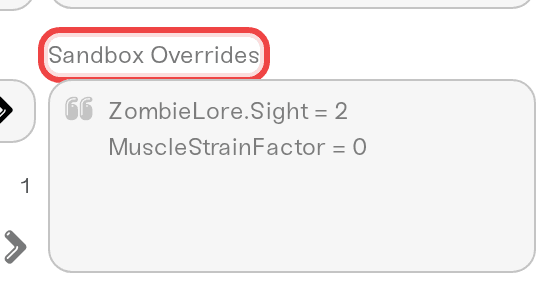
At the bottom of the Project Zomboid settings there is a Sandbox Overrides box. It accepts raw lines exactly as they appear in the game's servertest_SandboxVars.lua file, one per line:
ZombieLore.Sight = 2
MuscleStrainFactor = 0
LockedHouses = 2
WorldItemRemovalList = "Base.Hat, Base.Glasses"
For example, MuscleStrainFactor = 0 turns off the muscle strain your players get from swinging weapons and carrying heavy loads.
Rules:
One setting per line, spelled exactly like the sandbox file spells it. Nested settings use a dot, like
ZombieConfig.RallyGroupSize.Values can be
true,false, a number, or text in double quotes.Lines starting with
--are treated as comments and ignored.Overrides win over the regular settings above them, and they apply on the next restart.
This also works for settings added by mods, which normally only exist inside the sandbox file.
A per-skill XP rate such as
MultiplierConfig.Cookingdoes nothing on its own, because your server's global XP toggle is on so the XP Multiplier setting covers every skill. Project Zomboid: Speed Up Leveling With the XP Multiplier shows how to set a rate per skill.
The dashboard checks each line as you type and points at the first one that is not valid, so a typo can never break your server.
Changing settings from the in-game admin panel
If you are logged in as an admin, the in-game Sandbox Options panel works too, and what you change there stays in place across restarts, automatic restarts, and Wake & Play wake-ups. Two things to know:
Your dashboard keeps showing the values you last saved on the dashboard. It does not read the in-game panel back yet, so the two can show different numbers for a setting you changed in game.
When you save a setting on the dashboard, that setting is applied on the next restart, even if it was changed in game after your last dashboard save. Everything you did not touch on the dashboard is left as it is in the game.
If you want the dashboard and the game to agree again, open the Files card, edit Zomboid/Server/servertest_SandboxVars.lua, and save it: the dashboard reads the file and updates your settings to match.
Things that will NOT fix it
Editing servertest_SandboxVars.lua over SFTP while expecting the dashboard to update: the edit itself sticks across restarts, but the dashboard will not know about it and a later dashboard save of that same setting replaces it. Edit the file from the Files card instead, which syncs it into your settings, or use the settings and the Sandbox Overrides box.
Restarting without saving: settings apply on restart, but only after you hit Save.
A note on world-baked settings
A few sandbox options are read once when a world is created (start date and time, for example). Changing them later affects new content and new characters, not what is already generated. That is a Project Zomboid rule, not something we control.
Need help?
Ping us on Discord or email support@haptic.gg. Tell us the setting you are trying to change and what you expect it to do, and we will point you at the exact line.


