Counter-Strike 2: install CounterStrikeSharp plugins
 Counter Strike 2Guide
Pick plugins on the Mods card, or turn on the Mod Loader (Metamod + CounterStrikeSharp) in the expanded Overview card and drop each plugin's folder into…
Pick plugins on the Mods card, or turn on the Mod Loader (Metamod + CounterStrikeSharp) in the expanded Overview card and drop each plugin's folder into install/counter-strike-2/game/csgo/addons/counterstrikesharp/plugins/ with the Files card or SFTP and restart. Your plugin files and your edits to their configs are safe: they survive restarts and server moves.
Turn on the loader first
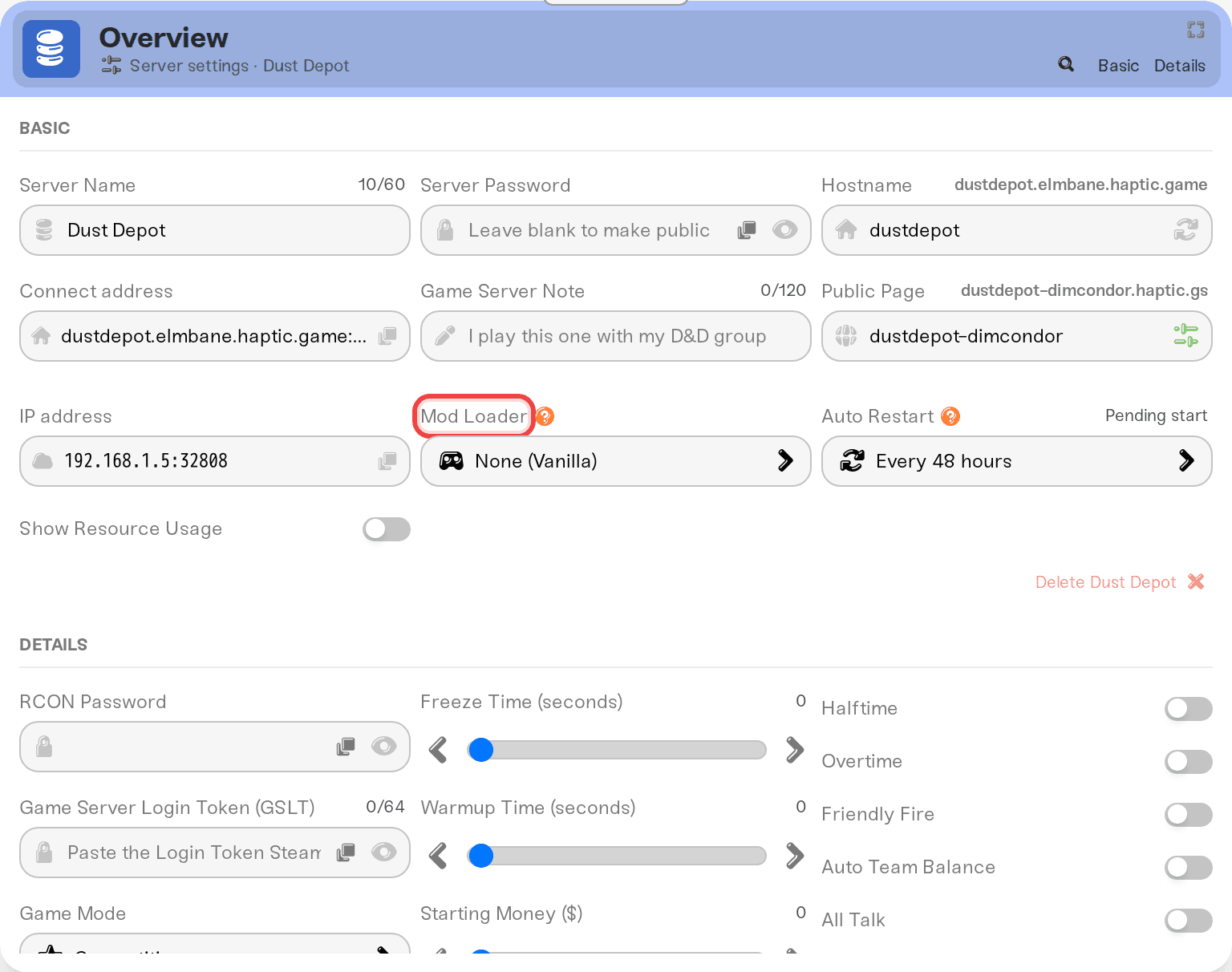
CounterStrikeSharp plugins need the loader running. In your server's expanded Overview card, set Mod Loader to the Metamod + CounterStrikeSharp option and press Save changes. We install and update the loader for you from then on: each start picks up the newest Metamod and CounterStrikeSharp builds. Its own files are managed by us and read-only.
Add a plugin from the Mods card
The Mods card lists CounterStrikeSharp and Metamod plugins from their authors' GitHub pages, most popular first. Search by name, or paste a plugin's GitHub link to ask for one that isn't listed yet: we test it on a real server first and add it to the list once it loads. Tick the plugins you want, save, and restart. Adding a plugin from the Mods card turns the Mod Loader on for you.
We keep Mods card plugins up to date: a new release is tested before your server gets it. Plugins whose authors haven't published them under an open licence can't be added from the Mods card, but you can still upload them yourself (below).
Install a plugin yourself
Get the plugin's folder
CS2 plugins ship as a folder named after the plugin, holding a .dll with the same name (MyPlugin/MyPlugin.dll) and often a lang/ folder. CounterStrikeSharp only loads a folder that has its matching .dll. Unzip the download on your computer first if it came as a zip. Many zips are laid out like the server itself (addons/counterstrikesharp/plugins/MyPlugin/): upload the MyPlugin folder from inside it.
Upload it
In the Files card, browse to install > counter-strike-2 > game > csgo > addons > counterstrikesharp > plugins and upload the whole folder. Over SFTP that is /install/counter-strike-2/game/csgo/addons/counterstrikesharp/plugins/.
Restart
Restart the server. CounterStrikeSharp loads plugins at startup.
If the zip has more than a plugin folder
A
shared/folder (a library other plugins use, like cs2-retakes'RetakesPluginShared): upload what is inside it to.../counterstrikesharp/shared/.A
cfg/folder (MatchZy and others shipcfg/MatchZy/): upload it intoinstall/counter-strike-2/game/csgo/cfg/.A
gamedata/file: upload it into.../counterstrikesharp/gamedata/.
Editing plugin configs
Plugins write their settings under .../counterstrikesharp/configs/plugins/<PluginName>/ the first time they run. Edit those files freely in the Files card: your changes win and stay put across restarts. (Before August 27, 2026 these were reset on every restart; that is fixed, so if you gave up on a config once, it works now.)
Native Metamod plugins
Some plugins (MultiAddonManager, CS2Fixes) are Metamod plugins rather than CounterStrikeSharp ones. They come as an addons/<name>/ folder plus a .vdf file:
upload the
<name>folder intoinstall/counter-strike-2/game/csgo/addons/;upload the
.vdfintoinstall/counter-strike-2/game/csgo/addons/metamod/.
They also need the Mod Loader on. Pick the Linux build: our CS2 servers run on Linux.
After a CS2 update
Big CS2 updates often break CounterStrikeSharp for a day or two, until its team ships a fixed build. We pick that build up automatically on the next start, so if your plugins stop loading right after an update, restart again once CounterStrikeSharp has caught up.
Things that will NOT work
Dropping a bare
.dllstraight intoplugins/. CounterStrikeSharp expects one folder per plugin.Editing anything under
counterstrikesharp/bin,api, ordotnet, ormetamod/bin. Those are the loader's own files; we refresh them on updates and they are read-only.Plugins that need a MySQL database (many admin, ban, rank and store plugins). Haptic does not offer a database for CS2 servers yet; plugins that can also use SQLite (MatchZy does) work.
Windows-only plugins. Only plugins with a Linux build (or plain .NET plugins, which run on both) work.
Careful with skin plugins
Plugins that give players skins, knives, gloves or agents they don't own (WeaponPaints and similar) break Valve's server guidelines, and Valve can ban the Game Server Login Token (GSLT) your server uses for it. CounterStrikeSharp's own setting FollowCS2ServerGuidelines (in .../counterstrikesharp/configs/core.json) blocks some of what those plugins do, and it is on by default. Turning it off is your call and your token's risk.
Need help?
Ask on Discord or email support@haptic.gg with the plugin name and your server's startup log if it did not load.
Server config lives at
install/counter-strike-2/game/csgo/cfg/haptic-<first 8 of your server id>.cfg; the Files card's quick-access chip jumps straight to it.


