Satisfactory: God Mode, flight, and the other creative settings
 SatisfactoryGuide
Flight, God Mode, free building, unlocked research, and the Starting Tier and Game Phase pickers are all checkboxes and lists in your server's Overview…
Flight, God Mode, free building, unlocked research, and the Starting Tier and Game Phase pickers are all checkboxes and lists in your server's Overview card, Details tab. Set them, save, and restart the server; they apply to everyone playing. One warning first: these are Satisfactory's Creative Mode settings, and turning any of them on disables achievements for that save forever. That's a Satisfactory rule, not something we control.
Read this before you flip anything
These are Satisfactory's Advanced Game Settings, which the game now presents as Creative Mode. What comes with it:
Enabling any Creative Mode setting disables achievements on that save, and the game gives no way to turn achievements back on for it.
Unticking the box in your dashboard sets that setting back to off the next time the server powers up. It is not a way to get achievements back on a save that has already had one on.
A marked save shows a pencil icon in the game's load menu.
So if achievements matter on your current factory, do not turn these on for it. Start a second save (or a second server) for creative play instead. Your buildings and inventories are not touched either way.
Turn a creative setting on
Open your server on My Servers and switch the Overview card to the Details tab.
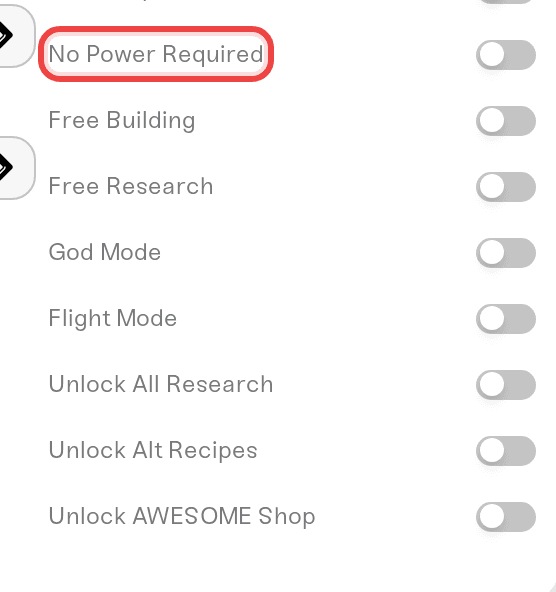
Tick what you want in the last block of checkboxes.
Click Save changes. Settings are applied the next time the server powers up.
Restart the server from its card so the new values take effect.
These are applied server-wide, so every player on the server gets them, not just you.
What each one does
God Mode: players cannot take damage or die from anything, including falls, enemies, gas, and radiation.
Flight Mode: everyone can fly freely with no equipment. This is the one people mean by "how do I turn on flying".
Free Building: buildings and equipment cost nothing and your inventory is not consumed.
No Power Required: buildings run without a power connection. Generators are still buildable, just not needed.
Free Research: milestones, research, and MAM nodes complete without submitting the items. The unlock order stays the same.
Unlock All Research: unlocks every MAM research tree and every milestone tier at once, so all recipes, buildings, and equipment are available immediately.
Unlock Alt Recipes: every alternate recipe available without hunting Hard Drives.
Unlock AWESOME Shop: everything in the shop without spending Coupons.
Starting Tier and Game Phase
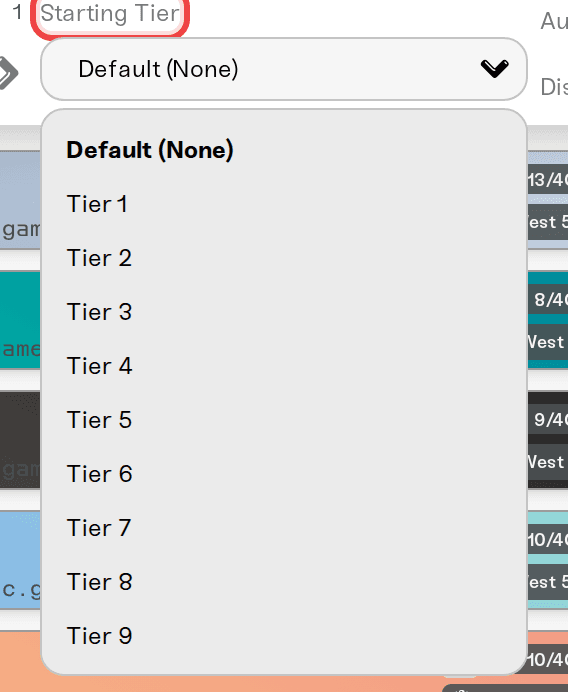
Two lists, at the bottom of the Details tab under the checkbox block, jump your progression instead of unlocking everything:
Starting Tier (Tier 1 to Tier 9) sets the highest unlocked tech tier when the session loads, with every milestone up to it completed for you. It only moves progression, never your existing buildings.
Game Phase (Phase 1 to Phase 4) sets the current Space Elevator phase, which unlocks the matching tier groups and project assembly recipes.
Both are set to Default (None) out of the box, which leaves your progression alone.
Turning creative settings back off
Untick the boxes, click Save changes, and restart. God Mode, Flight Mode, Free Building, and No Power Required stop applying the next time the server powers up. What the save already picked up stays: research, alternate recipes, AWESOME Shop items, and tiers unlocked while the settings were on remain unlocked. Setting Starting Tier and Game Phase back to Default (None) stops them being reapplied, but it does not take back progression already granted.
Spiders and FICSMAS
Two settings people look for in the same place:
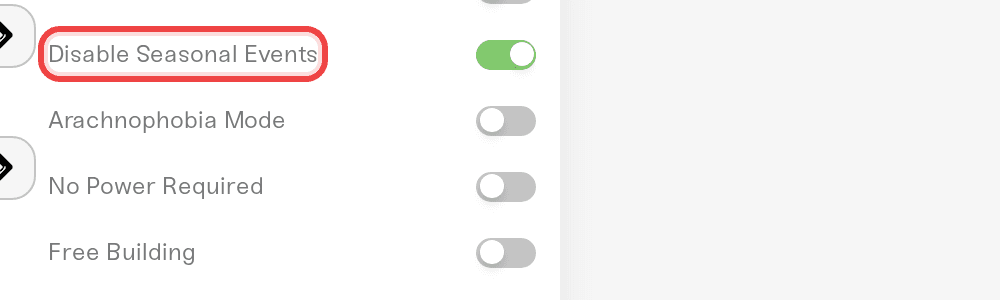
Arachnophobia Mode replaces the spider-like Stingers with flat holographic cat images. It is an accessibility option and does not change difficulty, but Satisfactory applies it through the same advanced game settings as the block above, so treat it like the rest if achievements matter on that save.
Disable Seasonal Events turns off FICSMAS, including the holiday decorations, recipes, and calendar. It is a plain server option rather than a Creative Mode setting, and it carries no achievements risk.
Need help?
Reach us on Discord or at support@haptic.gg. Include your server name, which settings you ticked, and whether you restarted after saving.


