Valheim Mods or Crossplay: Choosing for Your Group
 ValheimGuide
A Valheim server can run BepInEx mods or crossplay, not both at the same time. That is how Valheim itself works, on every host: crossplay switches the game…
A Valheim server can run BepInEx mods or crossplay, not both at the same time. That is how Valheim itself works, on every host: crossplay switches the game to a different networking system, and the mod loader does not run on it. So the real question is about your group: if anyone plays on Xbox, PlayStation, Switch 2, or Game Pass, run vanilla with crossplay on. If everyone is on Steam, mod freely. You can switch between the two whenever your group changes.
Why you have to choose
With crossplay on, Valheim connects players through Microsoft's PlayFab networking so consoles can join. BepInEx, the loader behind effectively all Valheim server mods, hooks into the Steam networking path, so on a crossplay server it does not load at all. This is a Valheim modding reality, not a Haptic rule, and no host can offer both on one server at once.
How the dashboard handles it for you
You never have to discover this the hard way mid-purchase or mid-session:
Installing mods while Crossplay is on: saving turns Crossplay off, and the save screen tells you before it happens.
Turning Crossplay on while mods are installed: the save is blocked until you remove the mods, so a modded world never silently loses its mods.
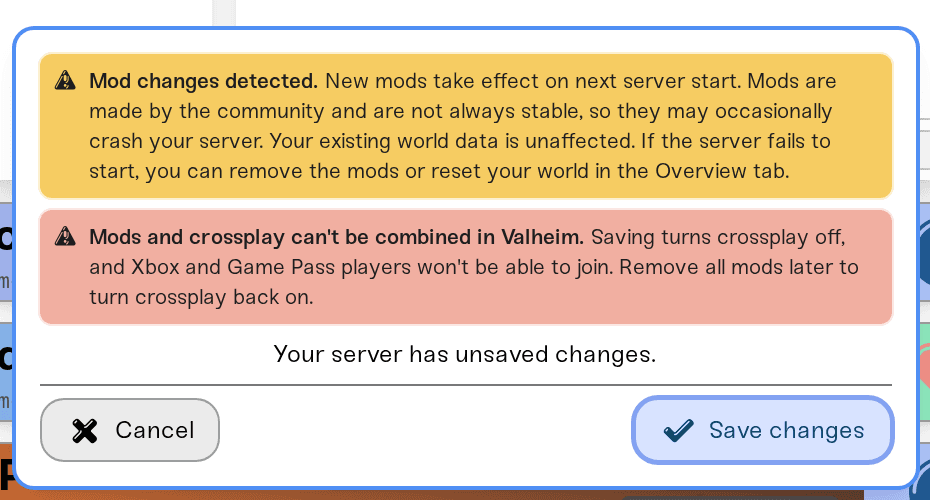
Choosing for your group
Anyone on console or Game Pass? Crossplay, vanilla. Valheim's world modifiers still give you plenty to tune: difficulty, resource rates, raids, portals, and more are all vanilla settings, no mods needed. See World modifiers and presets.
Everyone on Steam? Mods open up. One-click installs from Thunderstore in your dashboard, with download links your players use to match the server. See what your players need to install.
Mixed, and torn? Some groups run crossplay while console friends are active, then switch to a modded chapter later. Switching is a settings change, not a new server, and your world stays put. Just remember mods change what a world contains, so take a manual backup before big modpack experiments.
Switching later
From modded to crossplay
Remove the installed mods in your Mods tab, then turn Crossplay on and save. Worlds that used content-adding mods can lose the modded items when played vanilla, so back up first and think it through for heavy modpacks.
From crossplay to modded
Turn Crossplay off, save, then install mods. Console and Game Pass friends will no longer be able to join while mods are installed.


