DayZ: Become Admin, Kick, Ban, and Whitelist Players
 DayZGuide
DayZ has no admin list and no Admins tab. Your RCON Password (Overview card, Details tab) is your admin password: join the server, type #login <password>…
DayZ has no admin list and no Admins tab. Your RCON Password (Overview card, Details tab) is your admin password: join the server, type #login <password> in chat, and you can #kick and #ban from there. To whitelist, turn on the Whitelist setting and list allowed player IDs in whitelist.txt in your Files card. None of this touches your world or saves.
Your admin password
Press Detail view on your server card and open the Details tab of the Overview card. The RCON Password field is hidden behind dots: click the eye icon to reveal it, or the copy button next to it to copy it without showing it on screen. Every new server gets a random one, so it works right away.
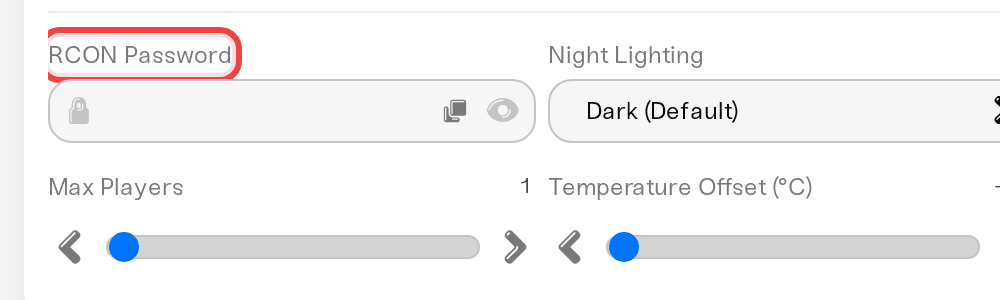
That one password does two jobs: it is the in-game #login password and the password behind the dashboard Console. BattlEye's remote console listens inside your server only, so third-party RCON tools cannot connect to it from outside; use the dashboard Console instead. Keep the password private; anyone who has it can #login in game and kick and ban.
To change it, type a new one, press Save changes in the popup at the bottom of the page, and restart the server. Avoid spaces: BattlEye cuts the password off at the first space, which breaks the Console connection. Do not mix it up with the Server Password on the Basic tab, which is the one players type to join.
Log in and moderate from in-game
Join your server normally (use the Server Password if you set one).
Open the chat and send
#login yourpasswordwith your RCON Password.If a command is rejected later, send
#loginagain. DayZ also allows only one admin logged in at a time, so coordinate with your co-admins.
Commands, all typed into chat:
#kick <name>removes a player.#ban <name>bans them; DayZ appends their ID toban.txton the server.#lockand#unlockstop or allow new joins while you deal with something.#logoutdrops admin rights.
To stop or restart, use Power down or Restart on your server card. Shutting down by command (#shutdown) ends the game process behind the dashboard's back, so your server's status can look wrong for a bit and crash protection can treat it as a crash.
Moderate from the dashboard Console
The Console card's command box sends commands to your DayZ server over BattlEye RCON while the server is online, and shows BattlEye's answer. No #login needed; the dashboard already uses your RCON Password. The Console connects about half a minute after the server shows Online, once the map has loaded. Useful commands:
playerslists everyone online with their BattlEye player number.say -1 <message>broadcasts to everyone online (the same command the dashboard uses for restart warnings).kick <number> [reason]andban <number> [minutes] [reason]work by the player numberplayersshows.banslists BattlEye's bans, andremoveBan <number>lifts one by the numberbansshows.
Bans made from the Console go into BattlEye's own list at battleye/bans.txt, bans made in-game go into ban.txt at the root; both are enforced.
Whitelist your server
With the whitelist on, only listed players can join, including you, so list yourself first.
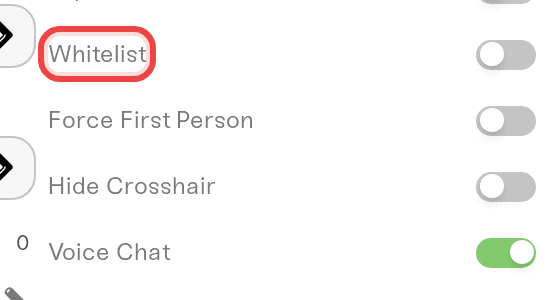
On the Overview card's Details tab, turn on Whitelist, press Save changes, and restart.
Open your Files card. At the top level (root), click
whitelist.txtto open it in the editor. If it is not there yet, create it with New file.Put one player ID per line, nothing else on the line, and press Save.
Restart the server so it reads the new list.
Which ID goes in the file? DayZ identifies players by an ID the server generates, and sources disagree on the format, so take it from your own server rather than guessing: ban a player once with #ban, open ban.txt, and copy the format it wrote. Your server's admin log (the .ADM file in logs/) also lists each player's ID next to their name.
Unban someone
Bans sit in one of two files, depending on where you made them. In your Files card, open the one that holds the player's line, delete that line, press Save, and restart:
ban.txtat the root, for bans made in-game with#ban.battleye/bans.txt, for bans made from the Console. Everything else inbattleye/is editable too, except the BattlEye config files (*.cfg), which hold your RCON Password and are rewritten at every start.
These files and whitelist.txt are real per-server files: your edits survive restarts and game updates.
Things that will NOT make you admin
Looking for an Admins tab. DayZ does not have one (ignore any tooltip that mentions it). The RCON Password is the whole system.
Owning the server on the dashboard. Dashboard roles control who can change settings, not who is admin in-game. Everyone still types
#login.Typing the RCON Password at the join screen. The join screen wants the Server Password; the RCON Password only goes into chat after
#login.
Need help?
If #login is rejected after a password change and a restart, message us on Discord or at support@haptic.gg. Include your server name and a screenshot of the chat response.


