FiveM and RedM: Game builds and DLC content
 FiveMGuide
Game Build decides which version of GTA V (or RDR2) your server accepts players on. Leave it alone unless a script asks for a specific build, or unless you…
Game Build decides which version of GTA V (or RDR2) your server accepts players on. Leave it alone unless a script asks for a specific build, or unless you want RedM DLC content. It lives in your server's Details tab and takes effect on the next restart. On RedM, pick 1355 or higher if you want players on Red Dead Online standalone licenses to be able to connect.
What the setting does
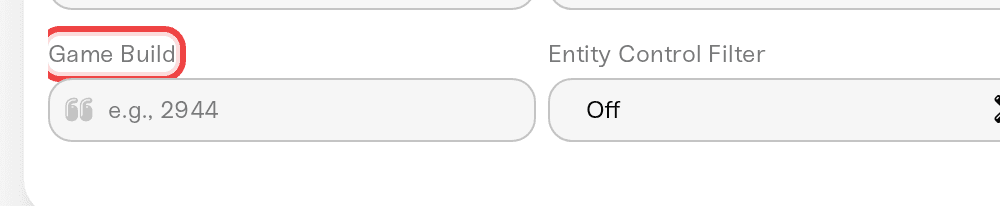
On a FiveM server, Game Build is a text box. Type a build number like 2802, 2944, or 3095, or leave it empty to allow any build. Whatever you put there, players must be on that build to connect. Empty means no enforcement at all.
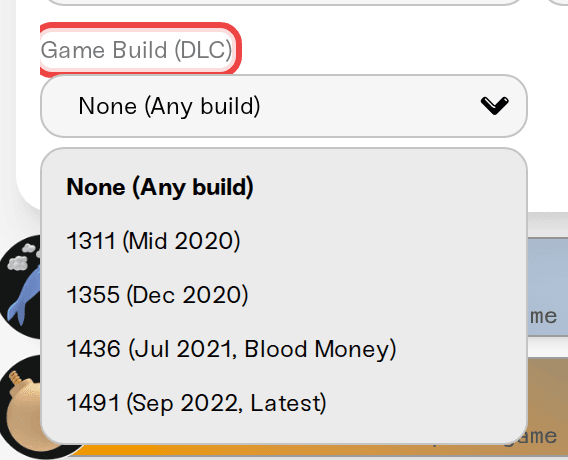
On a RedM server the same setting is a dropdown called Game Build (DLC), because on RDR2 the build number decides which DLC content is available.
To change it:
Open My Servers, press Detail view on your server, and open the Details tab of the Overview card.
Find Game Build (Game Build (DLC) on RedM). The search icon in the Overview title bar jumps straight to it if you type "build".
Set the value and press Save changes in the popup at the bottom of the page.
Restart the server. Settings apply on the next power up, not while the server is running.
When you actually need to set a build
Most servers never need to touch this. Set a build only when:
A script tells you to. Vehicle packs, MLOs, and newer weapon or clothing content often say "requires build 2944" or similar in their readme. Without the build, the content simply is not in the game files the players are running.
The console tells you to. If a resource cannot run on your current build, the Console card's Needs attention panel shows Resource needs a different game build. You have two ways to clear that: set the build the resource asks for, or replace the resource with a version that supports the build you are already on. If a single stale script is the only thing complaining, updating that script is the smaller change, since raising the build shuts out every player who cannot run it.
You want RedM DLC content. See the next section.
Setting a higher build is not free: every player has to be able to run that build. The safest default for a public server is the lowest build your scripts actually need.
RedM: which DLC build to pick
The dropdown offers five choices, and the difference matters for who can join:
None (Any build): no enforcement, players connect on any version.
1311 (Mid 2020): an older build. Not compatible with Red Dead Online standalone licenses, so players who bought RDO on its own are refused.
1355 (Dec 2020): the earliest option here that works with Red Dead Online standalone licenses.
1436 (Jul 2021, Blood Money): adds the Blood Money DLC content.
1491 (Sep 2022, Latest): the newest build, with the most content. This is what new RedM servers start on.
So if your players include anyone on a standalone Red Dead Online license, stay on 1355 or higher. And whichever build you enforce, players must own the matching content to connect. That is a Rockstar and Cfx.re rule, not something we control.
When players get a build mismatch error
A player refused with a game build or "revision mismatch" message is on a different version than your server is enforcing. Two ways out:
The player updates their game. GTA V and RDR2 update through Steam, the Rockstar launcher, or Epic. After the update finishes, they should fully close and reopen FiveM or RedM, then reconnect.
You stop enforcing the build. Clear the Game Build box (or choose None (Any build) on RedM), then save and restart. Do this only if no script on your server needs the build, otherwise you trade a join error for a broken resource.
If only one player is affected, it is their game copy. If everyone is affected right after you changed the setting, it is the enforcement.
Game build is not the same as FXServer version
Above the game settings there is a second picker called FXServer version. These are different things and swapping them is a common wrong turn:
Game Build is the players' game version, GTA V or RDR2.
FXServer version is the server software build that Cfx.re ships. Latest tracks the fleet-wide release; picking a specific one pins your server there until you switch back.

A resource that complains about the game build is never fixed by pinning FXServer, and vice versa.
Things that will not fix a build problem
Reinstalling the framework. The build is enforced by the server setting, not by QBCore, ESX, or VORP.
Raising the build to the newest number "just in case". That locks out anyone whose game or DLC ownership does not reach it.
Need help?
Reach us on Discord or at support@haptic.gg. Include the build you have set, the exact error your players see, and the name of the resource if the console flagged one.


