FiveM: Server not showing in the server list
 FiveMTroubleshooting
Your server is fine, and it is joinable the moment your dashboard says Online. The FiveM server list is run by Cfx.re, and it usually takes several minutes…
Your server is fine, and it is joinable the moment your dashboard says Online. The FiveM server list is run by Cfx.re, and it usually takes several minutes after each start to pick a server up. Friends who do not want to wait can join with the Connect address from the Share with your players card; that works whether or not the server is listed. Still unlisted after about 15 minutes? Check Private Server, Max Players, and your license key below.
Join without the server list
Every FiveM server on Haptic has a direct address that does not depend on the server browser.
Open your server's Details tab and find the Share with your players card.
Copy the Connect address (it looks like
odin.vesta.haptic.game:7699), or press Copy for Discord for a ready-to-paste message.Players open FiveM, press F8 to open the console, and type
connectfollowed by the address.
The hostname is yours across restarts, so friends can save it once; only a region move changes the port after the colon. The raw IP under Advanced: direct IP (temporary) moves whenever your server changes machines, so share the address, not the IP.
Why listing takes a while
Haptic does not run the FiveM server list; Cfx.re does. After your server boots it announces itself, and Cfx.re adds it to the browser a few minutes later. The boot checklist (hover the status badge while the server powers up) says up to 8 minutes, and Cfx.re's own guidance allows about 15.
Still unlisted after 15 minutes? Check these
The first three live in your server's Details tab. Save, then restart the server after changing any of them.
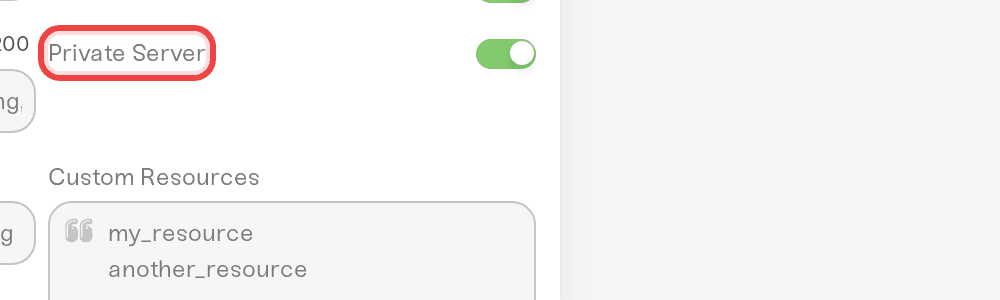
1. Private Server is off
Private Server hides your server from the FiveM browser on purpose; players can still join by direct connect, which is why a private server only looks broken in the list. Untick it if you want to be found.
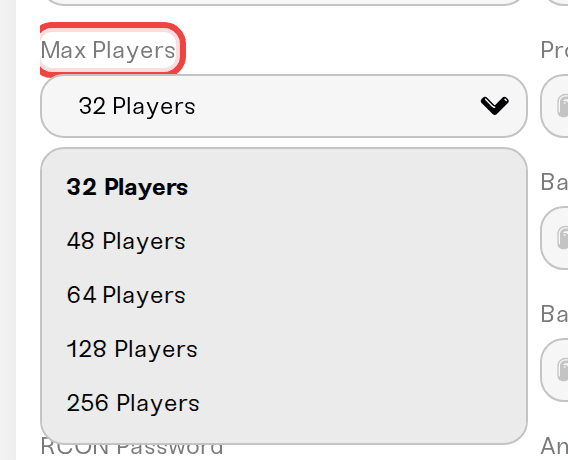
2. Max Players is 48 or lower, unless your key has a subscription
A free Cfx.re license key allows up to 48 player slots. Anything higher needs a paid Cfx.re subscription attached to that key; the Max Players dropdown marks 64 Players and above as requiring one. Without it, Cfx.re will not accept the server at that slot count, so it never lists (and on some builds it will not start). Set Max Players back to 48, or buy the subscription at portal.cfx.re before raising it. That limit is a Cfx.re rule, not something we control.
3. Your license key is valid and only used here
Each Cfx.re key works for one server. A key that is invalid, expired, or still in use on another host stops Cfx.re from authenticating your server, so it never lists and usually fails to start. Open your server's Console card; the Needs attention panel shows a Cfx.re license rejected card when this is the cause. Generate a fresh key at portal.cfx.re/servers/registration-keys, paste it into Cfx.re License Key, and restart.
4. Nothing in server.cfg fights the listing
Listing needs no extra lines in your own server.cfg; the only place Haptic writes an sv_master1 line is when you tick Private Server. If you pasted a config over from another host, look for a line starting with sv_master1 and remove it: your server.cfg loads last, so it wins, and that line is the standard way to delist a server. Edit server-data/server.cfg in the Files card, then restart.
5. The server is actually Online
A server that is Offline, still starting, or failing to start cannot be listed. If the status is anything other than Online, start with My server status is Offline.
On the player's side
Your server appears under its Project Name (set in Details), not under your Haptic server name. If you have not set a Project Name, it appears under the server name instead. Tell friends exactly what to search for.
Have them clear the browser's search box and filters (tags, language, "not full" and similar), which hide new servers more often than anything else.
If it is still missing, have them close FiveM completely and reopen it; the server browser keeps its own cache.
Things that will not fix it
Restarting over and over. Each restart starts the listing wait again.
Turning off Hide IP from Browser. It hides only your IP from the list, not the server. Leave it on.
Changing region or plan. Listing is handled by Cfx.re, not by where or how big your server is.
Need help?
Reach us on Discord or at support@haptic.gg. Include your server name, how long it has been Online, and a screenshot of the Console card's Needs attention panel if it shows anything.


