Understanding your memory budget
 HapticGuide
Your Haptic plan gives you one pool of memory, from 2 to 32 GB, and that pool is the whole price. Creating servers is free; you just split your memory…
Your Haptic plan gives you one pool of memory, from 2 to 32 GB, and that pool is the whole price. Creating servers is free; you just split your memory between them however you like from Manage on My Servers. Every active server needs at least 2 GB (some games need more), and running out of memory never deletes anything: free some up by stashing or shrinking a server, or add more to your plan.
One pool, split your way
Think of your plan as a budget of gigabytes. Each server you own holds a slice of it, and servers can run at the same time as long as their slices fit inside the total. An 8 GB plan can be one big 8 GB server, or a 4 GB and a 2 GB server with 2 GB spare, or anything else that adds up.
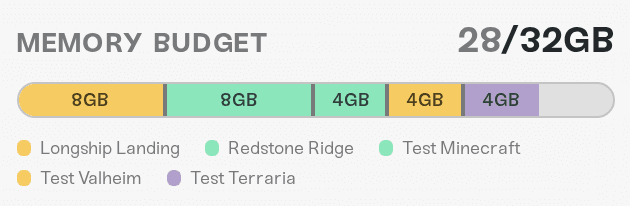
You can see the split any time: open My Servers and press Manage. The Memory Budget bar at the top shows one colored segment per server, a legend underneath, and your total on the right, like 6/8GB. Hover a segment to see that server's share.

Each server card also carries a small memory chip (for example 4/8GB). Hover it for the breakdown of where that memory comes from, along with the reminder that you can split your plan's memory across multiple servers and run them at the same time.
The same Memory Budget bar appears one more place: the Allocate Memory step when you add a new server, so you can carve out room for the new one on the spot.
Move memory between servers
Open the Manage view
Go to My Servers and press Manage. Every card rolls up and shows - and + buttons next to its memory chip.

Adding memory works live, taking it away needs a power down
You can give a running server more memory without stopping it: press +, save, and the extra memory is handed to the server right away. Some games only make full use of the bigger allocation after their next restart, so if the server still feels tight after a +, restart it once.
Taking memory away is different. A running server holds on to the memory it has, so - is disabled while it is online, with the tooltip Power down to reduce memory. Stop the server, press -, save, and start it again; the smaller size applies when it powers back up. See Start, stop, and restart your server.
One honest catch: on a desktop-sized screen, Manage currently locks both buttons while the server is online, with the tooltip Power down to change memory. If you see that, either power the server down first, or use the + button on a phone-sized window, where it stays available while the server runs.
Adjust and save
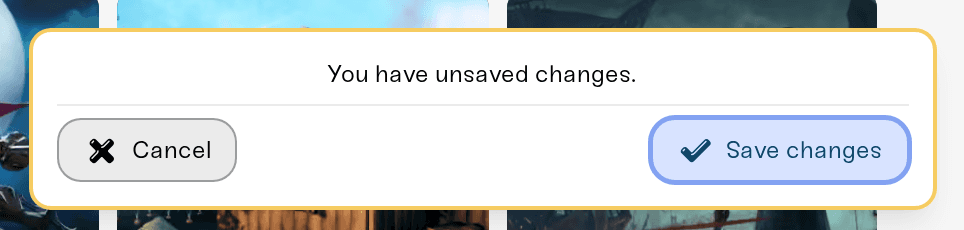
Press - and + until the split looks right. Nothing happens until you confirm: a card pops up saying You have unsaved changes. with Cancel and Save changes buttons.
Two rules to know:
Reducing a server to 0 GB stashes it. The server keeps its world, settings, mods, and backups, it just stops holding memory. Give it 2 GB or more later to bring it back. Full details in Stash and switch servers.
You cannot stash everything. If your changes would leave no active server, the save card turns red with At least one server must have 2GB+ allocated.
Every game has a minimum
Every active server needs at least 2 GB. Some heavier games set a higher floor, and the dashboard tells you exactly where it is: while allocating you will see a note like "requires at least 4GB", and the save card blocks any split that puts a server below its game's minimum.
If your whole plan is smaller than a game's minimum, that game shows a notice when you try to create a server for it, such as Requires at least 4GB. Your plan includes 2GB., with an Upgrade your plan link.
When you run out of memory
Running out is normal, it just means your servers currently claim the whole pool. Nothing is deleted and your worlds are safe. You will notice it in one of these ways:
Adding a server: the create button is disabled with Not enough memory to add this server. On the same screen you can take memory from your other servers with their - buttons (taking one to 0 GB stashes it), or press Stash [game] server instead to create the new server directly into your stash, holding no memory, ready for later.
Powering up a stashed server: a stashed server holds no memory, so it cannot start; the power button explains: This server is stashed. Allocate memory in Manage Servers to activate it. (A server left with less than 2 GB sees Allocate at least 2GB in Manage Servers before powering up. instead.)
Powering up when the pool is overcommitted: if your active servers together claim more than your plan (this can happen after a plan downgrade), the power button says something like Not enough memory available. You are using 10GB of 8GB. Reduce or stash a server in Manage until the total fits.
The fix is always one of three moves: shrink a server, stash a server, or grow the pool.
Sometimes a server gets more than you pay for
The memory chip can show a bigger number than the memory you allocated, for example 6/4GB. That is a memory boost: on some games Haptic adds extra memory on top of your allocation, free. Hover the chip and the tooltip lists each boost on its own line, like "An additional +2GB boost". Boosts never come out of your budget, so there is nothing to manage; enjoy the headroom.
Growing (or shrinking) the pool
Your budget's total comes straight from your plan, so changing it is a plan change: go to Account, open Your Haptic Plan, and press Change Plan. Upgrades apply immediately and the new gigabytes show up in the Memory Budget bar right away, ready to hand to any server. Downgrades take effect at your next billing date, and your servers' memory is adjusted automatically to fit the smaller pool. The step-by-step is in How to upgrade or change my plan.
A bigger plan also grows your stash room: you get 3 stash spots for every 2 GB of plan memory.
Need help?
Not sure how to split your memory, or seeing a message this article does not cover? Ask us in Discord or email support@haptic.gg with a screenshot of your Memory Budget bar and the name of the server you are trying to start.



