Enshrouded: difficulty presets and custom game settings
 EnshroudedGuide
Every Enshrouded gameplay setting is on your dashboard: My Servers, Detail view, then the Overview card's Details tab. Difficulty at the top offers the…
Every Enshrouded gameplay setting is on your dashboard: My Servers, Detail view, then the Overview card's Details tab. Difficulty at the top offers the game's presets (Default, Relaxed, Hard, Survival) plus Custom, and the individual game settings only appear once you pick Custom. Changes apply the next time the server starts, and a settings change never touches your world.
Where the settings live
Go to My Servers and press Detail view on your server's card.
In the Overview card, open the Details tab.
Change what you like, press Save changes in the popup at the bottom, then restart the server so the game loads the new values.
The general save-and-restart flow is in Change your server settings. Max Players, Voice Chat, Text Chat, and the role passwords sit on the same tab and are always visible; the role passwords have their own guide, Enshrouded roles: Admin, Friend, Guest, and Visitor passwords.
The Difficulty presets
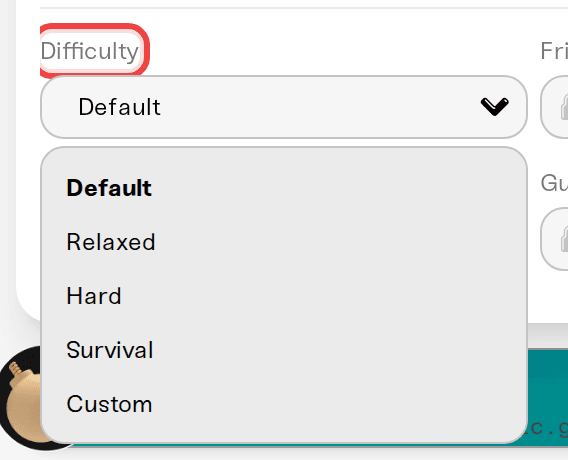
Difficulty is the first field on the Details tab:
Default: the standard Enshrouded experience.
Relaxed: fewer enemies and more resources, good for building-focused groups.
Hard: more enemies, and more aggressive ones.
Survival: hunger and starvation on top of harder combat.
Custom: you set every value yourself.
Custom unlocks the game settings
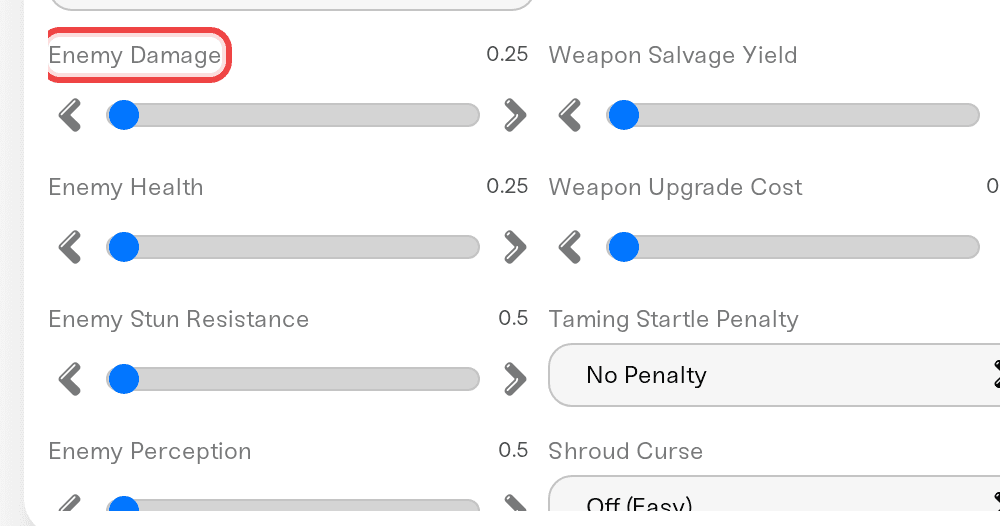
If you are hunting for Enemy Damage, Weapon Durability, Day Length, or any other field and cannot find it, set Difficulty to Custom first. The fields appear right away, roughly in this order: player stats, survival, combat, world, progression, then a few extras. Some are sliders, some are dropdowns, and the on/off ones (like Weapon Durability) sit together in their own column, so a field you expect beside a slider may be a column over. Hover a field's name to see what it does, and use the magnifier icon in the Overview title bar to jump straight to a field by name.
Switching from a preset to Custom does not carry that preset's balance over: the fields start at Enshrouded's own default values, so a Hard server switched to Custom plays like Default until you change something. Most multipliers start at 1.0, with Weapon Salvage Yield the exception at 0.5.
The settings people ask about most:
| You want | Setting | Notes |
|---|---|---|
| Easier or harder fights | Enemy Damage (0.25 to 5), Enemy Health (0.25 to 4), Boss Damage and Boss Health (0.2 to 5) | Multipliers, 1.0 is normal. Enemy sliders skip bosses; boss sliders skip regular enemies. |
| Fewer or more enemies | Enemy Density, Simultaneous Attackers | Few / Normal / Many / Extreme |
| Peaceful exploring | Pacified Enemies | Regular enemies only fight back if attacked; bosses stay hostile |
| Gear that never breaks | Weapon Durability | Turn it off |
| Keep your items on death | Death Penalty | Pick Keep Everything (No Penalty) |
| Hunger as a real threat | Starvation Damage, Hunger Duration (min) | Starvation is off by default under Custom |
| Longer days or nights | Day Length (min), Night Length (min) | Real minutes, 2 to 60; defaults 30 and 12 |
| No weather | Weather Frequency | Disabled / Rare / Normal / Often |
| More XP | Combat XP, Mining XP, Exploration & Quest XP | Multipliers up to 2.0 |
| More resources, faster crafting | Resource Drop Amount, Mining Damage, Plant Growth Speed, Crafting Speed | Multipliers up to 2.0 |
| More time in the Shroud | Shroud Timer | 0.5 to 2 |
| Smoother gliding | Glider Turbulence | Turn it off |
Also under Custom: Player Health, Player Mana, Player Stamina, Cold Resistance, Oxygen (Diving), Food Buff Duration, Enemy Stun Resistance, Enemy Perception, Enemy Attack Frequency, Weapon Salvage Yield, Weapon Upgrade Cost, Taming Startle Penalty, Shroud Curse, and Fishing Difficulty.
Keep inventory on death
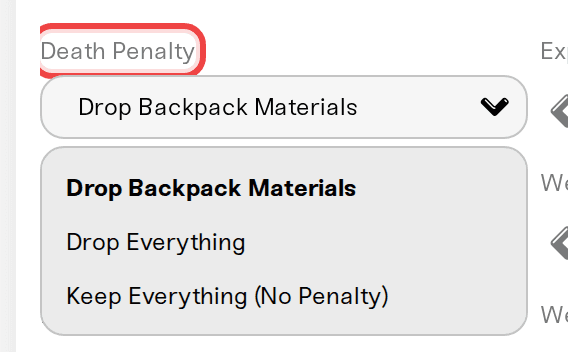
Enshrouded's version of keep inventory is the Death Penalty dropdown, which appears once Difficulty is Custom. It sits among the dropdowns and sliders, not next to the on/off fields, so search for it by name:
Drop Backpack Materials (default): crafting materials go into a tombstone, your gear stays with you.
Drop Everything: your full inventory and gear go into a tombstone.
Keep Everything (No Penalty): nothing drops and no tombstone appears.
What changed with Enshrouded 1.0
Enshrouded 1.0 reworked the values of the Enemy Damage slider, so a value that felt right before 1.0 can play differently now. Try it and adjust.
The first time a player loads an existing save in 1.0, the skill tree resets, so everyone spends their skill points again. That happens on each player's PC, not on your server.
The game applies Enemy Damage only up to 2.5 and Boss Health only up to 4, so a higher value plays the same as the maximum.
Max Players is capped at 16
Max Players goes from 1 to 16. Sixteen is Enshrouded's own limit for a dedicated server, not a Haptic plan limit, so no plan unlocks more.
Prefer editing the file?
The game's settings file, enshrouded_server.json, opens from the Quick access chip in the Files card. If the editor badges it Linked to dashboard, your edit sticks and shows up in the Details tab; if it badges it Regenerated on boot, the file is rebuilt at every start, so make the change in the Details tab instead. The Details tab is the easier route regardless: the raw file stores day and night length in nanoseconds instead of minutes, and the same Custom rule applies inside the file. The badges are explained in Edit config files.
Need help?
Reach us on Discord or at support@haptic.gg. Include your server name, the Difficulty you are on, and which setting is not behaving.


