Windrose: difficulty presets and custom world settings
 WindroseGuide
Difficulty lives in the Details tab of your server's Overview card, and only the Custom preset rewrites the difficulty of a world you already have. Picking…
Difficulty lives in the Details tab of your server's Overview card, and only the Custom preset rewrites the difficulty of a world you already have. Picking Easy, Medium, or Hard saves fine, but your world keeps whatever difficulty it was created with. Set the preset to Custom, dial in the values you want, save, and restart. Your ships, bases, and progress are never touched; only the world's settings block is rewritten.
Where the settings are
Go to My Servers and press Detail view on your server's card.
In the Overview card, open the Details tab.
Change what you like, press Save changes in the popup at the bottom, then restart. Nothing changes mid-session: new values are applied while the server boots.
The full save-and-restart flow is in Change your server settings.
Only Custom changes an existing world
Difficulty Preset is a dropdown near the top of the Details tab with four options: Easy, Medium (the default), Hard, and Custom. The first three are shorthand for multiplier values: Easy is 0.7x, Medium is 1.0x, Hard is 1.5x.
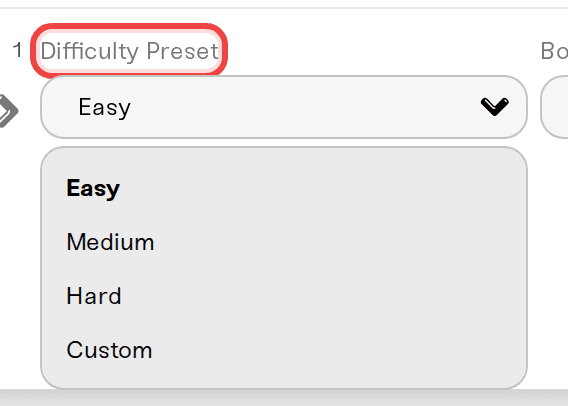
Those three set the difficulty a world is created with. Once the world exists, only Custom is written back into it, so a world created on Medium stays on Medium no matter how many times you pick Easy and restart.
To change a world you are already playing, use Custom. Want Hard? Set the preset to Custom and put the enemy and ship multipliers at 1.5. Easy is 0.7, Medium is 1.0.
Going from Custom back to Easy, Medium, or Hard does not undo your Custom values. They stay in the world and the game keeps using them, while the dashboard shows the preset you just picked. If your world feels stuck on old numbers, that is why: go back to Custom and set the values you want.
The Custom sliders
Set Difficulty Preset to Custom and seven multiplier sliders appear.
| Setting | Range | Default |
|---|---|---|
| Enemy Health | 0.2 to 5.0 | 1.0 |
| Enemy Damage | 0.2 to 5.0 | 1.0 |
| Enemy Ship Health | 0.4 to 5.0 | 1.0 |
| Enemy Ship Damage | 0.2 to 2.5 | 1.0 |
| Boarding Difficulty | 0.2 to 5.0 | 1.0 |
| Co-op Enemy Scaling | 0.0 to 2.0 | 1.0 |
| Co-op Ship Scaling | 0.0 to 2.0 | 0.0 |
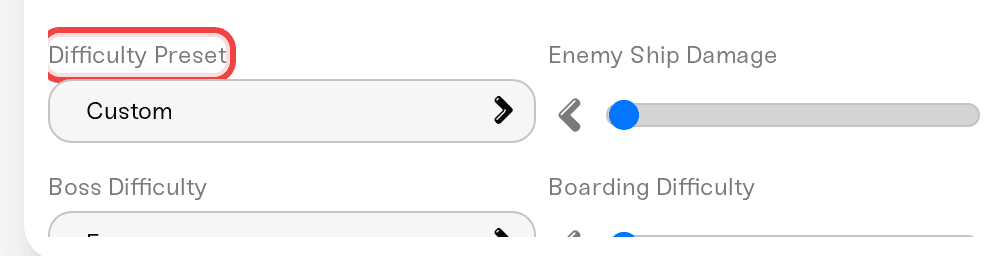
Three of them are easy to misread:
Boarding Difficulty sets how many enemy sailors you have to defeat when you board a ship, not how hard they hit.
Co-op Enemy Scaling raises enemy health and posture for each connected player. Set it to 0.0 to switch player-count scaling off entirely.
Co-op Ship Scaling does the same for enemy ship health, but it is off by default (0.0). Both co-op dials are separate from the difficulty multipliers, so leave them where you want them when you copy a preset by hand.
Two checkboxes also appear only under Custom:
Shared Quest Progress (on by default): finishing a co-op quest auto-completes it for other players on the same step. The game currently applies this to a subset of quests.
Immersive Exploration (off by default): turning it on hides the map markers for nearby unexplored points of interest, for everyone on the server. The name reads backwards to a lot of people, so to be clear: on means fewer markers and harder exploration, off means markers stay.
Boss Difficulty (Easy, Normal, Hard) sits higher up and stays visible on every preset, but like everything else here it only reaches your world under Custom. It is a separate dial from the multipliers, so 0.7x enemies with Hard bosses is a valid setup.
When your changes reach the world
These settings are stored per server, not per world, and are written into the world on disk each time the server starts on Custom.
On a brand-new server, and on the first start after you reset your world, there is no world on disk yet when we write, so the world is created with the game's defaults and your Custom values land on the next start. Restart once more and they are in. An uploaded world brings its own settings file, so there your values apply on the first start.
If your settings keep reverting
Over SFTP the file you will find is /server_description.json: server name, max players, password, and the direct-connect address. We rewrite it from your dashboard on every start, so hand edits there never last. The game's own copy inside the read-only /install/windrose/ tree is locked in the file manager for the same reason.
Difficulty lives in a different file, WorldDescription.json, buried in /savegame/SaveProfiles/.../Worlds/<world id>/. Windrose writes that one itself while it runs, and we only rewrite its settings block when your preset is Custom, so hand edits there are unreliable either way.
Use the dashboard instead. If you would rather work in a file, windrose_settings.kv is a quick-access shortcut at the top of your Files card. Whether raw edits stick depends on the server, and the file tells you which: open it and read the badge next to its name. Linked to dashboard means your edits are the source of truth and survive restarts. Regenerated on boot means the file is rebuilt from your dashboard settings every start, so change the setting on the Overview card instead. The badges are explained in Edit config files.
Need help?
Reach us on Discord or at support@haptic.gg. Include your server name and a screenshot of the Details tab.
Max Players sits in the same Details tab (1 to 10). 10 is the technical maximum, and the developers recommend 4 players for the best Early Access stability.


