Factorio: "Version mismatch" when joining your server
 FactorioTroubleshooting
Factorio only lets you join a server running the exact same game version as your client. Your server updates itself: when Factorio ships an update, a…
Factorio only lets you join a server running the exact same game version as your client. Your server updates itself: when Factorio ships an update, a running server on the old version restarts onto the new one by itself once it has been empty for 15 minutes, and a stopped or sleeping server starts on the new version next time. If players are online and an updated friend can't get in, Restart the server and it comes back on the latest build. The server runs stable Factorio unless Experimental Branch is on, and every player must match it.
Why this happens
Factorio multiplayer requires every player and the server to run exactly the same game version and the same mods. That is a Factorio rule, not something we control, so no server setting can let an out-of-date player in.
A running server keeps the version it started with. On patch day Steam updates players right away, while your server picks up the update the next time it restarts. Until then, updated players get the mismatch.
How your server updates itself
Haptic checks for new Factorio releases every hour. New releases usually reach us an hour or two after Factorio publishes them.
Your server card then shows an orange New update available warning next to the status.
Once nobody has been on the server for 15 minutes in a row, it restarts onto the new build by itself within a few minutes. If someone joins first, it waits for the next quiet moment, so nobody gets pulled out of the factory.
A server that is powered off or sleeping simply starts on the newest build the next time it starts.
The fix when people are online: restart your server
Open My Servers and find your Factorio server's card.
Press and hold the yellow Restart button until the ring completes.
Wait for the status to show Online, then have everyone join again.
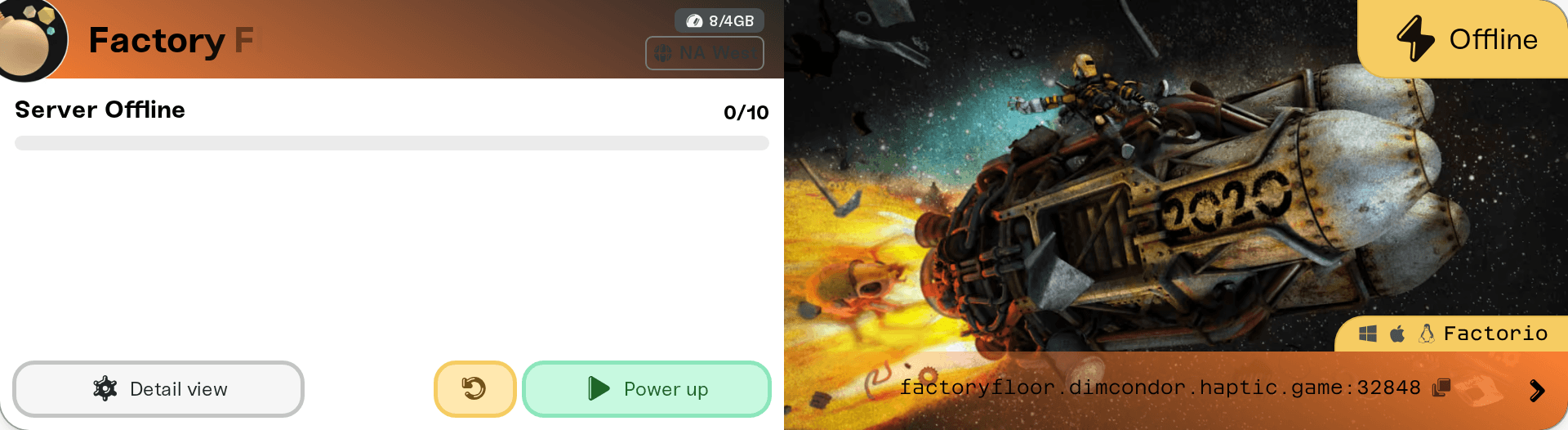
During startup the server picks up the newest Factorio build for its branch on its own. No reinstall, no file work, and your world is saved and backed up before the restart as always.
Restarting in the first minutes after a release can still bring the old build back, because the new one has not reached us yet. Wait a bit and restart once more.
One player still cannot join
They are on a different branch than the server. Factorio's experimental releases run ahead of stable. In Steam, right-click Factorio, open Properties, then Betas: pick experimental for a server with Experimental Branch on, or None for a stable server. Standalone players from factorio.com tick or untick Enable experimental updates in the game's Settings > Other.
Their game has not updated yet. Quit and reopen Steam to force the download, then launch Factorio again.
Nintendo Switch players need the matching Factorio update installed on the Switch, and can only join servers with no mods installed.
Running Factorio's experimental version
Turn on Experimental Branch in the Details tab of your server's Overview card and confirm: the server runs Factorio's current experimental release from its next start. Use it when your world was saved on an experimental version, which stable cannot load. Before you switch:
Every player must switch to the experimental version too, as described above.
Mods need a release for that Factorio version. A mod without one stops the server from starting until you turn it off in the Mods card.
There is no way back for that world. Once your world is saved on the experimental version, the stable version cannot load it. Going back to stable means restoring a backup made before you switched, or starting a new world.
When the mismatch is about mods
Factorio usually fixes mod mismatches for you: joining a modded server brings up the game's offer to sync mods with the server, which downloads the exact versions your server runs. That download needs a free factorio.com login inside the game.
After a big Factorio update, some mods take a few days to catch up. If a mod is stopping your server from starting, turn its Enabled switch off in the Mods card until the author updates it: see Mod load order and toggles.
If the error mentions Space Age, quality, or elevated rails, your server has Space Age DLC ticked in the Details tab of its Overview card, and every player needs to own the DLC to join.
No version picker, no rollback
There is no way to pick an older Factorio version or pin one. The Experimental Branch switch chooses between Factorio's current stable and current experimental release, nothing older. Backups cover your save, not the game build, so restoring a backup does not put the server back on an older patch either.
Need help?
Reach us on Discord or at support@haptic.gg. Include your server name and a screenshot of the version error the affected player sees.


