Valheim: Join Your Server (Steam, Game Pass, Xbox, and the Community list)
 ValheimGuide
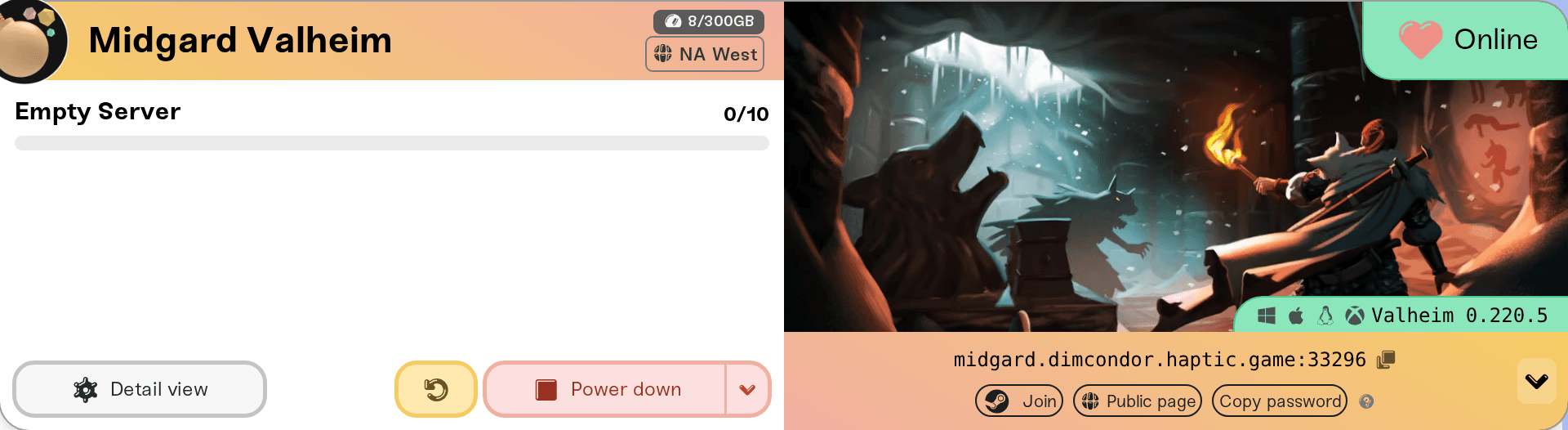
Your server card shows one address, like odin.vesta.haptic.game:2456, with a Copy password pill one click away behind the arrow at the end of the strip.…
Your server card shows one address, like odin.vesta.haptic.game:2456, with a Copy password pill one click away behind the arrow at the end of the strip. Steam players join with that address (the Join pill, Valheim's Join Game screen, or Steam's server favorites). Xbox, Game Pass, PlayStation 5, Switch 2, and Mac App Store players join with the join code that appears on the card while a crossplay server is online. Every join asks for your server password; Valheim requires one. Joining never touches your world.
What every player needs
The server address from the colored strip at the bottom of your server card on My Servers. Click it and it flashes Copied hostname!; send it with the
:portpart included.The server password. Click the small arrow at the right end of the strip (on a phone the pills sit under the address) and use Copy password. Valheim will not run without a password and it must be at least 5 characters, so there is no "no password" option for this game.
A server that says Online. A sleeping or offline server does not answer: Wake & Play servers wake from the dashboard (What is Wake and Play?), and friends can wake yours from your public page once you turn that on (Let friends wake your server).
Steam players (PC, Mac, Linux, Steam Deck)
Any of these works; the first is the fastest. On a Mac, a copy of Valheim started from the Steam library is the Steam version and joins this way; a copy opened from Launchpad or the Applications folder is the Mac App Store version and joins by join code (next section).
Join from the dashboard. While the server is Online and you are on a desktop browser, click the arrow at the right end of the address strip to expand the shortcut row, then click the Join pill with the Steam logo. It launches Valheim through Steam pointed at your server; pick your character and Valheim asks for the password. If Steam opens but the game never connects, use the next option.
In the game. Start Valheim, choose Start Game, pick a character, and go to the Join Game screen. Add your server there by its full address (
hostname:port), join it, and type the password when the game asks. Older guides point at a Join IP button; if your client does not show one, use the address box on Join Game instead. The address is the same either way.Steam favorites. In the Steam client, open View > Game Servers, go to Favorites, click Add a Server, and paste the address.
Valheim wants the hostname and the port together, with the colon. You do not need a numeric IP.
Console and Game Pass players (crossplay join code)
Xbox, Game Pass, PlayStation 5, Switch 2, and Mac App Store players join with a join code instead of an address, and your server only has one when Crossplay is turned on. The Mac App Store version should be updated in the App Store first: its builds can trail a Valheim patch for a while. Setup, the mods trade-off, and the per-platform flow are in Valheim Crossplay: How Console Friends Join Your Server.
Once crossplay is on and the server is Online, expand the shortcut row with the arrow at the right end of the address strip and a Join Code pill appears with the six-digit code on it. Click it to copy the code (tooltip Copy crossplay join code) and send it with the password. Friends start Valheim, pick a character, open Join Game, choose to add a server, and enter the code instead of an address. That is the whole flow on PlayStation 5 and Switch 2 as well. Steam players on a crossplay server can use the code too. The code changes every time the server starts, Wake & Play wakes included, so share the current one: it is also in the Share text, in Copy join details in the dashboard search, on your public server page, and on your Discord card. While the server is asleep or starting, those places say Join code appears once the server is running.
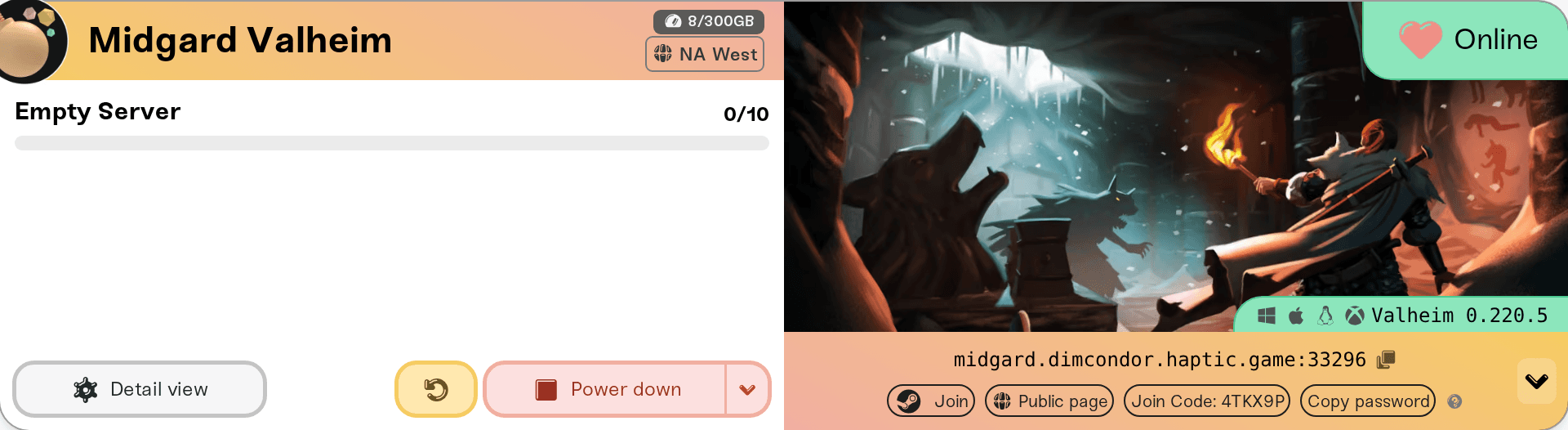
Two things to know about the code:
It is issued fresh on every server start. The pill only appears while the server is online, and after a restart or a wake from sleep you have a new code. Friends who saved the old one need the new one.
Crossplay joins go through Microsoft's PlayFab service, so a PlayFab outage takes join codes down for every crossplay Valheim server at once, while direct-address joins on non-crossplay servers keep working: see Valheim Crossplay: How Console Friends Join Your Server.
My server is not in the Community list
Valheim's in-game Community list is the least reliable way to find a server: new listings can take minutes to appear, the list is long, and it only shows servers that are online right now. The address, Steam favorites, and the join code always work; treat the Community list as a bonus.
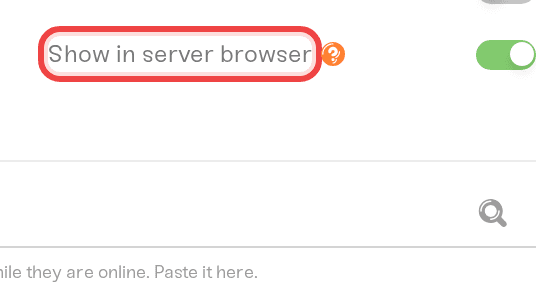
Whether your server may appear there is your choice: Show in server browser, in the Details tab of your server settings, is on by default. Turn it off and the server stays out of the list; friends join by address or code only. A change takes effect on the next restart. Your password still gates who can join either way.
If the join still fails
"Incompatible version": your game and the server are on different Valheim builds. Right after a Valheim update, restart your server; see Valheim "Incompatible Version" After an Update. Since 1.0 Steam has no public test branch for Valheim, so a version mismatch is always the restart case.
"DNS lookup failed" after adding a server: the address box holds more than the address, like a
Hostname:orAddress:label, the password, or a space. Paste only the address with its port, exactly as the card shows it (odin.vesta.haptic.game:2456). Clicking the address on your card copies exactly that, and so does the address line of the Share text or Copy join details.Steam says "app ID specified by server is invalid": the player tried to join from Steam's server list or a friend's Steam profile. Join from inside Valheim instead (Join Game, add a server, paste the address). If that Steam account does not own Valheim on Steam because their copy is from the Mac App Store, Xbox, or Game Pass, turn on Crossplay and have them join with the join code.
"Wrong password": copy it from the Copy password pill again; it is case-sensitive. Changing it in settings applies on the next restart.
A modded server: players need the same client-side mods installed; see Valheim mods: what your players need to install.
Everything else (timeouts, stuck on connecting, works for you but not a friend): walk through I can't connect to my server.
Need help?
Ask in Discord or email support@haptic.gg. Include your server name, the player's platform (Steam, Game Pass, Xbox, PlayStation, Switch, Mac App Store), and a screenshot of the message they get.


