Palworld: Change How Often Your Server Autosaves
 PalworldGuide
Your Palworld server's autosave timer is on your dashboard: open My Servers, press Detail view on your server, and set Autosave Interval (min) on the…
Your Palworld server's autosave timer is on your dashboard: open My Servers, press Detail view on your server, and set Autosave Interval (min) on the Overview card's Details tab. It takes whole minutes from 1 to 120, and the default is 20. Press Save changes, then restart the server so the new interval takes effect.
Change the autosave interval
Go to My Servers and press Detail view on your Palworld server's card.
In the Overview card, open the Details tab.
Find Autosave Interval (min). You can also type "Autosave" into the search palette (the magnifier icon in the Overview title bar) to jump straight to it.
Enter a number of minutes between 1 and 120.
Press Save changes in the popup at the bottom of the page.
Restart your server. Like most settings, the new interval applies the next time the server starts. See Start, stop, and restart your server.
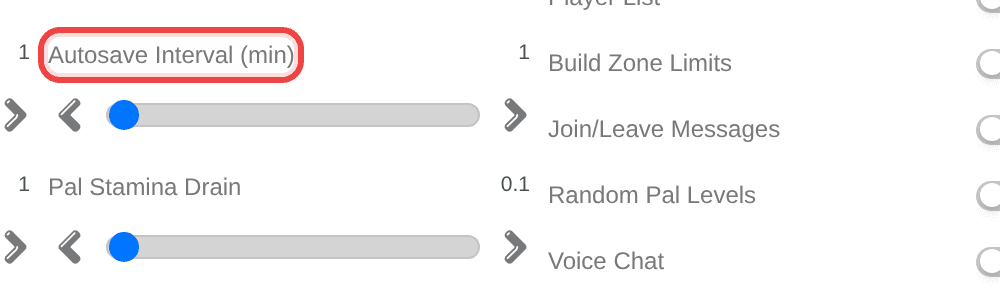
To undo it, set the field back to 20, save, and restart.
| Setting | Options | What it does |
|---|---|---|
| Autosave Interval (min) | 1 to 120 minutes, default 20 | How often the server saves the world while it is running. |
If you looked for this before and could not find it
You were right: the autosave timer used to be missing from the dashboard, so older Palworld servers ran on Palworld's own built-in timer, which saves far more often and hitches more. Nothing was broken, the setting simply was not there yet.
Now that it is, Haptic adds the 20 minute default to an older server's settings once. After that the field is yours: whatever you set in Autosave Interval (min) is kept and never reset.
Picking a value: stutter versus lost progress
Every autosave can cause a brief stutter for players who are online. That is the whole trade-off:
A longer interval means fewer stutters, but more progress is lost if the server crashes, because everything since the last save is gone.
A shorter interval means less to lose in a crash, but more frequent stutters.
The good news is that a crash is the only case where the interval matters. A normal stop, restart, hibernation, or backup saves the world first, so ordinary shutdowns and Wake & Play sleep never lose progress, whatever you set here.
If your group notices a regular hitch while playing, raise the interval. If your server has crashed and taken a chunk of progress with it, lower it. If you are not sure, 20 minutes is the default for a reason.
Things that will NOT fix it
Setting it to 0 to turn autosave off. There is no off switch. The lowest value is 1 minute; anything below that goes back to the default of 20.
Going above 120. The highest value is 120 minutes; a larger number is capped at 120.
Saving without restarting. The server keeps its old interval until it next starts.
Typing minutes into the config file. If you edit
PalWorldSettings.iniyourself in the Files card, the same setting is calledAutoSaveSpanand it is in seconds, so 20 minutes is1200. The dashboard field does this conversion for you, which is why it is the easier place to change it.Lowering the interval to recover progress you already lost. A shorter timer only protects what happens from now on. To go back to an earlier point, use a backup: see Restore your server to an earlier backup.
Need help?
Reach us on Discord or at support@haptic.gg. Include the interval you set and roughly when the stutter or the lost progress happened.


