V Rising: How Friends Join Your Server
 V RisingGuide
Friends join a V Rising server with Direct Connect and the numeric IP address and port shown on your server card, for example 203.0.113.10:33001. Direct…
Friends join a V Rising server with Direct Connect and the numeric IP address and port shown on your server card, for example 203.0.113.10:33001. Direct Connect only accepts the numbers. The name-based address that ends in haptic.game does not work in V Rising, so never send that one. The address appears on the card while the server is online.
Send friends the address
Open My Servers and start your V Rising server if it is not running.
Once the card says Online, the strip at the bottom shows the IP address and port. Click it to copy.
Send it to your friends exactly as copied, numbers, dot, colon and port included.
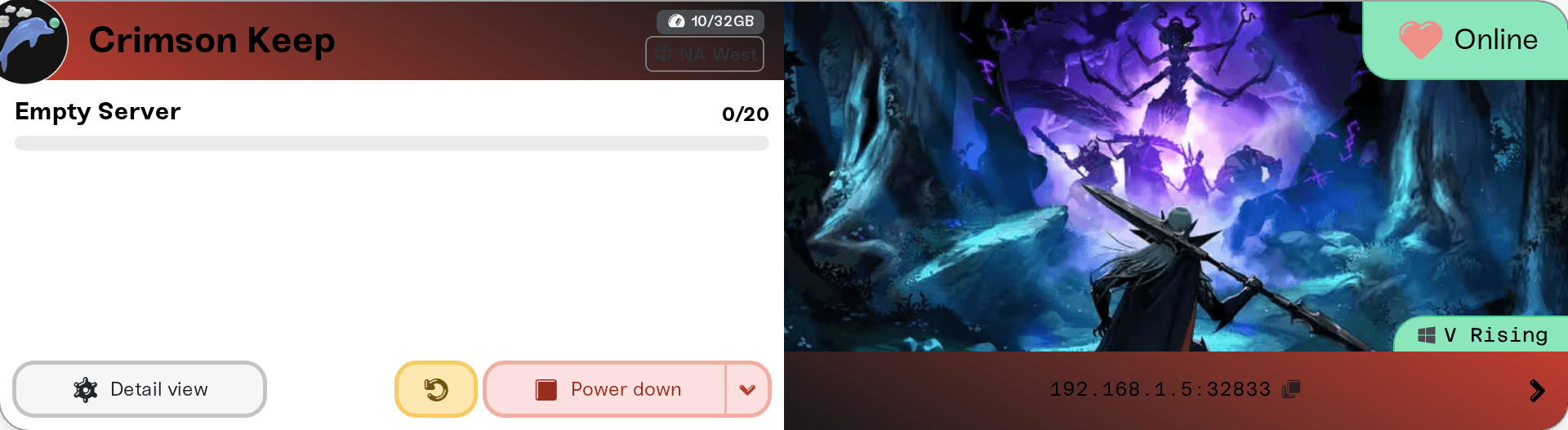
While the server is stopped, starting or asleep, the strip reads "Address appears when the server is online". That is on purpose: a server that starts again can land on a different machine with a different IP address, so copy the address fresh after a restart or a wake instead of reusing an old one. The port stays the same.
If you set a Server Password, friends type it when they join. Add, change or clear it in your server settings; it applies at the next restart.
Join from inside the game
By Direct Connect
In the online server list, choose Direct Connect and enter the numeric address and port from your card, for example 203.0.113.10:33001. If the game asks for a password, enter your Server Password. This works whether or not the server is listed.
In the server list
With List in the In-Game Browser (EOS) on (the default), your server asks to be shown in the game's online server list under its Server Name, while it is online. If a friend can't spot it there, use Direct Connect.
Who can join
PC (Steam) players. Haptic runs the PC version of the V Rising server.
No PlayStation 5 players. PS5 players can only join servers running the separate PS5 server version, which Haptic does not offer, so a mixed PC and PS5 group cannot share one server.
Up to your Max Players. The game allows up to 128 at once, set by Max Players. Admin Slots lets admins in even when the server is full.
If someone cannot get in
They typed the name-based address. V Rising refuses it. Use the numbers from the card.
The address is from before the last restart or wake. Copy it again from the card.
The server is asleep or stopped. A sleeping server is not in the list and Direct Connect cannot reach it. Wake it from the dashboard or with your wake link first.
The game just updated. Players and the server must run the same version. Haptic checks for a new server version every hour and restarts onto it by itself once nobody is playing; until then your card shows New update available, and a restart moves it over right away.
They tried Steam's Join Game. There is no Steam join link for V Rising servers on Haptic yet; use Direct Connect.
Something on their network. VPNs, firewalls, and school or work networks can block game traffic; a phone hotspot is a quick test. Full checklist: I can't connect to my server.
Things that will not fix it
Sending the name-based address with a different port. V Rising refuses names in Direct Connect, whatever the port.
Opening ports on your own router. Players connect straight to the server; nothing on your side needs changing.
Restarting over and over. Each start can move the server to a new address, so a friend holding an old one stays locked out. Restart once, then send the address the card shows.
Need help?
Ask in Discord or email support@haptic.gg with a screenshot of your server card and of what your friend sees when they try to connect.


