40% OFFOur winter sale is on! We're giving everyone 40% off their new server at checkout!
 EnshroudedGuide
Friends open Enshrouded, go to Play then Join, switch on dedicated servers in the server filter, and pick your server by its name. The game then asks for a…
Friends open Enshrouded, go to Play then Join, switch on dedicated servers in the server filter, and pick your server by its name. The game then asks for a password, and the password they type decides their role: give your group the Friend Password, never the Admin Password. To search for your server directly, the game's Search by IPv4 box takes your server's numeric IP and the port shown on your server card.
This is Keen's own recommended way in, and it needs no address at all.
Check that your server card says Online. If it doesn't, press Power up first.
Start Enshrouded, choose Play, then Join.
In the server filter on the right, switch on the option that shows dedicated servers ("Show dedicated server"). Dedicated servers are hidden until you do.
Find your server's name in the list. It is the Server Name from your dashboard; a new name shows up after the next restart.
Click the star next to it to make it a favorite. Favorites sort to the top of the list next time.
Join, and type one of your role passwords when the game asks.
The Search by IPv4 button on the Join screen (newer game versions label it Search by IPv4/Domain) finds one server by its address. It wants a numeric IP and a port.
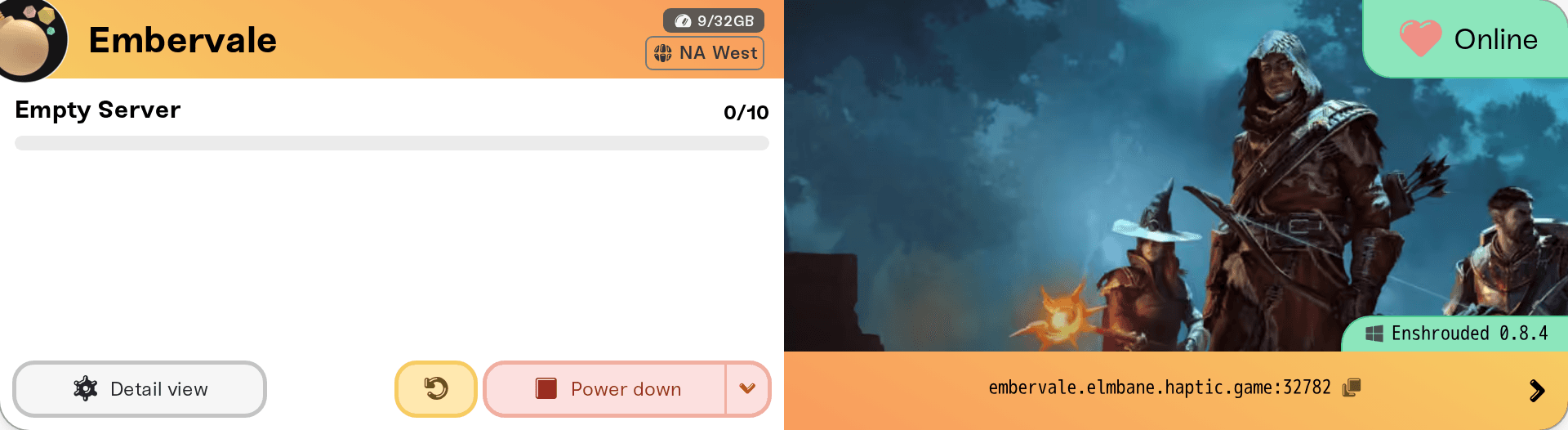
Click the address strip on your server card to copy the address, for example camp.yourname.haptic.game:12346. The number after the colon is the port Enshrouded searches on. Use it exactly as shown, not Enshrouded's default 15637.
Get the numeric IP: press Win+R, type cmd, press Enter, then run ping -4 followed by your address without the :port, for example ping -4 camp.yourname.haptic.game. The numbers in square brackets on the first line are your server's IP. The pings themselves may time out; the IP still shows.
In Enshrouded, open Search by IPv4 and enter the IP, a colon, and your port, for example 203.0.113.10:12346.
We have not confirmed that the game accepts the hostname itself in this box, so use the numbers. The IP belongs to the machine your server runs on and can change if your server moves to another one, while the hostname always follows it. If a saved favorite stops finding your server, look the IP up again.
Still not in the list? Keen suggests adding the server as a favorite in Steam: in the Steam app open View, then Game Servers, go to Favorites, click the + button, and enter the same IP and port. Steam favorites then show at the top of the in-game list.
Enshrouded has no single server password. When a player joins, the game asks for one, and which password they type sets what they can do:
| Password typed | Role | What they can do |
|---|---|---|
| Admin Password | Admin | Everything, plus kick and ban |
| Friend Password | Friend | Build, terraform, open chests |
| Guest Password | Guest | Explore and fight; no chests, no base changes |
| None | Visitor | Only when Allow Visitors (No Password) is on; no chests, building, or terraforming |
All three passwords are in the Details tab of your Overview card, and the copy pills behind the > chevron on your server card copy them. Anyone who types the Admin Password becomes an admin, so keep it for the people you trust with kicks and bans. Someone who joined with the wrong one disconnects and rejoins with the right one. The full guide: Enshrouded roles: Admin, Friend, Guest, and Visitor passwords.
The card is not Online. Start or wake the server, then retry.
They can't see it in the list. The dedicated-server filter is off, or the list has not refreshed. Search by IP instead, or add the Steam favorite above.
The port is wrong. It has to be the port on your card, not the default 15637.
The game just updated. Players can only join a server on the same Enshrouded build: Enshrouded: 1.0, game updates, and version mismatch.
The server looks full. Max Players goes up to 16. Enshrouded also holds a few slots back for the Admin and Friend roles, so a player joining as a Guest can find the server full before it reaches your Max Players.
They are on PlayStation 5. Your server runs the PC (Steam) version, so PS5 players won't see it yet. PS5 support is coming, but PC and PS5 can't share a server at 1.0: Can PlayStation 5 or Xbox players join?
Something on their network. VPNs and school or work networks block game traffic: I can't connect to my server.
Reach us on Discord or at support@haptic.gg. Include your server name, how the player tried to join, and a screenshot of what they see.
 © Haptic, LLC
*40% off applies automatically at checkout for your first month. Ends November 22, 2026.


