Astroneer: How Friends Join Your Server
 AstroneerGuide
In Astroneer's main menu, click Server List, then Add Dedicated Server, type the numeric IP address and port from your server card into Server URL (for…
In Astroneer's main menu, click Server List, then Add Dedicated Server, type the numeric IP address and port from your server card into Server URL (for example 203.0.113.10:33001) and click Add Server. Pick it under Favorite Servers and click Join. If nothing shows under Favorite Servers, quit Astroneer fully, launch it again and add the server once more.
Send friends the address
Open My Servers and start your Astroneer server if it is not running.
Once the card says Online, the strip at the bottom shows the IP address and port. Click it to copy.
Send it to your friends exactly as copied, numbers, dots, colon and port included.
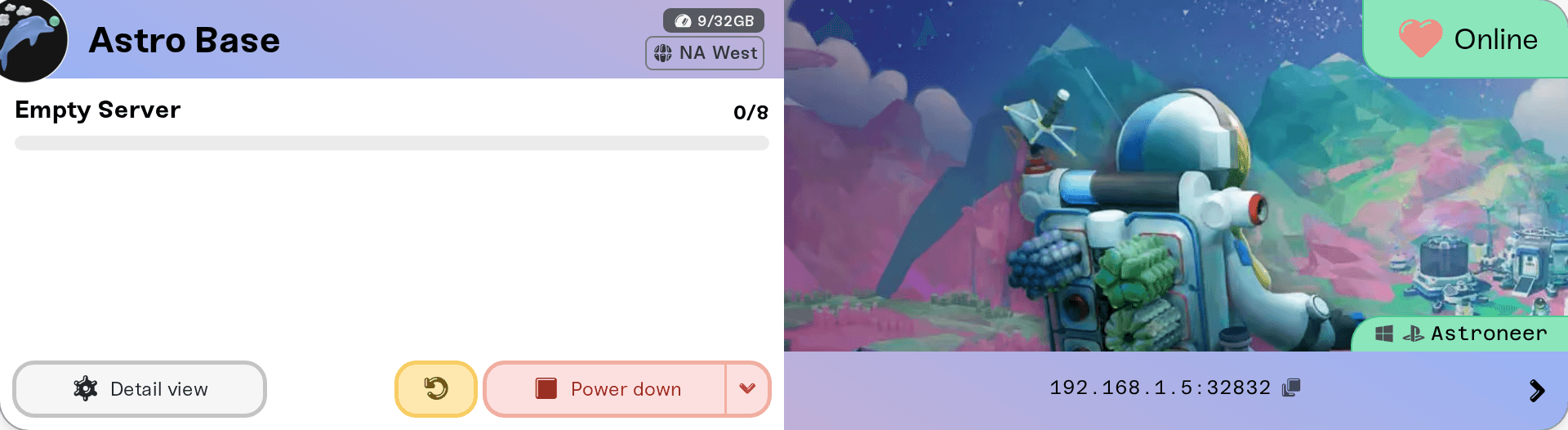
While the server is stopped, starting or asleep, the strip reads "Address appears when the server is online". A server that starts again can land on a different machine with a different IP address, so copy the address fresh after a restart or a wake. The port stays the same.
If you set a Server Password, friends type it when they join. Add, change or clear it in your server settings; it applies at the next restart.
Add the server in Astroneer
Add it once
In Astroneer's main menu, click Server List, then Add Dedicated Server. In Server URL, type the numeric address and port from your card, for example 203.0.113.10:33001. Give it any nickname and click Add Server.
Join
The server appears under Favorite Servers. Select it and click Join. If the server has a password, the game asks for it.
You do not need to change anything in Astroneer's own files (Engine.ini) to join a Haptic server.
If nothing shows under Favorite Servers
Quit Astroneer completely and launch it again, then add the server again. If the list still stays empty, load any single-player save once, go back to the main menu and add the server one more time. While your server card says Online, the server is up and listed; the empty list is on the game's side.
Who can join
PC (Steam) and PlayStation players.
No Xbox or Microsoft Store players. System Era lets those versions join only its partner hosts.
No Nintendo Switch players. The Switch version has no dedicated-server support.
Up to 8 players, the game's own limit. Max Players can set it lower; a bigger plan does not add slots.
If someone cannot get in
They typed the name-based address. Use the numbers from the card.
The address is from before the last restart or wake. Copy it again from the card and add the server again.
The server is asleep or stopped. Wake it from the dashboard or with your wake link first.
The game just updated. Players and the server must run the same version. Haptic checks for a new server version every hour and restarts onto it once nobody is playing; until then your card shows New update available, and a restart moves it over right away.
The server runs mods they do not have. Most Astroneer mods must be installed by every player with AstroModLoader. See Astroneer: install mods on your server.
Something on their network. VPNs, firewalls, and school or work networks can block game traffic. Full checklist: I can't connect to my server.
Need help?
Ask in Discord or email support@haptic.gg with a screenshot of your server card and of what your friend sees in Astroneer.


