40% OFFOur winter sale is on! We're giving everyone 40% off their new server at checkout!
 Sons Of The ForestGuide
Copy the IP address and port from your server card while the server is online. In Sons of the Forest, open Multiplayer, then Join, then Join by IP, and…
Copy the IP address and port from your server card while the server is online. In Sons of the Forest, open Multiplayer, then Join, then Join by IP, and type the numbers with the port, for example 203.0.113.10:33001. If you set a Server Password, friends type it as they join.
Open My Servers and start your Sons of the Forest server if it is not running.
Once the card says Online, the strip at the bottom shows the IP address and port. Click it to copy.
Send it to your friends exactly as copied, numbers, dots, colon and port included.
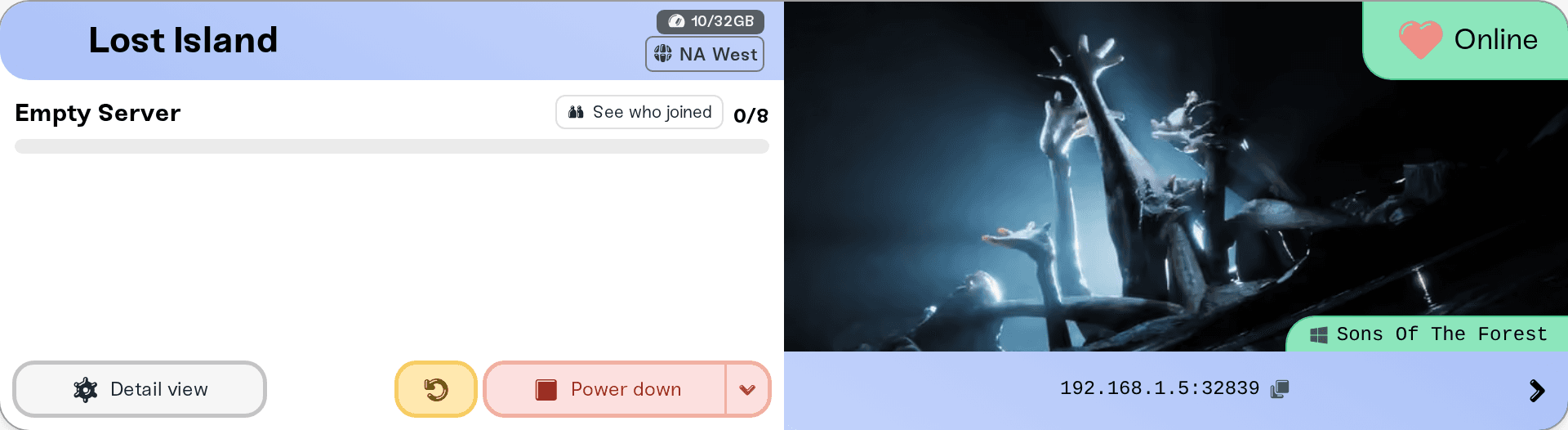
While the server is stopped, starting or asleep, the strip reads "Address appears when the server is online". A server that starts again can land on a different machine with a different IP address, so copy the address fresh after a restart or a wake. The port stays the same.
On Wake & Play, press Wake up on your server card before your friends connect. The game cannot wake a sleeping server by itself.
In Sons of the Forest, open Multiplayer, then Join.
Choose Join by IP.
Type the numeric IP address and port from your server card, for example 203.0.113.10:33001, and join.
If the server has a password, type it when the game asks.
Use the numbers, not the server's name-based address: the name has not been tested in the game's Join by IP box yet.
PC players on Steam. Sons of the Forest is a PC game, and there is no console version.
Up to 8 players at once. That is the game's own limit. Max Players in your server settings can lower it, and a bigger plan does not add slots.
Only the players you allow, if you want. A Server Password keeps strangers out, and a Ban on the Admins tab keeps one player out. See Sons of the Forest: Kick, Ban and Manage Players.
Ask in Discord or email support@haptic.gg with your server's name and what the game said when the join failed.
 © Haptic, LLC
*40% off applies automatically at checkout for your first month. Ends November 22, 2026.


