40% OFFOur winter sale is on! We're giving everyone 40% off their new server at checkout!
 Garry's ModGuide
Your Garry's Mod progress can move to your server. Power the server down, open the Backups card, click Upload World and drop in sv.db and the data folder…
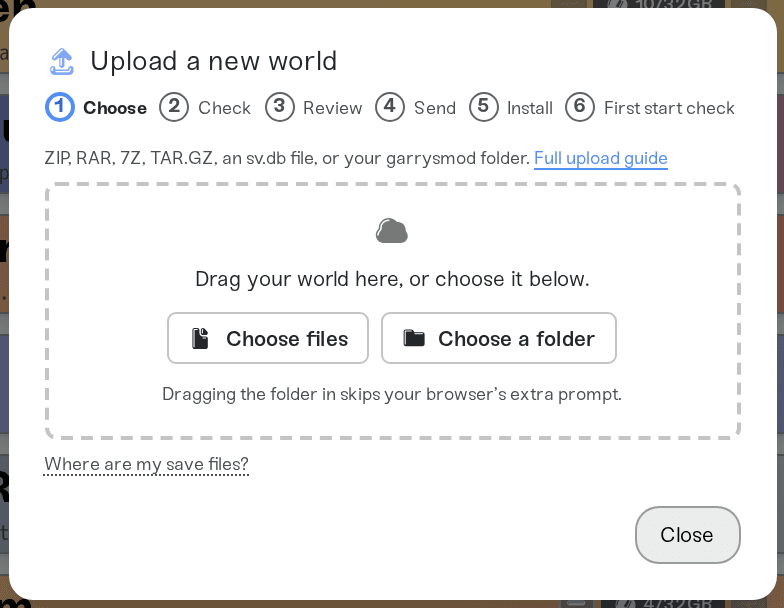
Your Garry's Mod progress can move to your server. Power the server down, open the Backups card, click Upload World and drop in sv.db and the data folder zipped together (or another host's whole garrysmod folder). The server's current world is saved as a backup first, then replaced by yours. Your server keeps its own settings, addons, admins and bans.
A Garry's Mod server keeps its progress in two places inside garrysmod:
sv.db is the server's database. It holds what addons save for each player, such as TTT karma, DarkRP money and RP names, and the tables of admin mods like ULX.
The data folder holds Sandbox's saved props (data/persist) and the files addons keep for themselves.
An upload brings both. Your server's cfg files, settings/users.txt, addons, gamemodes and maps stay as they are, so add any addons your world needs on your server first.
Your own PC (Steam on Windows): press Win+R, paste %SYSTEMDRIVE%\Program Files (x86)\Steam\steamapps\common\GarrysMod\garrysmod and press Enter. If Steam keeps your games somewhere else, right-click Garry's Mod in Steam, choose Manage > Browse local files, and open garrysmod. Take sv.db and the data folder from there: on a PC the garrysmod folder also holds gigabytes of game content the server doesn't use, and an upload can be at most 10 GB.
Another host: download the server's garrysmod folder from its file manager or FTP, or just sv.db and the data folder inside it.
Close Garry's Mod, or stop the other server, before you copy the files, so nothing is writing to sv.db while you copy it.
Power down your server.
Open the Backups card and click Upload World.
Drag in a ZIP of sv.db and data. A single sv.db file works too, and the box zips it for you. From another host, its whole garrysmod folder works as well.
Review the summary and click Upload and replace world.
When the import finishes, power the server up.
The server's own admins and bans are kept. If the uploaded sv.db has ULX or FAdmin tables, the server keeps its own instead, and the server card says the uploaded world's admin lists were not installed. Manage admins and bans on the Admins tab.
No world found: the upload had neither sv.db nor a data folder. Upload sv.db and data from inside garrysmod, not a folder with only addons or maps.
More than one world: the upload held several sv.db files. Pick the one you want from the list, or upload one garrysmod folder at a time.
Damaged world: sv.db could not be read. Copy it again with the game or the old server stopped, then upload the new copy.
Ask in Discord or email support@haptic.gg with the name of the file you uploaded and what the server card says after the upload.
 © Haptic, LLC
*40% off applies automatically at checkout for your first month. Ends November 22, 2026.


