40% OFFOur winter sale is on! We're giving everyone 40% off their new server at checkout!
 Garry's ModGuide
Your server's address is on its card in My Servers, with the port at the end, like gmod.foxden.haptic.game:34307. The quickest way in is the Join button in…
Your server's address is on its card in My Servers, with the port at the end, like gmod.foxden.haptic.game:34307. The quickest way in is the Join button in the row that opens from the small arrow next to the address. Inside Garry's Mod there is no Direct Connect button: open Find Multiplayer Game, click Favorites, paste the address into the box at the top, click the heart next to your server and join it. Or turn on the developer console and type connect followed by the address. Always include the port.
Open My Servers and start your server if it is not running. The strip at the bottom of the card shows its address and port. Click it to copy, then send it to your friends exactly as copied.
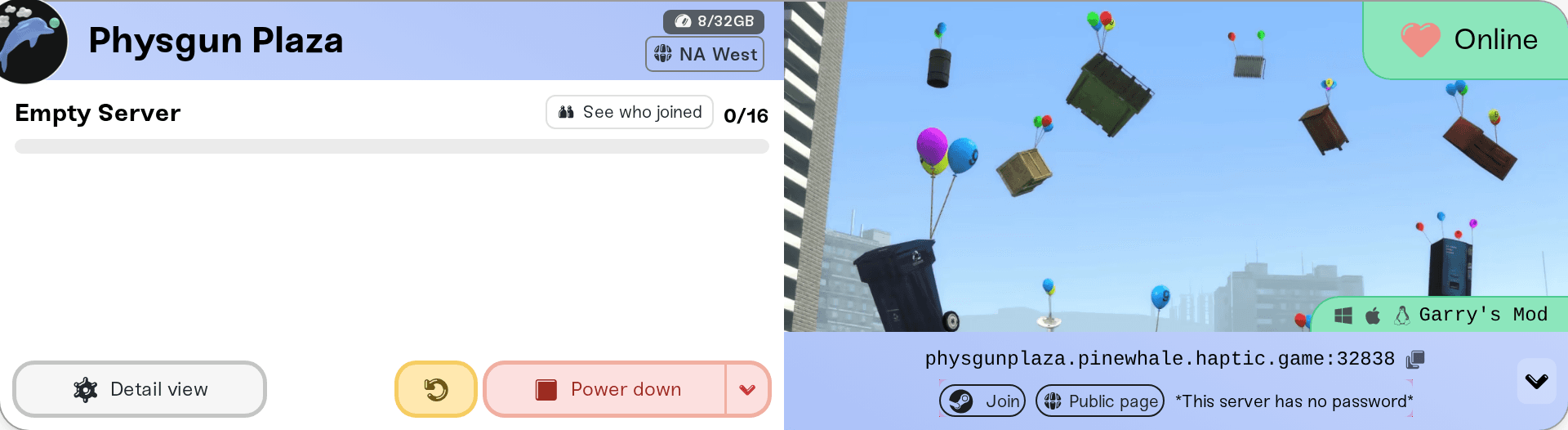
Every way of joining below takes that same address and port. The port matters: without it, Garry's Mod looks on the game's default port, where your server is not.
The address stays the same when your server restarts or wakes up, so a friend's saved favorite keeps working.
On a computer with Garry's Mod installed through Steam, wait until your server card says Online, then click the small arrow at the right end of the address strip. In the row that opens, click Join: Steam opens Garry's Mod and connects you to your server.
Garry's Mod's own server browser has one box that takes an address, on its Favorites page:
Start Garry's Mod and click Find Multiplayer Game.
In the left column, click Favorites.
Paste your address and port into the box under Search for servers by address to add to favorites, then click Find servers at given address.
Your server appears below the box with its name, map and player count. Click the heart next to its name to add it to your favorites.
Your favorites are listed by gamemode (a new server runs Sandbox). Click the gamemode, click your server, then click Join Server. Double-clicking the server works too.
If your server has a password, a Password box appears next to Join Server when you select it. Type the password there before you join.
If the result says The server at address … failed to respond, your server is not online yet, or the address or port was mistyped.
The developer console is off when Garry's Mod is first installed. Turn it on once:
On the main menu, click Options, open the Keyboard tab and click Advanced….
Tick Enable developer console (~) and click OK.
Then join:
Press ~, the key above Tab. If nothing opens on your keyboard layout, bind a key to Toggle developer console on the same Keyboard tab.
If your server has a password, type password "your password" and press Enter first.
Type connect followed by your address and port, then press Enter:
connect gmod.foxden.haptic.game:34307The Legacy Browser. On the Find Multiplayer Game page, click Legacy Browser in the left column. It opens the classic server browser: on its Favorites tab, click Add a Server, enter your address and port, and add it to your favorites.
Steam's server list. In Steam, open View, then Game Servers, then the Favorites tab, click + and enter your address and port. Your server then shows in Garry's Mod's favorites too.
The Internet list. While it is online, your server can also show under Internet, filed under its gamemode, by its server name. A server with a Game Server Login Token (in your server's settings) ranks higher there. Searching a list of thousands is slower than the address, though.
Garry's Mod players on Steam. Haptic runs the PC version of the Garry's Mod server.
Up to your Max Players. A full server shows Server is full instead of Join Server.
Everyone, unless you limit it. A Server Password, the Whitelist switch in your server's settings, and bans on the Admins tab each keep people out.
The server is not Online. If the card says Sleeping, press Wake up and join when it says Online. See What is Wake and Play?.
"Connection failed after 4 retries", or nothing happens. The server is offline, or the port is missing or wrong. Copy the address from the card again, port included.
Turned away for the password. Check the Server Password in your server's settings: Set or remove your server password. In the server browser the player types it in the Password box; from the console, with password "your password" before connect.
The Whitelist is on. Only players on the Admins tab's Whitelist, and your admins, get in.
Joining takes a long time the first time. Players download your server's Steam Workshop items, maps and gamemode as they join. A big collection takes a while once, then joins are quick.
Purple-and-black checkerboards or red ERROR signs in the game. Your maps or addons use content from Counter-Strike: Source or Team Fortress 2. Mount Counter-Strike: Source and Mount Team Fortress 2 in your server's settings give the server that content, but each player needs it on their own computer too, usually by installing that game through Steam.
Ask in Discord or email support@haptic.gg. Include your server name, which way the player tried to join, and a screenshot of the message they get.
 © Haptic, LLC
*40% off applies automatically at checkout for your first month. Ends November 22, 2026.


