40% OFFOur winter sale is on! We're giving everyone 40% off their new server at checkout!
 Sons Of The ForestGuide
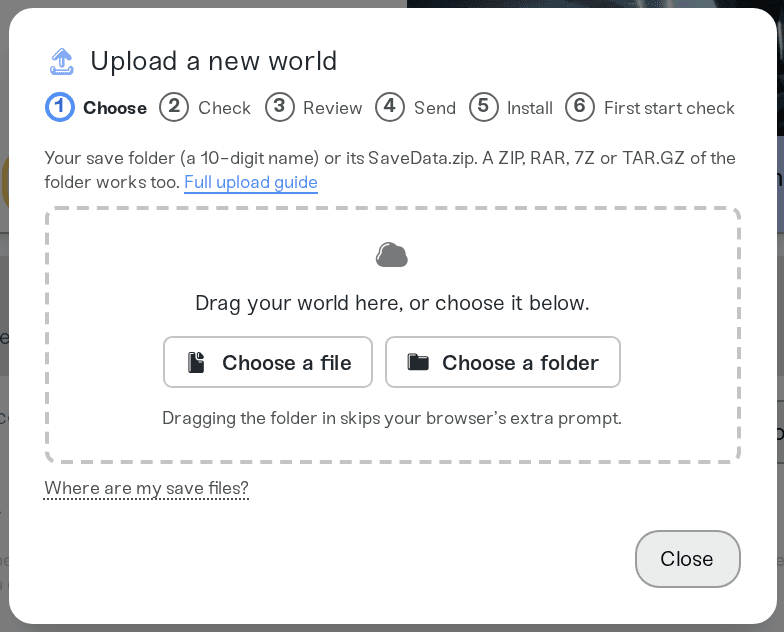
Stop your server, open the Backups card and choose Upload World. Upload your world's save folder (a 10-digit name) from Saves\<your Steam ID>\Multiplayer…
Stop your server, open the Backups card and choose Upload World. Upload your world's save folder (a 10-digit name) from Saves\<your Steam ID>\Multiplayer or SinglePlayer, or the SaveData.zip inside it. The world goes into your server's current Save Slot, and Game Mode follows the world.
Quit Sons of the Forest to the main menu, or close it, so the game is not saving.
Press Win+R, paste %USERPROFILE%\AppData\LocalLow\Endnight\SonsOfTheForest\Saves, and press Enter.
Open the folder named with your Steam ID, then Multiplayer for games you hosted or SinglePlayer for single-player games.
Each world is a folder with a 10-digit name, such as 0000000001, holding SaveData.zip. Sort by date modified: the one you played last is the newest.
The upload panel shows the same path, and the Steam Deck one, under "Where are my save files?".
Moving from another host? Download the slot folder (such as 0000000001) from Saves/DedicatedServer/Multiplayer in that server's user data folder, or the whole Saves folder.
Open My Servers and stop your Sons of the Forest server.
On the Backups card, choose Upload World and drop in the 10-digit folder or its SaveData.zip. A ZIP, RAR, 7Z or TAR.GZ of the folder works too.
Wait for the import to finish. The world that was in that save slot is saved as a backup first, so it is one click away if you want it back.
Start the server.
The world comes across: the island, your base and everything stored in it.
Game Mode follows the world. A Custom world brings its Custom difficulty settings with it, and the dashboard shows them.
Your other save slots stay. Only the current Save Slot gets the new world. A dedicated server's Saves folder with two or more slots puts each slot's world in the same slot on your server.
Characters are separate. The player who hosted the world starts with a new character on the server. From then on, each player keeps their character by saving at a shelter or bed in the game (hold E, then Save). See Sons of the Forest: Saves and Backups.
Uploading a MultiplayerClient folder. It only holds your character from a game someone else hosted, not a world, so it is refused.
Placing SaveData.zip somewhere else with Files. The server only loads the world in its current Save Slot's folder. Use Upload World, which puts it in the right place.
Ask in Discord or email support@haptic.gg with the name of what you uploaded and a screenshot of the message under the upload box.
 © Haptic, LLC
*40% off applies automatically at checkout for your first month. Ends November 22, 2026.


