40% OFFOur winter sale is on! We're giving everyone 40% off their new server at checkout!
 Minecraft BedrockGuide
Open your server's Details tab, find the Game Rules group, switch on Keep Inventory and press Save changes. It applies at once while the server is on, with…
Open your server's Details tab, find the Game Rules group, switch on Keep Inventory and press Save changes. It applies at once while the server is on, with no restart. A rule you never touched shows your world's own value (World: on or World: off). If someone changes a rule in game with /gamerule, Haptic keeps that choice and the dashboard shows it, marked Set in game, after the next start.
Open My Servers, open your Bedrock server and expand the Overview card.
On the Details tab, scroll to Game Rules.
Switch the rule you want, or pick a value, and press Save changes.
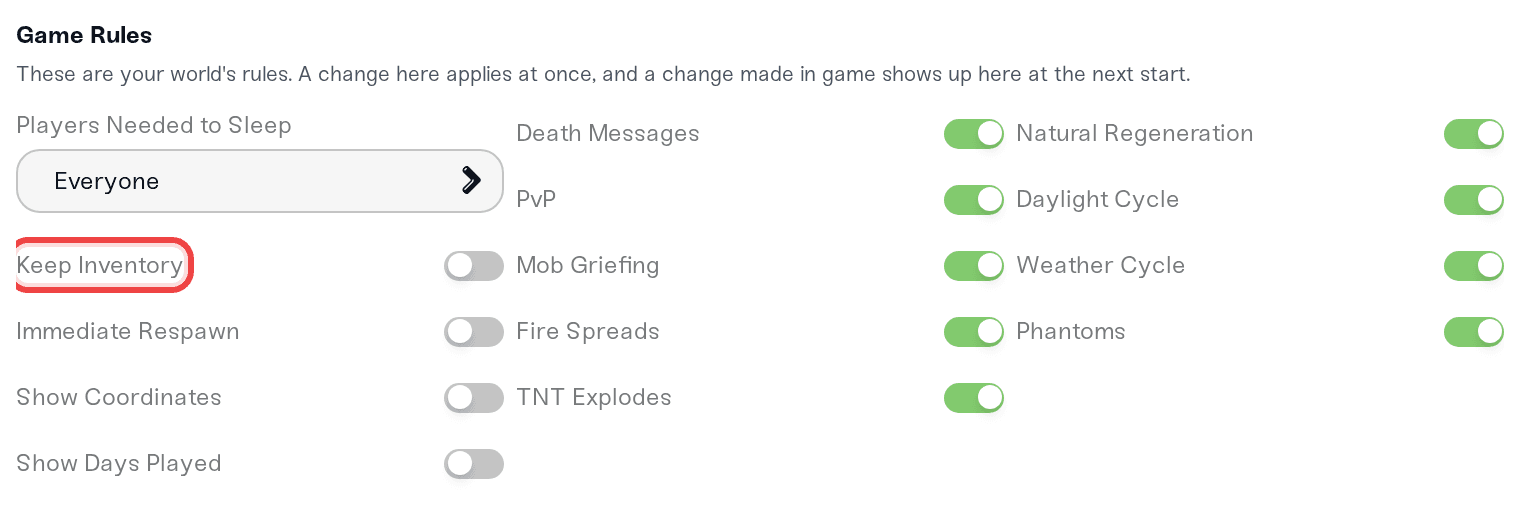
A change you save applies at once while the server is on, and a server that is off gets it when it starts. Nothing needs a restart, and none of these turn cheats on for your world.
| Setting | Options | What it does |
|---|---|---|
| Keep Inventory | On, off | Players keep their items and XP when they die. |
| Immediate Respawn | On, off | Players skip the death screen and respawn at once. |
| Players Needed to Sleep | One player, half the players, everyone | How many players online must be in bed to skip the night. |
| Show Coordinates | On, off | Shows each player's X, Y and Z coordinates on screen. |
| Show Days Played | On, off | Shows how many in-game days the world has been played. |
| Death Messages | On, off | Says in chat when a player dies, and how. |
| PvP | On, off | Players can hurt each other (Friendly Fire in Bedrock's world settings). |
| Mob Griefing | On, off | Creepers blow holes in the ground and endermen pick up blocks. Off keeps builds safe from mobs. |
| Fire Spreads | On, off | Fire spreads to nearby blocks and burns them out. |
| TNT Explodes | On, off | Lit TNT explodes. Off makes TNT harmless. |
| Natural Regeneration | On, off | Players heal over time when their hunger bar is full enough. |
| Daylight Cycle | On, off | Time of day moves on. Off stops the sun or moon where it is. |
| Weather Cycle | On, off | The weather changes by itself. Off keeps the current weather. |
| Phantoms | On, off | Phantoms spawn at night for players who have not slept in three days. |
These are your world's own rules, saved inside the world. The dashboard shows what the world really has:
A rule you never changed on the dashboard is left to the world. It shows the world's value, with a small World: on or World: off beside it.
When someone changes a rule in game with /gamerule, Haptic keeps that choice at every start and never puts the old value back. After the next start the dashboard shows the world's value, marked Set in game.
A change you save on the dashboard after that wins again, and the next start keeps it.
Bedrock only lets a player type /gamerule in game when the world has cheats on (Allow Cheats). The dashboard and the Console card change rules without cheats, so your world keeps its achievements.
While your server is online, the Console card takes Bedrock's own commands, without the leading slash. Bedrock's rule names have no spaces or underscores, and letter case does not matter:
gamerule keepInventory true
gamerule doFireTick false
gamerule playersSleepingPercentage 0 (one player skips the night)
gamerule on its own lists every rule and its value.
Start typing gamerule and the console suggests the rule names. If you type a rule with spaces (gamerule keep inventory true) or by its Minecraft Java name (gamerule keep_inventory true), the console sends it under Bedrock's name and says so.
Typing Java's names in Bedrock's own chat. In game, /gamerule keep_inventory true is a syntax error on Bedrock. Use /gamerule keepInventory true, or the dashboard.
Turning on Allow Cheats just for keep inventory. It is not needed: the Keep Inventory switch works with cheats off, and cheats turn off achievements for the world.
Restarting to make a dashboard change stick. A saved rule already applies to the running server, and the next start keeps it.
If a rule does not do what you expect, ping us on Discord or open a ticket. Tell us which rule and what you see in game, and we will check the world's rules with you.
 © Haptic, LLC
*40% off applies automatically at checkout for your first month. Ends November 22, 2026.


