40% OFFOur winter sale is on! We're giving everyone 40% off their new server at checkout!
 7 Days To DieGuide
Your server card shows an address: a name ending in .haptic.game, a colon, and a port number. Steam players start 7 Days to Die, choose Join a Game, and…
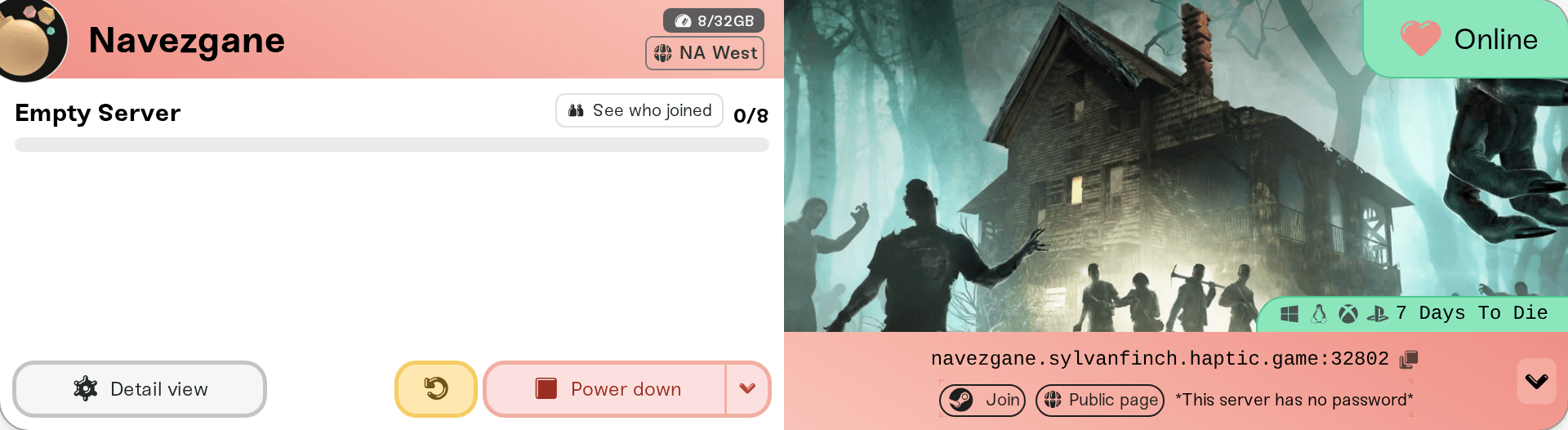
Your server card shows an address: a name ending in .haptic.game, a colon, and a port number. Steam players start 7 Days to Die, choose Join a Game, and either find your server by name in the server browser or connect straight to that address. PlayStation 5 and Xbox Series X|S players can only use the server browser, so keep Server Visibility on Public. Everyone types the server password if you set one, and your server must say Online first. Joining never touches your world.
The server address (Steam players who connect directly). It is on the colored strip at the bottom of your server card on My Servers. Click it to copy it; a Copied! bubble confirms. The part before the colon is the address, the number after it is the port.
The exact Server Name (anyone using the server browser). It is the Server Name field in the Basic tab of your server's Overview card.
The server password, if you set one. The Server Password is optional and lives in the same Basic tab; blank lets anyone who finds the server in. To copy it, click the small arrow at the right end of the address strip (on a phone the pills sit under the address) and use Copy password.
A server that says Online. A sleeping or stopped server does not answer and is not in the server browser. Joining never wakes it: wake it from the dashboard (What is Wake and Play?), or let friends wake it from your public page once you turn that on (Let friends wake your server).
The same shortcut row has a How to join pill that opens this guide.
Start 7 Days to Die and choose Join a Game. The server browser opens.
Either search the list for your Server Name, or use the button at the bottom of the browser that connects by IP, and enter the address from your card: the part before the colon as the address and the number after it as the port.
Type the server password when the game asks.
The first time a player joins, the server sends them the world, so the first load takes longer than later ones. Players must launch the game with Easy Anti-Cheat on, which is the normal launch, while your server's Easy Anti-Cheat setting is on (the default).
On a desktop browser, while your server is Online, the shortcut row also has a Join pill with the Steam logo. It opens 7 Days to Die through Steam and asks it to connect to your server. It is a shortcut for Steam players only and may just open the game; if it does, join from Join a Game as above.
Console copies of 7 Days to Die cannot connect by address; that is a game rule. Console friends join like this:
Start 7 Days to Die and choose Join a Game.
Search the server browser for your exact Server Name.
Select your server and type the server password if it has one.
That works only while three things are true on your server:
Allow Crossplay is on (it is by default, in the Details tab).
Server Visibility is Public (the default). Friends Only shows the server to Steam friends only, and Not Listed hides it from the browser, which leaves console players no way in.
No mod changes game data. A mod with a Config folder hides your server from console players. Which mods are safe, and the settings crossplay locks, are in 7 Days to Die: crossplay, Easy Anti-Cheat, and mods.

Nobody can join right after a 7 Days to Die update: everyone must be on the server's game version. Your card shows New update available, and the server restarts onto the new build once it has been empty for 15 minutes. If people are waiting, restart your server yourself.
Latest Experimental is on: every player has to switch their game to the same experimental branch in Steam (Properties, then Betas); the dashboard names the branch when you turn the setting on. Stable and experimental players cannot mix.
Wrong password: copy it from the Copy password pill again. A changed password applies after a restart (Set or remove your server password).
Kicked seconds after joining on a modded server: the mods on the player's PC and the server's do not match. See 7 Days to Die: crossplay, Easy Anti-Cheat, and mods.
Everything else: walk through I can't connect to my server.
Ask in Discord or email support@haptic.gg. Include your server name, the player's platform (Steam, PlayStation, or Xbox), and a screenshot of the message they get.
 © Haptic, LLC
*40% off applies automatically at checkout for your first month. Ends November 22, 2026.