40% OFFOur winter sale is on! We're giving everyone 40% off their new server at checkout!
 Conan ExilesGuide
While your server is Online, its card shows an IP address and port, like 192.0.2.10:7777. In Conan Exiles, choose Play Online, then Direct Connect at the…
While your server is Online, its card shows an IP address and port, like 192.0.2.10:7777. In Conan Exiles, choose Play Online, then Direct Connect at the bottom of the server browser, paste that address, and type your password if you set one. Use the numbers from the card, not a name. Conan Exiles on your server is PC only: PlayStation and Xbox players cannot join it. Joining never touches your world.
The server address. It is on the colored strip at the bottom of your server card on My Servers, and it only shows while the card says Online; at any other time the strip says Address appears when the server is online. Click it to copy it; a Copied! bubble confirms. The IP can change when your server starts on a different machine, so copy it fresh if a saved address stops working.
The server password, if you set one. The Server Password is optional and lives in the Basic tab of your server's Overview card; blank lets anyone in. To copy it, click the small arrow at the right end of the address strip (on a phone the pills sit under the address) and use Copy password.
A server that says Online. A sleeping or stopped server does not answer. Joining never wakes it: wake it from the dashboard (What is Wake and Play?), or let friends wake it from your public page once you turn that on (Let friends wake your server).
The same shortcut row has a How to join pill that opens this guide.
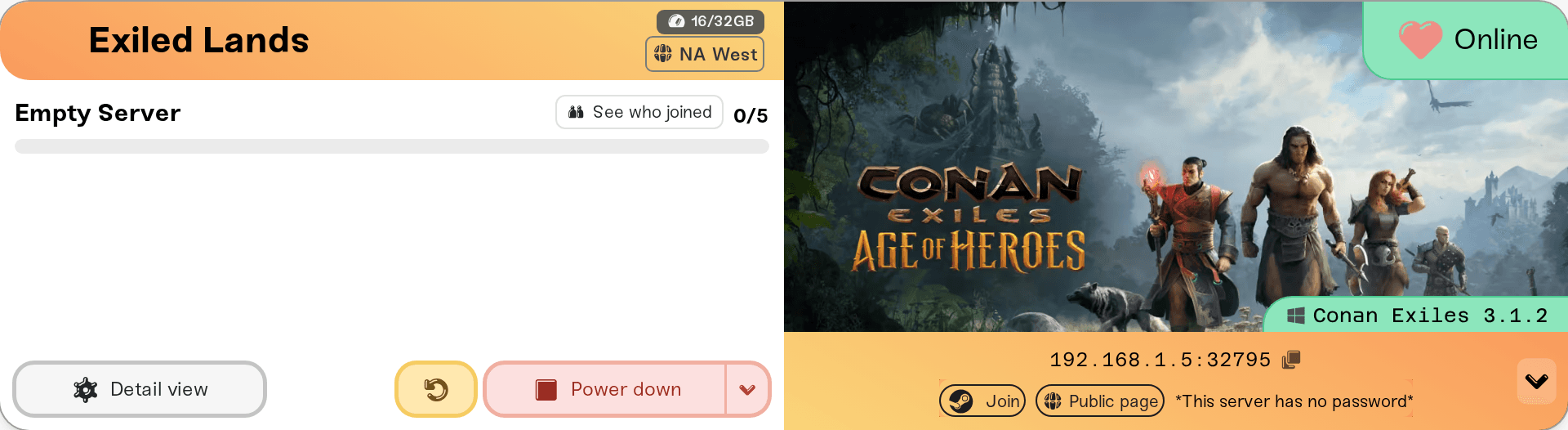
Start Conan Exiles and choose Play Online.
Click Direct Connect at the bottom of the server browser.
Paste the full address from your card: the numbers and the :port part.
Enter the password if your server has one, and connect.
If the game says Connection timed out! Could not find server., check that your card says Online and that you pasted the numbers from the card, not a name ending in .haptic.game.
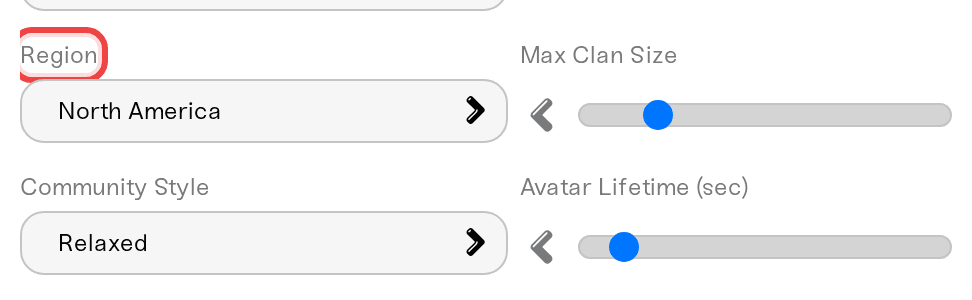
Your server is also listed in Conan Exiles' own server browser under its Server Name. Two settings in the Details tab of the Overview card decide how it is labelled there: Region (the region tag players filter by) and Community Style (Purist, Relaxed, Hard Core, Role Playing, or Experimental). Match Region to where your players live, or the browser's default filter may hide the server.
In Steam, open View > Game Servers, go to Favorites, and add your server's IP with the query port, which is the port on your card plus 2. The port on your card is the game port, which Direct Connect uses.
On a desktop browser, while your server is Online, the shortcut row also has a Join pill with the Steam logo. It opens Conan Exiles through Steam with your server's address. It is a shortcut and may only open the game; if it does, use Direct Connect.
PC players can. A friend on the Epic Games Store, Microsoft Store, or PC Game Pass can join as long as their copy runs Conan Exiles Enhanced, the version your server runs. PlayStation and Xbox players cannot join, and no setting changes that; the reasons are in Conan Exiles: can console friends join your server?.
Two things players ask before their first join:
Mods: nobody installs anything by hand. The game downloads your server's mods when they join, then restarts once. See Conan Exiles: Workshop mods, the Enhanced-only rule, and updates.
The Isle of Siptah DLC is not needed to join. A player only needs it to travel to the Siptah region. See Conan Exiles: both maps on one server (Exiled Lands + Isle of Siptah).
"Connection timed out! Could not find server.": the server is not online yet, or the address box holds a name instead of the numbers. Copy the address from your card again.
Wrong password: copy it from the Copy password pill again. A changed password applies at the next start, so restart after changing it (Set or remove your server password).
Every player is turned away right after a Conan Exiles patch: the players' game and the server must be on the same version. Tell us in Discord with your server name.
A BattlEye error while joining: BattlEye Anti-Cheat (in the Details tab) is on by default. Switch it off only if a player keeps hitting a BattlEye handshake problem that stops them joining, then restart the server.
Everything else: walk through I can't connect to my server.
Ask in Discord or email support@haptic.gg. Include your server name, the player's store, and a screenshot of the message they get.
 © Haptic, LLC
*40% off applies automatically at checkout for your first month. Ends November 22, 2026.