40% OFFOur winter sale is on! We're giving everyone 40% off their new server at checkout!
 FactorioGuide
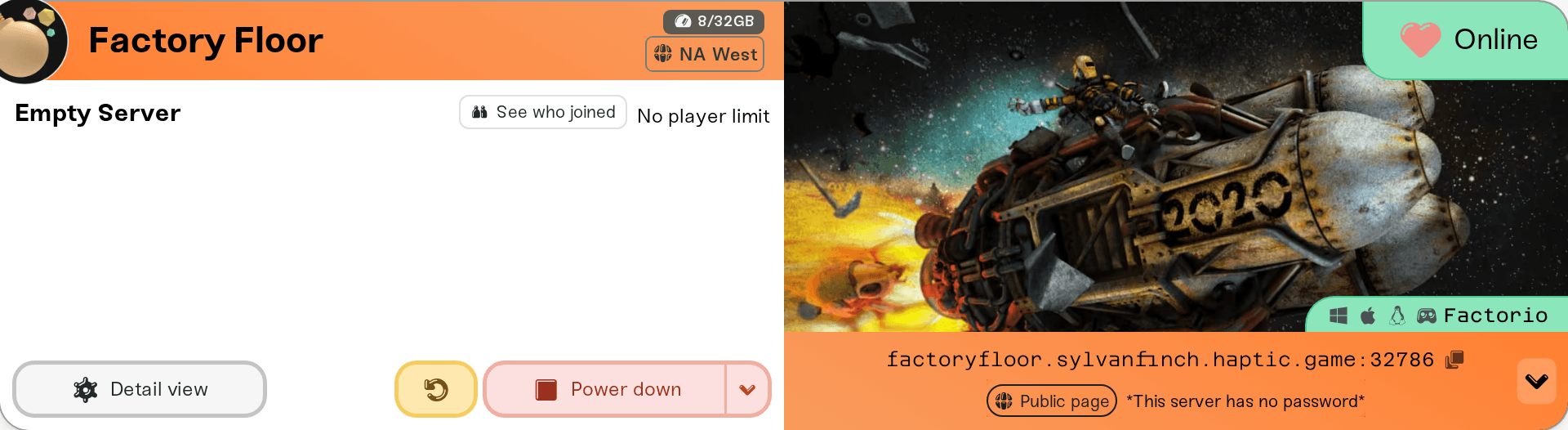
Your server card shows one address: a name like factoryfloor.vesta.haptic.game, a colon, and a port number. In Factorio, open Multiplayer, then Connect to…
Your server card shows one address: a name like factoryfloor.vesta.haptic.game, a colon, and a port number. In Factorio, open Multiplayer, then Connect to address, paste that address, and type the server password if you set one. There is no Steam Join button for Factorio: everyone joins from inside the game, whether they bought it on Steam or on factorio.com. Every player needs the same Factorio version and mods as the server, and a factorio.com account while Require Factorio Account is on. Joining never touches your world.
The server address from the colored strip at the bottom of your server card on My Servers. Click it to copy it and send it with the :port part included.
The server password, if you set one. On a desktop browser, click the small arrow at the right end of the strip and use the Copy password pill; on a phone the pills sit under the address. With no password set, the row says This server has no password and anyone with the address can join. See Set or remove your server password.
A server that says Online. A sleeping or offline server does not answer. Wake & Play servers wake from the dashboard (What is Wake and Play?), and friends can wake yours from your public page once you turn that on (Let friends wake your server). Trying to join does not wake it.
The same Factorio version as the server. Your server runs Factorio's current stable release, or the current experimental one with Experimental Branch on. Players must be on the same one: see Factorio: "Version mismatch" when joining your server.
A factorio.com account while Require Factorio Account is on, which it is by default (and always while List Publicly is on). Players sign in to it inside Factorio.
Space Age, if your server has the Space Age DLC setting on: every player must own it.
The same row of shortcuts has a How to join pill that opens this guide, so you can send it to your friends.
This works for every PC player, from Steam or from factorio.com.
Start Factorio and choose Multiplayer.
Choose Connect to address.
Paste the address exactly as copied from your card, hostname and port together with the colon. You do not need a numeric IP.
Connect, and type the password when Factorio asks for one.
If your server runs mods, Factorio offers to sync them with the server when you join and downloads the exact versions your server uses. That download needs your factorio.com login inside the game.
With List Publicly on, your server also appears in Factorio's Multiplayer > Browse Public Games list under your Server Name. It needs your factorio.com username and token, and it only shows while the server is online. Setup is in Factorio: list your server on the public server browser. Leave it off and the server stays join-by-address only.
Play on LAN does not find a Haptic server: your server runs in a data centre, not on your home network. Use the address or the public list.
Switch players can join a Factorio server that has no mods installed, as long as the Switch has the same Factorio version as the server. Switch updates can arrive later than PC ones, so after a Factorio update a Switch player may have to wait for theirs. They connect with the same address from your card. If a Switch player cannot get in with it, tell us in Discord with a photo of the message.
"Version mismatch" or a message about the game version: your game and the server are on different Factorio releases or branches. See Factorio: "Version mismatch" when joining your server.
A message about a missing factorio.com account or user verification: sign in to your factorio.com account inside Factorio, or the owner can turn off Require Factorio Account in the Details tab (not possible while List Publicly is on).
"Wrong password": copy it from the Copy password pill again. A change to the password applies on the next restart.
Rejected even with the right password: the server's Whitelist may be on. Only players on the whitelist get in; see Manage admins, whitelist, and bans.
The server is full: raise Max Players in the Details tab (0, the default, means no limit). Admins can always join a full server.
A mod problem: let Factorio sync the server's mods when it offers to. If you added a mod by hand, see Factorio: install a mod by uploading the zip.
Everything else (timeouts, stuck connecting): walk through I can't connect to my server.
Ask in Discord or email support@haptic.gg. Include your server name, the player's platform (Steam, factorio.com, Switch), and a screenshot of the message they get.
 © Haptic, LLC
*40% off applies automatically at checkout for your first month. Ends November 22, 2026.