40% OFFOur winter sale is on! We're giving everyone 40% off their new server at checkout!
 FiveMGuide
Your friends open FiveM on a Windows PC, press F8, type connect and your server's address, and press Enter. The address is the one on the colored strip at…
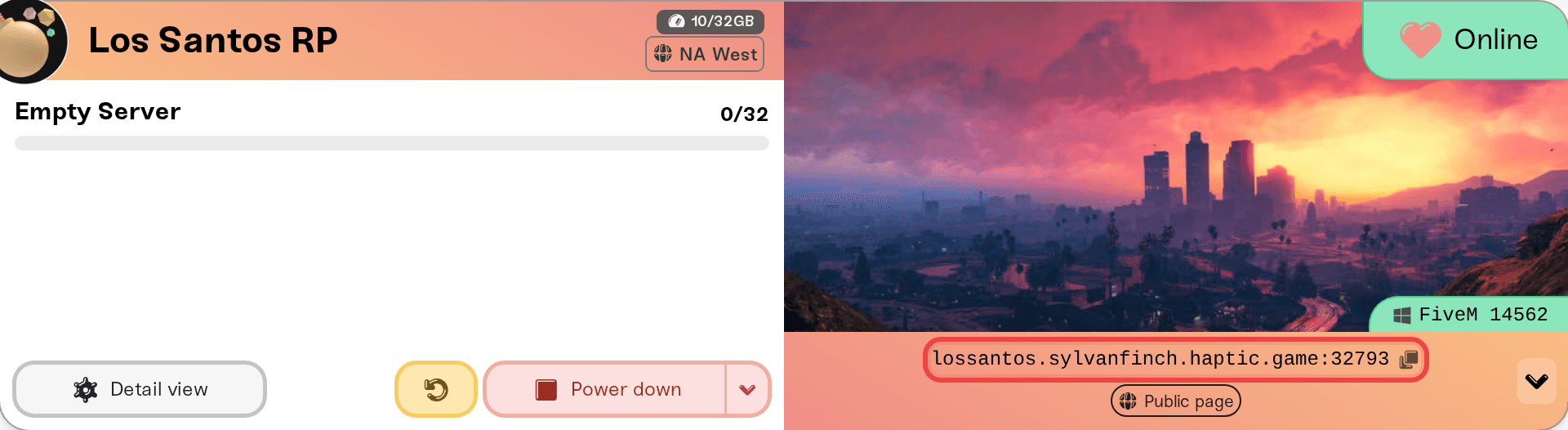
Your friends open FiveM on a Windows PC, press F8, type connect and your server's address, and press Enter. The address is the one on the colored strip at the bottom of your server card, like odin.vesta.haptic.game:7699. FiveM servers have no join password, so there is nothing else to send. Your server also shows up in FiveM's server list a few minutes after each start, unless you turned on Private Server.
GTA V on a Windows PC, plus the FiveM client. FiveM is a PC mod for GTA V and runs on Windows only. GTA V from Steam, the Rockstar Games Launcher or Epic all work. FiveM may ask players to link a Cfx.re account the first time; it is free at forum.cfx.re.
The server address. Click the address on the strip at the bottom of your server card on My Servers and it is copied, port included. The same address is the Connect address on the Share with your players card (next section).
No password. FiveM servers have no join password, so the card shows no password pill. To keep strangers out, see Keep strangers out below.
A server that says Online. FiveM servers on Haptic are Always On: they run until you stop them. If the card says anything other than Online, start it first; trying to connect never starts a server.
The card's shortcut row also has a How to join pill that opens this guide: on desktop, click the arrow at the right end of the address strip; on a phone the pills sit under the address.
This works once your server is Online, listed or not.
Start FiveM and wait for its main menu.
Press F8 to open the console.
Type connect followed by a space and the address, for example connect odin.vesta.haptic.game:7699, and press Enter.
FiveM downloads your server's resources and loads you in. A first join to a server with many scripts can take a while.
Paste the address exactly as copied, port and colon included.
Open your server's Overview card, go to the Details tab, and find Share with your players at the top.
Copy copies the Connect address. It stays the same across restarts, so friends can save it once.
Copy for Discord copies a ready-to-paste message with your server name and the address.
Advanced: direct IP (temporary) shows the numeric IP and port while the server is online. It changes when your server moves machines, so share the address instead.
After a region move the port number changes, so send friends the new address.

Cfx.re runs the FiveM server list. Your server appears there several minutes after each start, under the name you gave it on the Cfx.re portal. Until you fill that in, it is listed as Missing server data. Turning on Private Server in the Details tab keeps it out of the list.
If it does not show up, or shows with no name, follow FiveM: Server not showing in the server list. Friends can always join with the address meanwhile.
FiveM has no server password, and Private Server only hides your server from the list: anyone who has the address can still connect. To control who gets in, use txAdmin's whitelist or your framework's. Opening txAdmin is covered in FiveM: Manage your server with txAdmin.
FiveM runs only on Windows PCs with GTA V, which is why the server card shows the Windows icon. The PlayStation and Xbox editions of GTA V have no FiveM, so console players need GTA V on a Windows PC to play on your server.
FiveM cannot reach the address: try the numeric IP from Advanced: direct IP (temporary) on the Share with your players card, with connect in F8 the same way. That IP changes when the server moves machines, so get a fresh one each time it stops working.
A game build or "revision mismatch" message: the player's GTA V is on a different build than your server enforces. See FiveM and RedM: Game builds and DLC content.
The server is not Online: see My server status is Offline. A server whose Cfx.re license key is rejected does not start; the Console card's Needs attention panel says so, and FiveM: Getting started on Haptic has the fix.
Everything else (timeouts, stuck loading): walk through I can't connect to my server.
Ask in Discord or email support@haptic.gg. Include your server name, the exact text the player typed in F8, and a screenshot of the message FiveM shows them.
 © Haptic, LLC
*40% off applies automatically at checkout for your first month. Ends November 22, 2026.