40% OFFOur winter sale is on! We're giving everyone 40% off their new server at checkout!
 TerrariaGuide
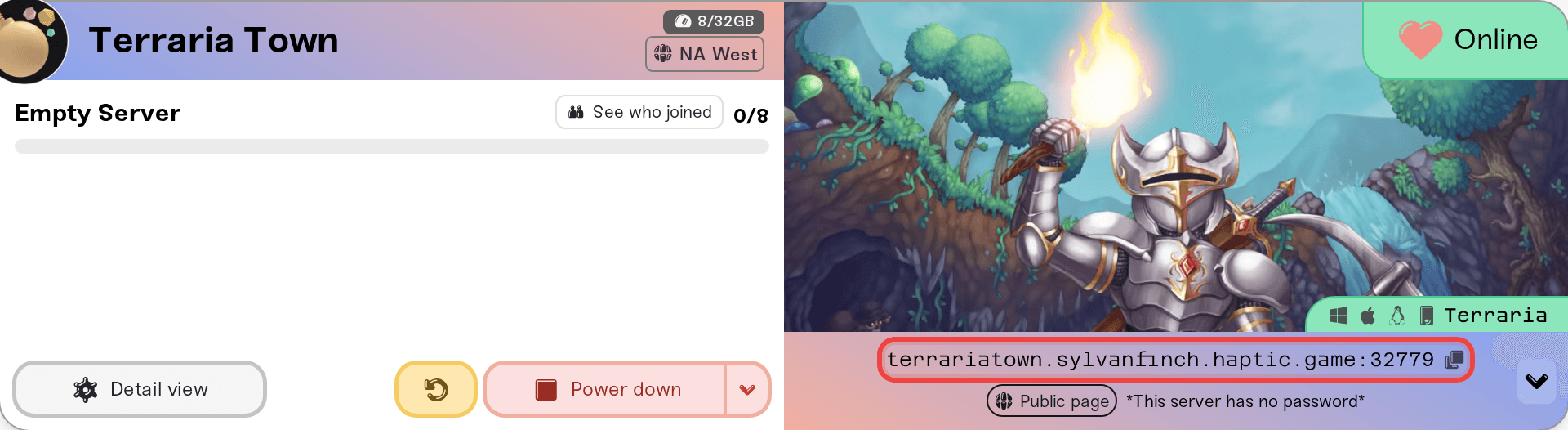
Your server card shows one address in the form address:port. In Terraria, choose Multiplayer, then Join via IP, pick a character, type the part before the…
Your server card shows one address in the form address:port. In Terraria, choose Multiplayer, then Join via IP, pick a character, type the part before the colon, and type the port on the next screen. If you set a password, friends type it after the port. On a modded server, everyone launches the free tModLoader app instead of Terraria. PC, Steam Deck, and mobile players can join; console Terraria cannot reach any dedicated server yet.
The server address and port from the colored strip at the bottom of your server card on My Servers. Click it to copy it. Terraria asks for the address and the port on two separate screens, so friends split it at the colon.
The password, if you set one. It is the Server Password in the Basic tab of the Overview card. On the card, click the small arrow at the right end of the address strip (on a phone the pills sit under the address) and use Copy password. With no password set, anyone with the address can join.
The same Terraria version as the server, and on a modded server, tModLoader.
A server that says Online. A sleeping or offline server does not answer, and trying to join does not wake it. Wake & Play servers wake from the dashboard (What is Wake and Play?), and friends can wake yours from your public page once you turn that on (Let friends wake your server).
The same shortcut row has a How to join pill that opens this guide, and a Share button that puts the address and password in a message for your friends.
Start Terraria and choose Multiplayer, then Join via IP.
Pick or create a character.
Type only the address, the part before the colon.
Terraria then asks for the port on its own screen. Type the number after the colon.
If the server has a password, Terraria asks for it next.
There is no Steam Join pill for Terraria, and Steam's join options do not reach it: the server runs without Steam. Join via IP is the way in.
That is the most common reason a join fails. Address first, port on the next screen.
A modded server only takes players on tModLoader, a separate free app on Steam for anyone who owns Terraria. Players launch tModLoader instead of Terraria and use the same Multiplayer and Join via IP steps. tModLoader downloads the server's mods for them as they connect. Plain Terraria cannot join a modded server, and tModLoader cannot join a plain one. More in Terraria Mods with tModLoader.
iPhone, iPad, and Android players use the same Join via IP flow, address first and port next. Two things to know: the mobile app gets Terraria updates on its own schedule, so after a patch a mobile friend can be turned away for a few days until mobile catches up, and mobile cannot join a modded server.
Console Terraria (Switch, PlayStation, Xbox) has no way to connect to a dedicated server yet, on any host. Re-Logic has console crossplay in development, and nothing on your server needs to change when it arrives. Console friends can still play together through the console's own multiplayer. Details in Terraria crossplay: can console and mobile friends join?.
Terraria: Can't Join Your Server? covers each failure in full:
"Not on the same version" after a Terraria patch: Restart your server from the dashboard once the update is out, and have friends update their game.
A Journey character on a non-Journey world, or the reverse: Terraria refuses it. Pick a character that matches the world's Difficulty.
A vanilla player on a modded server, or a tModLoader player on a plain one.
Wrong password: copy it again from the card. A password change applies on the next restart.
Still stuck? Walk through I can't connect to my server.
Ask in Discord or email support@haptic.gg. Include your server name, the player's platform (PC, Steam Deck, mobile), whether they use tModLoader, and a screenshot of the message they get.
 © Haptic, LLC
*40% off applies automatically at checkout for your first month. Ends November 22, 2026.