40% OFFOur winter sale is on! We're giving everyone 40% off their new server at checkout!
 Minecraft JavaGuide
Your server card shows one address in the form name:port. In Minecraft Java Edition, choose Multiplayer, then Add Server, paste the whole address into…
Your server card shows one address in the form name:port. In Minecraft Java Edition, choose Multiplayer, then Add Server, paste the whole address into Server Address, and join. Keep the port. Minecraft Java has no server password; the whitelist in the Admins tab keeps strangers out. Bedrock friends (phones, tablets, Windows, consoles) can join once Bedrock Crossplay is on, with the separate Bedrock: address the card then shows.
The server address from the colored strip at the bottom of your server card on My Servers. Click it to copy it, :port included, and send it exactly like that. There is no password to send.
The same Minecraft version as the server, shown under Game Version on the Overview card. On a modded server, the same mods too (below).
A server that says Online. A sleeping or offline server does not answer, and trying to join does not wake it. Wake & Play servers wake from the dashboard (What is Wake and Play?), and friends can wake yours from your public page once you turn that on (Let friends wake your server).
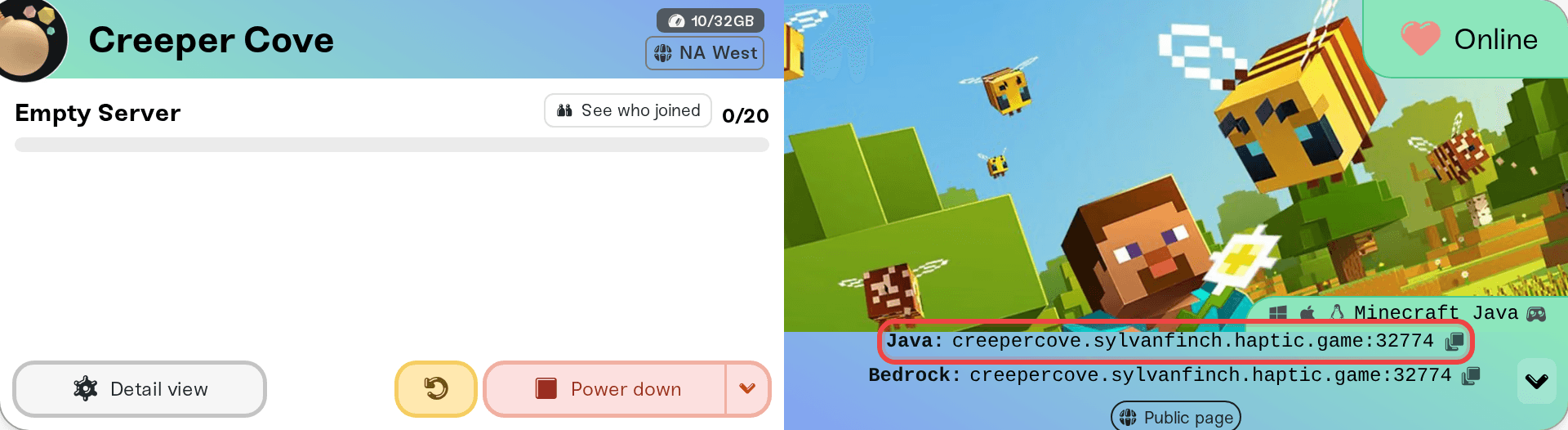
The card's shortcut row has a How to join pill that opens this guide: on a desktop browser, click the small arrow at the right end of the address strip; on a phone the pills sit under the address. The Share button there puts the address in a message for your friends.
Start Minecraft Java Edition and choose Multiplayer.
Choose Add Server, give it any name, and paste the full address into Server Address, port included.
Save it, pick the server in the list, and join.
For a one-off join, Direct Connection on the same screen takes the same address without saving it.
The name alone sometimes works, but many home routers and internet providers then send Minecraft to its default port 25565, which our servers never use. The address exactly as the card shows it always works.
On a modpack, Fabric, Forge, or NeoForge server, every player needs the same mods on their own PC, usually by installing the same pack in the CurseForge or Modrinth app and launching from that profile. Otherwise they are refused or kicked with a mod-mismatch error. See Minecraft: Run a Modpack Server. Paper plugins run on the server only, so players on a Paper server join from the plain launcher.
Bedrock players can join once Bedrock Crossplay is on, on the Overview card. Turning it on lists everything it changes (Paper, memory, version, restart) and does it in one go. The card then shows a second address labeled Bedrock:. Bedrock players use that row, never the Java one: its port can differ.
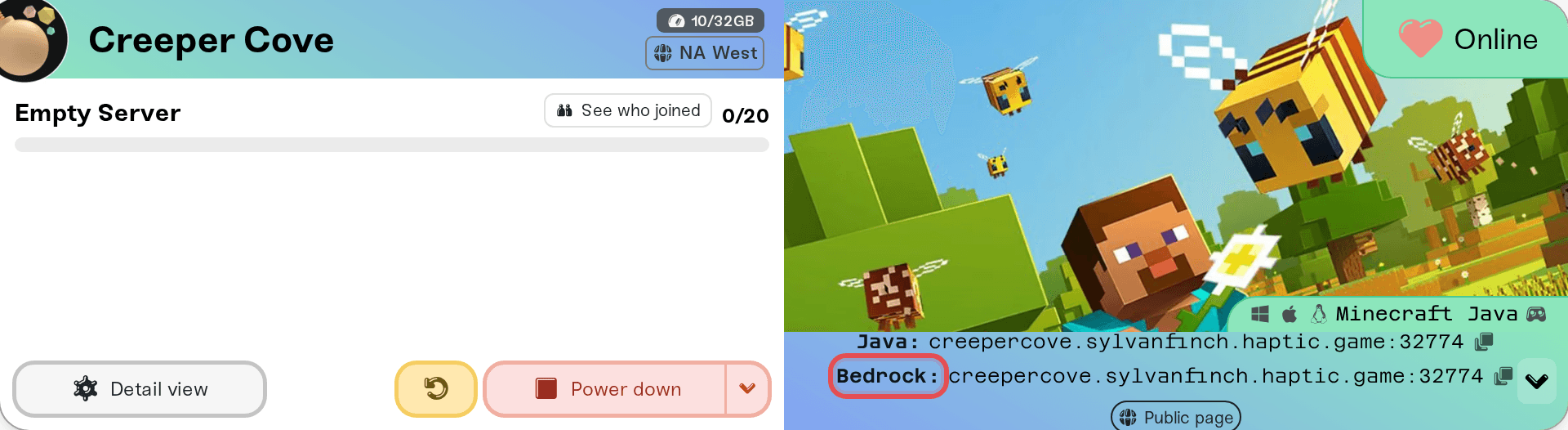
Phones, tablets, and Windows: in Minecraft (Bedrock), open the Servers tab, choose Add Server, and enter the address and the port from the Bedrock: row, each in its own box.
Xbox, PlayStation, and Switch: console Minecraft has no screen for typing an address, so friends make a one-time network (DNS) change to the free BedrockConnect service, which adds one. Every Minecraft host has the same limit.
Setup and requirements are in Minecraft: Java and Bedrock Crossplay on Your Server; the console DNS step is in How Xbox, PlayStation, and Switch friends join your server.
While the whitelist is off, anyone with your address can join. To allow only chosen players, open the Admins tab on the Overview card, turn the whitelist on, and add each player. It warns you first, because it locks out everyone not on the list, you included. Add Bedrock friends with Edition set to Bedrock. More in Manage admins, whitelist, and bans.
"Outdated server!", "Outdated client!", or "Incompatible version": the player and the server run different Minecraft versions; see Minecraft: Versions, Updates, and "Outdated Server" Errors.
"You are not whitelisted on this server!", or a Bedrock friend turned away at once: add them in the Admins tab.
A Bedrock friend sees "Unable to connect to world": they used the Java address or port. Use the Bedrock: row.
Everything else (timeouts, stuck on connecting, works for you but not a friend): walk through I can't connect to my server.
Ask in Discord or email support@haptic.gg. Include your server name, whether the player is on Java or Bedrock (and which device), and a screenshot of the message they get.
 © Haptic, LLC
*40% off applies automatically at checkout for your first month. Ends November 22, 2026.