40% OFFOur winter sale is on! We're giving everyone 40% off their new server at checkout!
 Voyagers Of NeraGuide
Start your server, then copy the Invite code from your server card and send it to your friends. They enter it in the game's invite code option to join. The…
Start your server, then copy the Invite code from your server card and send it to your friends. They enter it in the game's invite code option to join. The game makes a new code every time the server starts, so after a restart or a wake, send the new one. Friends can also look for your server by its name in the game's server browser.
Open My Servers and start your Voyagers of Nera server if it is not running.
Once the card says Online, it shows Invite code with the current code. Click it to copy.
Send the code to your friends.
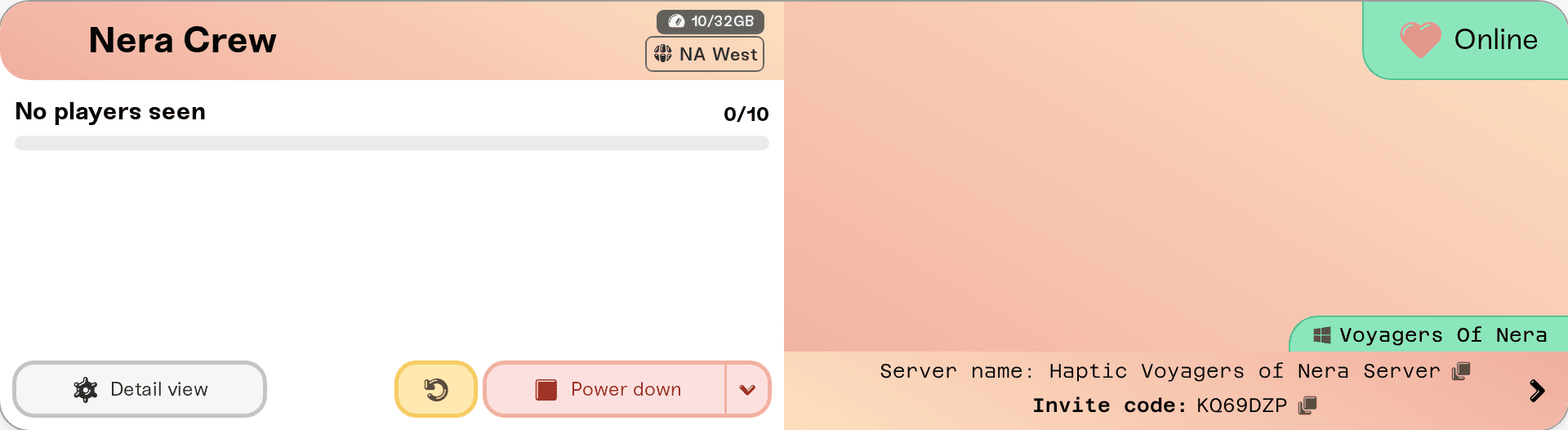
While the server is stopped, starting or asleep, the card says the invite code appears once the server is running. A code from an earlier start no longer works, so always copy it fresh from the card.
Your friends open Voyagers of Nera and, from the main menu, choose to join a game with an invite code.
They type the code exactly as you sent it and confirm.
If you set a Server Password, they type it when the game asks.
Your server also lists itself in the game's server browser under its Server Name. Change the name on the Basic tab of the Overview card; the new name shows after the next restart. The game's server browser is often slow to list servers, so the invite code is the quicker way in.
The code is from an earlier start. Copy the current one from the card and send it again.
The server is asleep or stopped. Wake it or start it from the dashboard first, wait for Online, and then copy the code.
Your server has a password and the code does not get them in. Other hosts have reported that the game's invite codes can fail on a server with a password. Clear Server Password on the Basic tab, restart the server, and send the new code.
They play on a console. Voyagers of Nera servers on Haptic are for the PC version of the game on Steam. The console versions are coming.
Ask in Discord or email support@haptic.gg with your server's name and what your friend sees when the join fails.
 © Haptic, LLC
*40% off applies automatically at checkout for your first month. Ends November 22, 2026.