40% OFFOur winter sale is on! We're giving everyone 40% off their new server at checkout!
 Counter Strike 2Guide
Your server card shows one address: a name ending in .haptic.game, a colon, and a port number. In CS2, turn on the developer console, press ~, and type…
Your server card shows one address: a name ending in .haptic.game, a colon, and a port number. In CS2, turn on the developer console, press ~, and type connect followed by that address. Friends can also find the server by name in CS2's Community Server Browser. On a computer, the Join pill on your card is a shortcut through Steam. None of this works until your server has a Steam Game Server Login Token (GSLT).
CS2 only lets players on the same local network join a server without a Game Server Login Token (GSLT), so the dashboard will not start one until a token is saved. Tokens are free; the steps are in Counter-Strike 2: add a Game Server Login Token (GSLT) so players can join.
The server address from the colored strip at the bottom of your server card on My Servers. Click it to copy it, port included.
The server password, if you set one. Server Password in the Basic tab is optional; left blank, anyone with the address can join. When one is set, click the small arrow at the right end of the address strip (on a phone the pills sit under the address) and use Copy password. See Set or remove your server password.
A server that says Online. A sleeping or stopped server does not answer, and joining never wakes it. Wake & Play servers wake from the dashboard (What is Wake and Play?), and friends can wake yours from your public page once you turn that on (Let friends wake your server).
CS2 is a PC game, so every player joins from a computer through Steam.
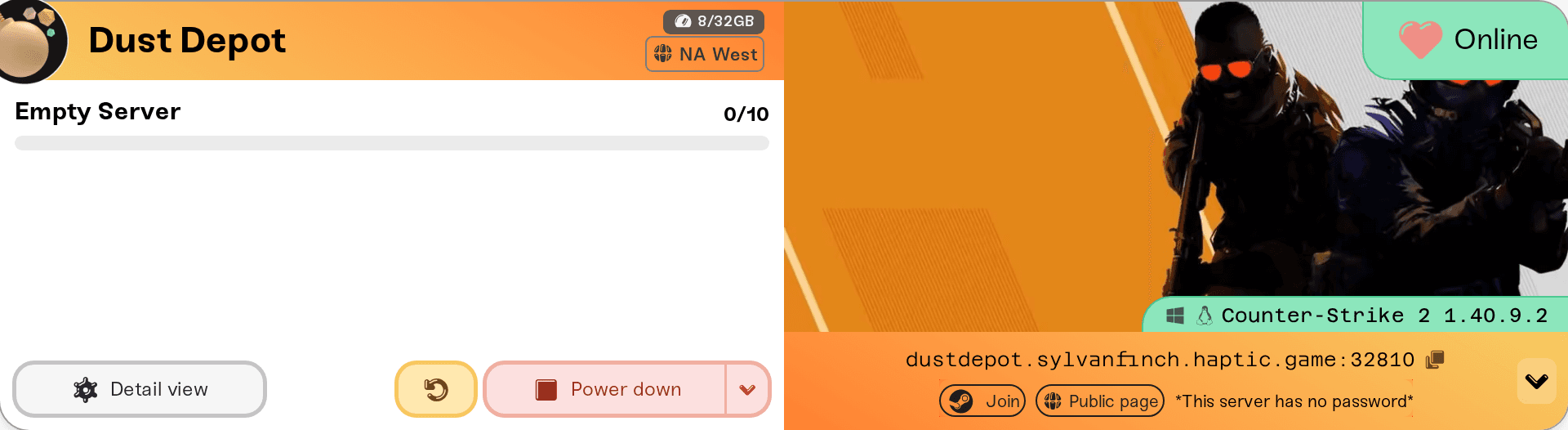
The card's shortcut row also has a How to join pill that opens this guide. On a computer, click the arrow at the right end of the address strip to open that row; on a phone the pills sit under the address.
In CS2, open Settings, then Game, and turn on Enable Developer Console. You only do this once.
Press ~ to open the console.
Type connect followed by a space and your full address, then press Enter.
If your server has a password, add it on the same line: connect your-address:port; password yourpassword.
Paste the address exactly as your card shows it, port included; no numeric IP needed.
Once your server has a token and is Online, it shows in CS2's Community Server Browser under its server name. Open it from Play in CS2 and search for that name. Give it a couple of minutes after the server starts.
You can also save the server in Steam: in the Steam client, open View, then Game Servers, go to Favorites, choose to add a server, and paste the address.
On a computer, while your server is Online, open the shortcut row with the arrow at the right end of the address strip and click the Join pill with the Steam logo. It hands Steam your address and starts CS2. Friends get the same button on your public page if you set one up. Phones do not show the pill.
It is a shortcut: it does not carry your password, and if CS2 opens but never connects, use the console.
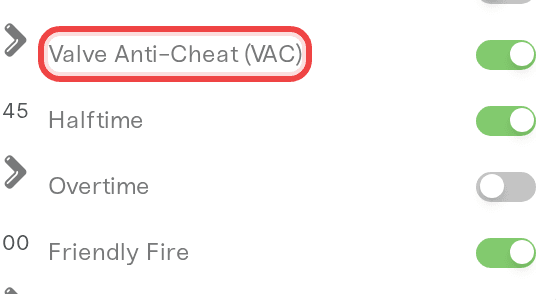
Valve Anti-Cheat (VAC), in the Details tab of your server settings, is on by default and keeps players with known cheats out. A player who starts CS2 with -insecure (for example to test their own mods or tools), or whose account has a VAC ban, can only join while VAC is off. Turning it off makes the server run with -insecure, and the change takes effect on the next restart.
The server will not start, or nobody outside your home can join. Check the token: Counter-Strike 2: add a Game Server Login Token (GSLT) so players can join. Steam can retire or regenerate a token, and the server needs the current one.
CS2 just updated. Updated players cannot join a server still on the previous build. Your card shows New update available, and an empty server restarts itself onto the new build; to update right away, restart it. See Counter-Strike 2: Players can't join after an update? Restart your server.
Wrong password. Copy it from the Copy password pill again. A changed password applies after the next restart.
Everything else (timeouts, stuck connecting, works for you but not a friend): walk through I can't connect to my server.
Ask in Discord or email support@haptic.gg. Include your server name, how the player tried to join, and a screenshot of the message they get, but never your Steam token.
 © Haptic, LLC
*40% off applies automatically at checkout for your first month. Ends November 22, 2026.