45% OFFOur Black Friday flash sale is on! 45% off your new server at checkout, through Cyber Monday!
 HapticGuide
Hand your whole Haptic plan, with every server on it, to a friend from Account, Your Haptic Plan. Nothing changes until they accept from an email link.…
Hand your whole Haptic plan, with every server on it, to a friend from Account, Your Haptic Plan. Nothing changes until they accept from an email link. Worlds, backups, mods and settings go with it, and the old address keeps working.
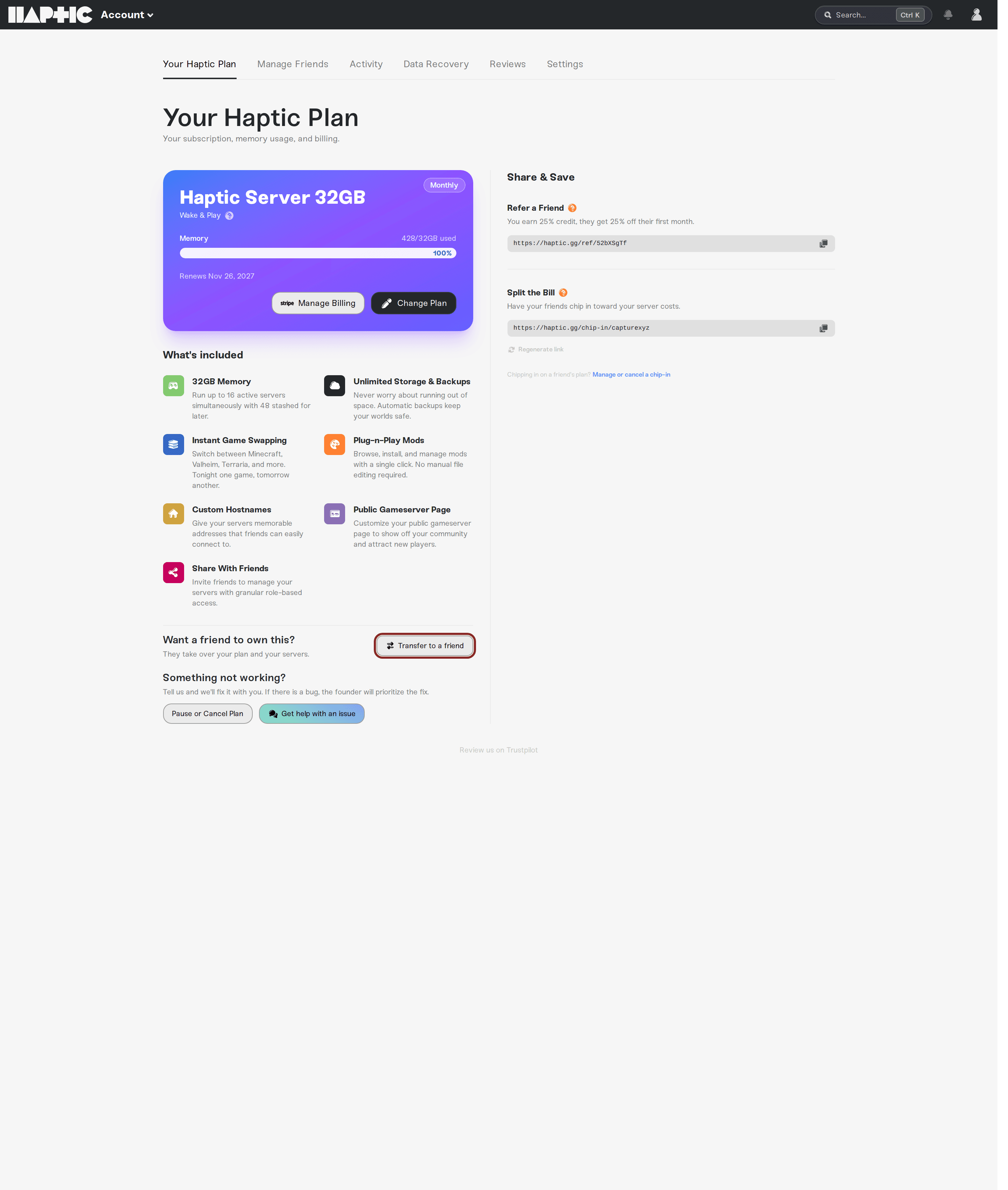
Go to Account and stay on Your Haptic Plan. Just above Something not working?, press Transfer to a friend. You can also press Transfer on a friend's card under Manage Friends, or Hand it to a friend in Pause or Cancel Plan.
Whoever handed you this plan comes first, as Previous owner. Then friends who chip in every month (Card on file), friends who played lately, and friends who chipped in once. Or pick Someone else by email, even someone with no Haptic account yet.
You keep Admin access by default, or pick Operator or No access. The new owner can change it later. Confirm it is you with your password, Google or Discord, and press Send request. Your friend gets one email with a link.
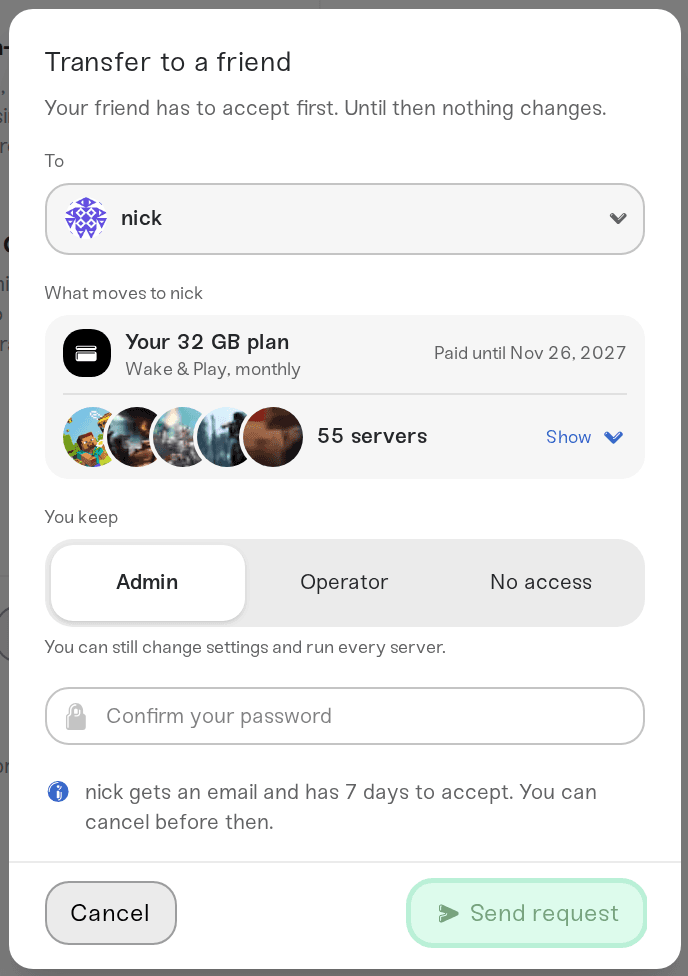
Everything stays yours until your friend accepts.
Resend email sends a new link (the old one stops working) and Cancel transfer withdraws the request, both on Your Haptic Plan.
The request expires after 7 days if nobody answers.
You cannot delete a server, reset a world, or pause or cancel your plan until you cancel the transfer.
You can still change your plan or add a server. Your friend sees the new details before accepting.
Open the link in the email. It works only for that address, for 7 days.
Sign in, or if you are new to Haptic, make your account on the same page with Google, Discord or a password of your own.
Check the servers and what you will pay, then press Accept and take over, or Add a card and accept if you have no card saved. Unless the old owner's last payment failed, we check the card without charging it.
If you chip in monthly on that server, your chip-in card is used and the chip-in stops. Someone who already has a plan of their own cannot take over another one yet, unless it is their own plan coming back.
Moves to the new owner: every server on the plan, stashed ones too, with its world, backups, mods, settings and public page; the plan's size and billing period; and every friend's access. Friends with access to the whole account get Admin access to each server.
Stays with the old owner: their login, email and payment method, their support chats (the new owner never sees them) and earlier server activity.
The public page's share password changes. SFTP logins are personal, so there is nothing to reset.
Nothing on the day you accept. The first charge lands when the old owner's paid time runs out, at the regular price of the same plan, without discount codes. If that price is no longer offered, it moves at today's price, shown before you accept.
If the old owner's last payment failed, the new owner pays when they accept, and the old owner's unpaid bill is cancelled, so nobody pays twice.
Account Boost memory does not move. The new plan pays for all the memory the servers use.
The old owner's plan stops renewing on its paid-through date. To keep it for another game, they can resume it from Your Haptic Plan before then.
The new owner can press Change Plan on Your Haptic Plan to change the memory, plan type or billing period.
A free trial, until its first payment goes through.
A gifted plan, while it is still in its free time.
A paused plan (resume it first).
A plan with an open payment dispute.
A plan you received in the last 24 hours, except back to the person who gave it.
Changed your mind? A plan can go back to the person who handed it over (Previous owner in the list).
If their old plan has not ended yet, they press Take it back and nobody pays: their old plan renews as before on the card it already uses, and their friend's plan ends without a charge. Once their old plan has ended, it works like any other transfer.
The server gets an address on the new owner's account, and the old one keeps working, so nobody has to add it again. If that name is taken there, it gets a slightly different one, shown before accepting.
a transfer never moves a login. To have a friend help run your servers, give them access instead. See Friend roles and permissions.
If a transfer went wrong, message us on Discord or at support@haptic.gg with both email addresses and the server name.
 © Haptic, LLC
*45% off applies automatically at checkout for your first month. Ends November 30, 2026.